How to set up log collection and redirection
General scheme for setting up logs
Logs are collected by local log collection module shturval-log-collector based on Vector. The module is installed from the shturval-log-collector chart into the logging namespace, and its parameters are passed to Helm via custom values.
To sending configure logs to external storage, syslog or SIEM, use ShturvalServicePatch. ShturvalServicePatch overrides custom values of the shturval-log-collector service and allows you to add new sinks and transforms without manually editing system ClusterVectorPipeline.
To send logs to SIEM, use the instructions: Exporting security logs to external systems.
Minimum setup order:
- Make sure that the CRD chart
shturval-log-collector-crdsis installed in the cluster andshturval-log-collectoris installed in the namespaceloggingin Auto mode. - Check the basic log collection: the Logs tab should be available on the cluster dashboard.
- If credentials must not appear in plaintext in
ShturvalServicePatch, create a Secret in theloggingnamespace first and reference it from the SSP. How to create the Secret and which keys to set is in Redirection example. - Prepare the
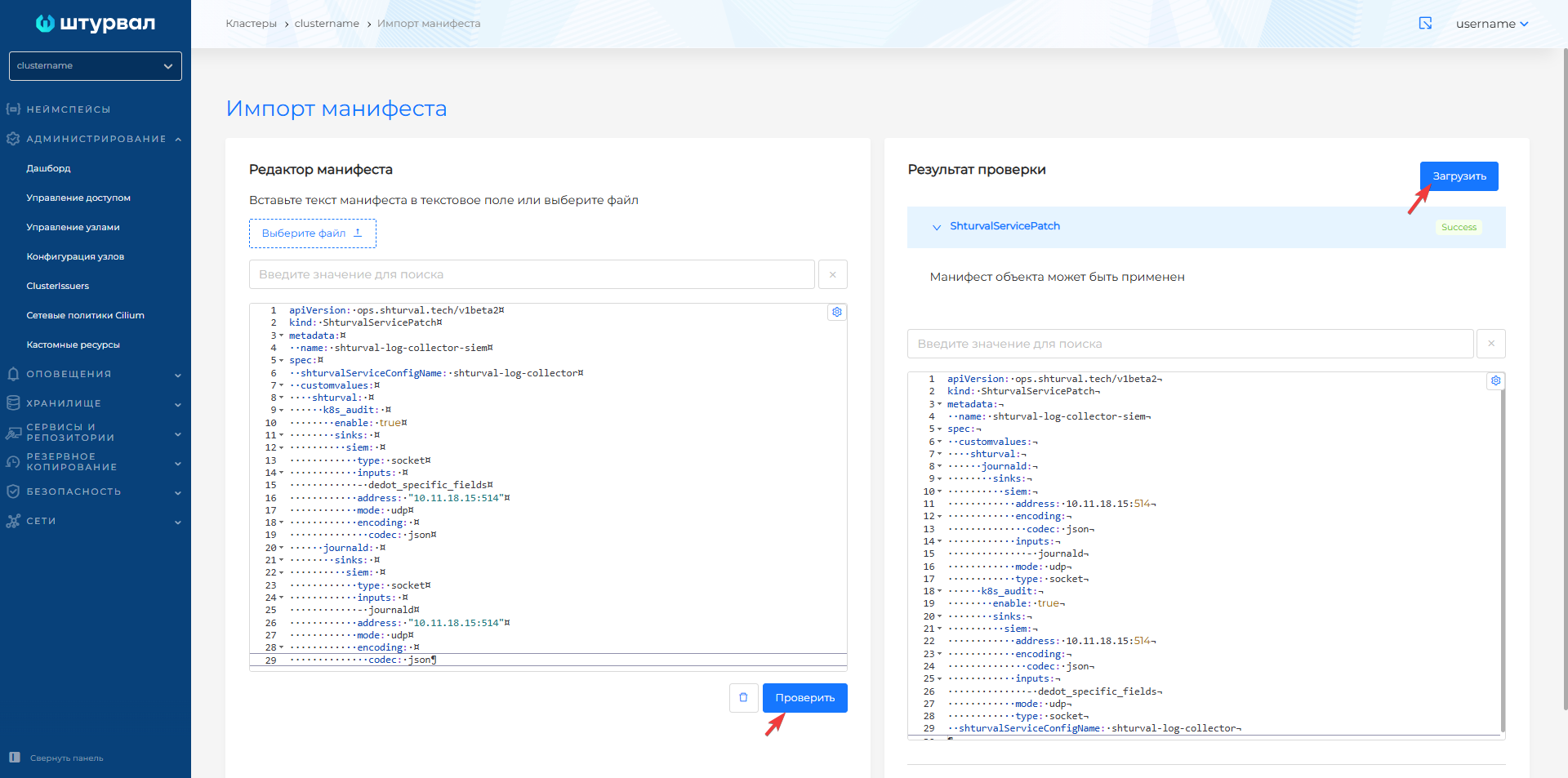
ShturvalServicePatchmanifest with the required parameters. - Upload it via the import manifests functionality in the GUI.
- Wait for the changes to be applied and check the status on the service page.
After applying ShturvalServicePatch:
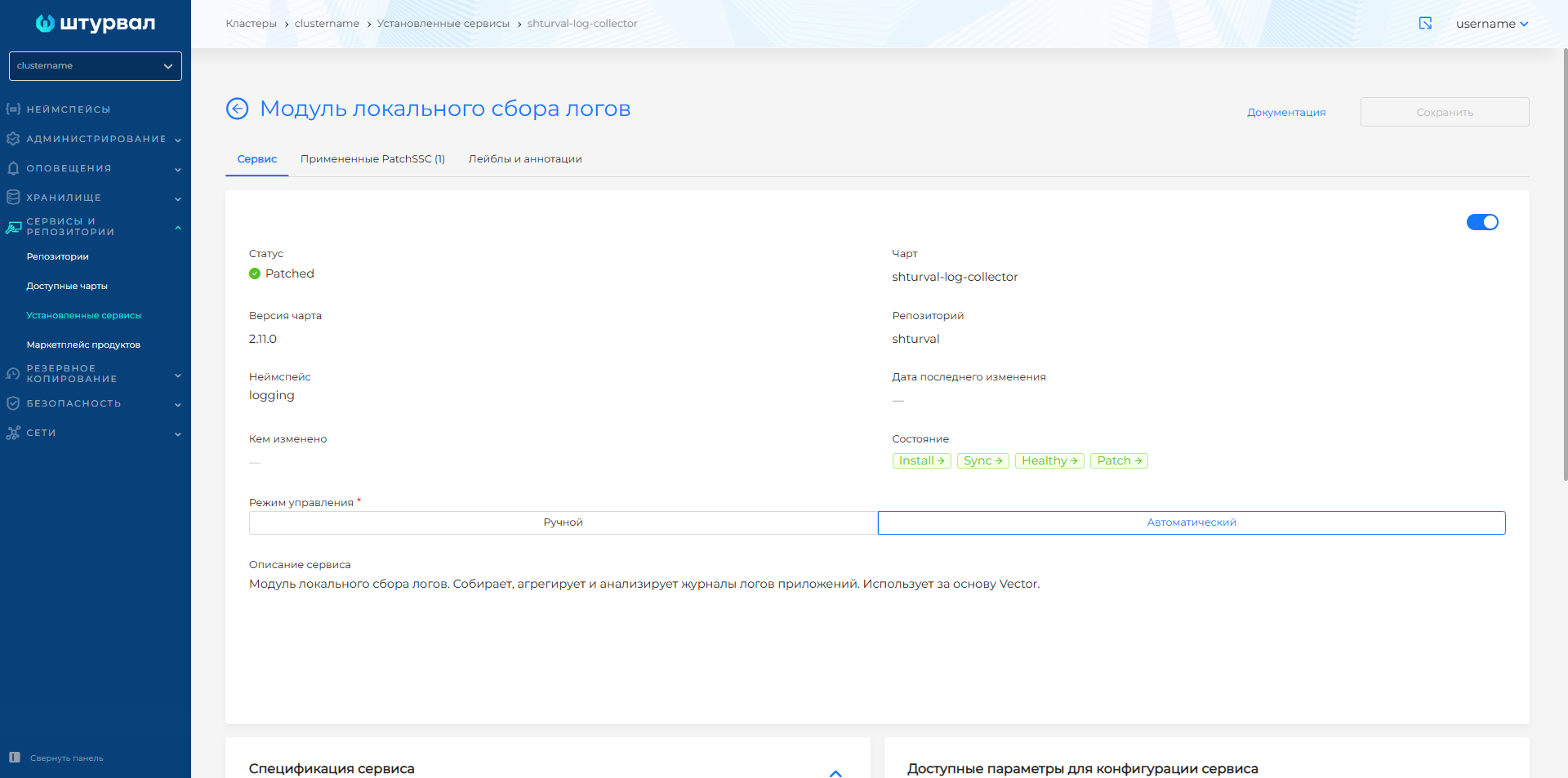
- on the Service tab local log collection module the status changes to
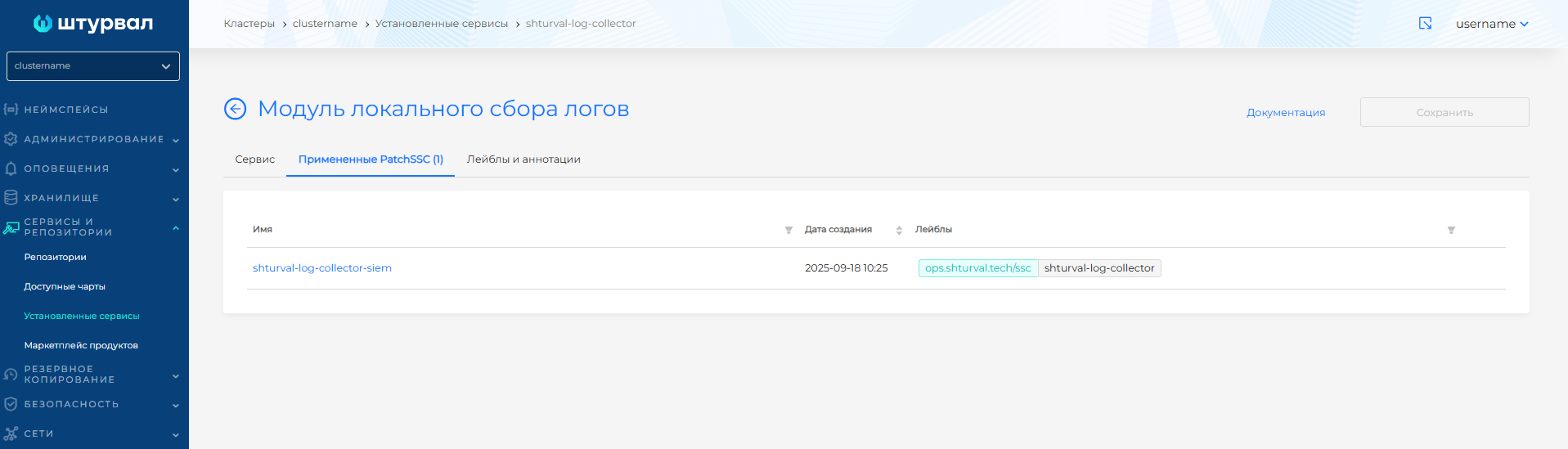
Patched; - on the Applied ShturvalServicePatch tab, a list of applied
ShturvalServicePatchis displayed.
Screenshots of manifest loading and service status
Applied ShturvalServicePatch
Redirecting logs to external storage
Scenario: You need to redirect one or more log types to external storage (e.g. Elasticsearch/OpenSearch), while maintaining local storage in VictoriaLogs.
General template ShturvalServicePatch
We recommend storing credentials for the external storage in a Secret and passing them into the sink as ${username} and ${password}. If you do not use a Secret, omit the vector and aggregator blocks in the SSP and set the username and password directly in auth.
apiVersion: ops.shturval.tech/v1beta2
kind: ShturvalServicePatch
metadata:
  name: <resource name>
spec:
  shturvalServiceConfigName: shturval-log-collector
  customvalues:
    vector:
      agent:
        envFrom: # All Secret keys become agent environment variables
          - secretRef:
              name: <secret-creds>
        volumes: # Agent volumes; the list fully replaces chart values
          - name: var-log
            hostPath:
              path: /var/log/
              type: ""
          - name: journal
            hostPath:
              path: /var/log/journal/
              type: ""
          - name: var-lib
            hostPath:
              path: /var/lib/
              type: ""
          - name: <volume-ca>
            secret:
              secretName: <secret-ca>
              items:
                - key: ca.crt
                  path: ca.crt
        volumeMounts: # Mount volumes into the agent container
          - name: var-log
            mountPath: /var/log/
          - name: journal
            mountPath: /run/log/journal/
          - name: var-lib
            mountPath: /var/lib/
          - name: <volume-ca>
            mountPath: /etc/ssl/external-es
            readOnly: true
    aggregator:
      env: # Aggregator environment variables; the list fully replaces chart values
        - name: PLATFORM_USERNAME
          valueFrom:
            secretKeyRef:
              name: platform-creds
              key: username
        - name: PLATFORM_PASSWORD
          valueFrom:
            secretKeyRef:
              name: platform-creds
              key: password
        - name: username
          valueFrom:
            secretKeyRef:
              name: <secret-creds>
              key: username
        - name: password
          valueFrom:
            secretKeyRef:
              name: <secret-creds>
              key: password
      volumes: # Aggregator volumes; the list fully replaces chart values
        - name: data
          emptyDir: {}
        - name: <volume-ca>
          secret:
            secretName: <secret-ca>
            items:
              - key: ca.crt
                path: ca.crt
      volumeMounts: # Mount volumes into the aggregator container
        - name: <volume-ca>
          mountPath: /etc/ssl/external-es
          readOnly: true
    shturval:
      <log_type>: # auditd, journald, k8s_audit, k8s_events, k8s_logs
        enable: true # Enables sending logs
        transforms: {} # Transform logs (optional)
        sinks: # Endpoints for sending data
          elastic_logs: # Data recipient name
            type: <type_sink> # for example: elasticsearch
            auth: # Authentication settings
              user: "${username}"
              password: "${password}"
              strategy: <strategy>
            endpoints: # Connection URL(s)
              - <endpoint>
            tls: # TLS connection settings
              ca_file: /etc/ssl/external-es/ca.crt
              verify_certificate: true
            api_version: <version>
            buffer: # Buffer to store logs before sending
              max_size: <size>
              type: <buffer_type>
- Lists
volumes,volumeMounts, andaggregator.envinShturvalServicePatchfully replace the corresponding chart values. If you set these blocks, keep the hostPath mountsvar-log,journal, andvar-libon the agent. On the aggregator, keep thedataemptyDir andPLATFORM_USERNAME/PLATFORM_PASSWORDfromplatform-creds. Then add env and volumes for the external Elasticsearch. - Keep TLS verification enabled (
verify_certificate: true) and setca_file.
Explanation of key fields:
| Parameter | Description | Data type | Example |
|---|---|---|---|
metadata.name | Name ShturvalServicePatch | string | shturval-log-collector-logs |
vector.agent.envFrom | Sources that populate environment variables in the agent container: all key-value pairs from the Secret become environment variables | array | secretRef.name: external-es-creds |
vector.agent.volumes | Volumes for the agent pod. The list fully replaces chart values: keep the hostPath mounts var-log, journal, var-lib and add the CA Secret | array | var-log, journal, var-lib, external-es-ca |
vector.agent.volumeMounts | Mounts the volumes into the agent container filesystem | array | mountPath: /etc/ssl/external-es |
aggregator.env | Environment variables for the aggregator container. The list fully replaces chart values: keep PLATFORM_USERNAME / PLATFORM_PASSWORD and add the external Elasticsearch credentials | array | PLATFORM_USERNAME, username |
aggregator.volumes | Volumes for the aggregator pod. The list fully replaces chart values: keep the data emptyDir and add the CA Secret | array | data, external-es-ca |
aggregator.volumeMounts | Mounts the volumes into the aggregator container filesystem | array | mountPath: /etc/ssl/external-es |
elastic_logs.type | Vector sink type; for Elasticsearch/OpenSearch use elasticsearch. In the examples the recipient key is named elastic_logs, other names are allowed in sinks | string | elasticsearch |
elastic_logs.auth.user | Username for HTTP Basic Authentication | string | ${username} |
elastic_logs.auth.password | Password for HTTP Basic Authentication | string | ${password} |
elastic_logs.auth.strategy | Vector authentication strategy: basic is HTTP Basic Authentication | string | basic |
elastic_logs.endpoints | List of Elasticsearch URLs to send logs to. Each URL must include an HTTP scheme, a hostname or IP, and a port | array | https://external-elastic.address:9200/insert/elasticsearch/ |
elastic_logs.tls.ca_file | Absolute path to an additional CA certificate file in DER or PEM (X.509) format | string | /etc/ssl/external-es/ca.crt |
elastic_logs.tls.verify_certificate | Validates the upstream server certificate on TLS connect | boolean | true |
elastic_logs.api_version | Elasticsearch API version: v6, v7 (including OpenSearch), v8, or auto | string | v8 |
elastic_logs.buffer.max_size | Maximum buffer size. For type: disk it must be at least ~256 MB (268435488 bytes) | int | 268435488 |
elastic_logs.buffer.type | Buffer type: disk stores events on disk and is more durable; memory is faster but data is lost on crash | string | disk |
Redirection example
- In the cluster, create a Secret of type
Opaquenamedexternal-es-cain theloggingnamespace. Add theca.crtkey and put the external Elasticsearch CA certificate in its value.
Example command:
kubectl create secret generic external-es-ca -n logging \
  --from-file=ca.crt=/path/to/external-es-ca.crt
Example manifest
apiVersion: v1
kind: Secret
metadata:
  name: external-es-ca
  namespace: logging
type: Opaque
stringData:
  ca.crt: |
    -----BEGIN CERTIFICATE-----
    <external Elasticsearch CA certificate>
    -----END CERTIFICATE-----
- In the cluster, create a Secret of type
Opaquenamedexternal-es-credsin theloggingnamespace. Add theusernameandpasswordkeys: inusernameput the external Elasticsearch account name, inpasswordput that account’s password.
Example command:
kubectl create secret generic external-es-creds -n logging \
  --from-literal=username='<username>' \
  --from-literal=password='<password>'
Example manifest
apiVersion: v1
kind: Secret
metadata:
  name: external-es-creds
  namespace: logging
type: Opaque
stringData:
  username: <username>
  password: <password>
- Apply the single
ShturvalServicePatchbelow. It mounts the CA on agent and aggregator, puts credentials in environment variables, and sets up elasticsearch sinks undershturval.
Combined ShturvalServicePatch for all log types. In the shipped values, inputs are: auditd uses auditd; journald, k8s_audit, and k8s_events use critical_level; k8s_logs uses post_transforms_system_namespaces and post_transforms_user_namespaces.
apiVersion: ops.shturval.tech/v1beta2
kind: ShturvalServicePatch
metadata:
  name: shturval-log-collector-external-es
spec:
  shturvalServiceConfigName: shturval-log-collector
  customvalues:
    vector:
      agent:
        envFrom:
          - secretRef:
              name: external-es-creds
        volumes:
          - name: var-log
            hostPath:
              path: /var/log/
              type: ""
          - name: journal
            hostPath:
              path: /var/log/journal/
              type: ""
          - name: var-lib
            hostPath:
              path: /var/lib/
              type: ""
          - name: external-es-ca
            secret:
              secretName: external-es-ca
              items:
                - key: ca.crt
                  path: ca.crt
        volumeMounts:
          - name: var-log
            mountPath: /var/log/
          - name: journal
            mountPath: /run/log/journal/
          - name: var-lib
            mountPath: /var/lib/
          - name: external-es-ca
            mountPath: /etc/ssl/external-es
            readOnly: true
    aggregator:
      env:
        - name: PLATFORM_USERNAME
          valueFrom:
            secretKeyRef:
              name: platform-creds
              key: username
        - name: PLATFORM_PASSWORD
          valueFrom:
            secretKeyRef:
              name: platform-creds
              key: password
        - name: username
          valueFrom:
            secretKeyRef:
              name: external-es-creds
              key: username
        - name: password
          valueFrom:
            secretKeyRef:
              name: external-es-creds
              key: password
      volumes:
        - name: data
          emptyDir: {}
        - name: external-es-ca
          secret:
            secretName: external-es-ca
            items:
              - key: ca.crt
                path: ca.crt
      volumeMounts:
        - name: external-es-ca
          mountPath: /etc/ssl/external-es
          readOnly: true
    shturval:
      auditd:
        sinks:
          elastic_logs:
            type: elasticsearch
            inputs: [auditd]
            bulk:
              index: "{{ .Values.CLUSTER_NAME }}_auditd-%Y.%m.%d"
            auth:
              user: "${username}"
              password: "${password}"
              strategy: basic
            endpoints:
              - "https://external-elastic.address:9200/insert/elasticsearch/"
            tls:
              ca_file: /etc/ssl/external-es/ca.crt
              verify_certificate: true
            api_version: "v8"
            buffer:
              max_size: 268435488
              type: disk
      journald:
        sinks:
          elastic_logs:
            type: elasticsearch
            inputs: [critical_level]
            bulk:
              index: "{{ .Values.CLUSTER_NAME }}_journald-%Y.%m.%d"
            auth:
              user: "${username}"
              password: "${password}"
              strategy: basic
            endpoints:
              - "https://external-elastic.address:9200/insert/elasticsearch/"
            tls:
              ca_file: /etc/ssl/external-es/ca.crt
              verify_certificate: true
            api_version: "v8"
            buffer:
              max_size: 268435488
              type: disk
      k8s_audit:
        sinks:
          elastic_logs:
            type: elasticsearch
            inputs: [critical_level]
            bulk:
              index: "{{ .Values.CLUSTER_NAME }}_kaudit-%Y.%m.%d"
            auth:
              user: "${username}"
              password: "${password}"
              strategy: basic
            endpoints:
              - "https://external-elastic.address:9200/insert/elasticsearch/"
            tls:
              ca_file: /etc/ssl/external-es/ca.crt
              verify_certificate: true
            api_version: "v8"
            buffer:
              max_size: 268435488
              type: disk
      k8s_events:
        sinks:
          elastic_logs:
            type: elasticsearch
            inputs: [critical_level]
            bulk:
              index: "{{ .Values.CLUSTER_NAME }}_events-%Y.%m.%d"
            auth:
              user: "${username}"
              password: "${password}"
              strategy: basic
            endpoints:
              - "https://external-elastic.address:9200/insert/elasticsearch/"
            tls:
              ca_file: /etc/ssl/external-es/ca.crt
              verify_certificate: true
            api_version: "v8"
            buffer:
              max_size: 268435488
              type: disk
      k8s_logs:
        transforms:
          system_namespaces_message_encode:
            type: remap
            inputs: [post_transforms_system_namespaces]
            source: |
              .message =
                encode_json(.message)
          user_namespaces_message_encode:
            type: remap
            inputs: [post_transforms_user_namespaces]
            source: |
              .message =
                encode_json(.message)
        sinks:
          elastic_logs:
            type: elasticsearch
            inputs: [system_namespaces_message_encode]
            bulk:
              index: "{{ .Values.CLUSTER_NAME }}_logs-%Y.%m.%d"
            auth:
              user: "${username}"
              password: "${password}"
              strategy: basic
            endpoints:
              - "https://external-elastic.address:9200/insert/elasticsearch/"
            tls:
              ca_file: /etc/ssl/external-es/ca.crt
              verify_certificate: true
            api_version: "v8"
            buffer:
              max_size: 268435488
              type: disk
          elastic_user_logs:
            type: elasticsearch
            inputs: [user_namespaces_message_encode]
            bulk:
              index: "{{ .Values.CLUSTER_NAME }}_user-logs-%Y.%m.%d"
            auth:
              user: "${username}"
              password: "${password}"
              strategy: basic
            endpoints:
              - "https://external-elastic.address:9200/insert/elasticsearch/"
            tls:
              ca_file: /etc/ssl/external-es/ca.crt
              verify_certificate: true
            api_version: "v8"
            buffer:
              max_size: 268435488
              type: disk
If you do not need some log types, delete the unused keys under shturval in this same manifest.
      auditd:
        sinks:
          elastic_logs:
            type: elasticsearch
            inputs: [auditd]
            bulk:
              index: "{{ .Values.CLUSTER_NAME }}_auditd-%Y.%m.%d"
            auth:
              user: "${username}"
              password: "${password}"
              strategy: basic
            endpoints:
              - "https://external-elastic.address:9200/insert/elasticsearch/"
            tls:
              ca_file: /etc/ssl/external-es/ca.crt
              verify_certificate: true
            api_version: "v8"
            buffer:
              max_size: 268435488
              type: disk
      journald:
        sinks:
          elastic_logs:
            type: elasticsearch
            inputs: [critical_level]
            bulk:
              index: "{{ .Values.CLUSTER_NAME }}_journald-%Y.%m.%d"
            auth:
              user: "${username}"
              password: "${password}"
              strategy: basic
            endpoints:
              - "https://external-elastic.address:9200/insert/elasticsearch/"
            tls:
              ca_file: /etc/ssl/external-es/ca.crt
              verify_certificate: true
            api_version: "v8"
            buffer:
              max_size: 268435488
              type: disk
      k8s_audit:
        sinks:
          elastic_logs:
            type: elasticsearch
            inputs: [critical_level]
            bulk:
              index: "{{ .Values.CLUSTER_NAME }}_kaudit-%Y.%m.%d"
            auth:
              user: "${username}"
              password: "${password}"
              strategy: basic
            endpoints:
              - "https://external-elastic.address:9200/insert/elasticsearch/"
            tls:
              ca_file: /etc/ssl/external-es/ca.crt
              verify_certificate: true
            api_version: "v8"
            buffer:
              max_size: 268435488
              type: disk
      k8s_events:
        sinks:
          elastic_logs:
            type: elasticsearch
            inputs: [critical_level]
            bulk:
              index: "{{ .Values.CLUSTER_NAME }}_events-%Y.%m.%d"
            auth:
              user: "${username}"
              password: "${password}"
              strategy: basic
            endpoints:
              - "https://external-elastic.address:9200/insert/elasticsearch/"
            tls:
              ca_file: /etc/ssl/external-es/ca.crt
              verify_certificate: true
            api_version: "v8"
            buffer:
              max_size: 268435488
              type: disk
      k8s_logs:
        transforms:
          system_namespaces_message_encode:
            type: remap
            inputs: [post_transforms_system_namespaces]
            source: |
              .message =
                encode_json(.message)
          user_namespaces_message_encode:
            type: remap
            inputs: [post_transforms_user_namespaces]
            source: |
              .message =
                encode_json(.message)
        sinks:
          elastic_logs:
            type: elasticsearch
            inputs: [system_namespaces_message_encode]
            bulk:
              index: "{{ .Values.CLUSTER_NAME }}_logs-%Y.%m.%d"
            auth:
              user: "${username}"
              password: "${password}"
              strategy: basic
            endpoints:
              - "https://external-elastic.address:9200/insert/elasticsearch/"
            tls:
              ca_file: /etc/ssl/external-es/ca.crt
              verify_certificate: true
            api_version: "v8"
            buffer:
              max_size: 268435488
              type: disk
          elastic_user_logs:
            type: elasticsearch
            inputs: [user_namespaces_message_encode]
            bulk:
              index: "{{ .Values.CLUSTER_NAME }}_user-logs-%Y.%m.%d"
            auth:
              user: "${username}"
              password: "${password}"
              strategy: basic
            endpoints:
              - "https://external-elastic.address:9200/insert/elasticsearch/"
            tls:
              ca_file: /etc/ssl/external-es/ca.crt
              verify_certificate: true
            api_version: "v8"
            buffer:
              max_size: 268435488
              type: disk
When sending Kubernetes logs to Elasticsearch/OpenSearch, the message field after post_transforms_system_namespaces or post_transforms_user_namespaces can be a structured object. That happens when a container writes JSON, for example authn authentication logs. VictoriaLogs indexes those fields, and they appear on the cluster Logs tab. The Elasticsearch sink expects a string in message. Without encode_json, events will not land in the index or will not be found by search. The k8s_logs block above adds system_namespaces_message_encode and user_namespaces_message_encode to encode message. Put those names in sink inputs instead of post_transforms_*.
To skip user-namespace logs, remove the elastic_user_logs sink from the manifest.
After you apply the SSP, check the target Elasticsearch/OpenSearch index for new documents. For GUI sign-in events, look for authn container logs in namespace shturval-backend with security_event_type: authentication and login / logout inside message.
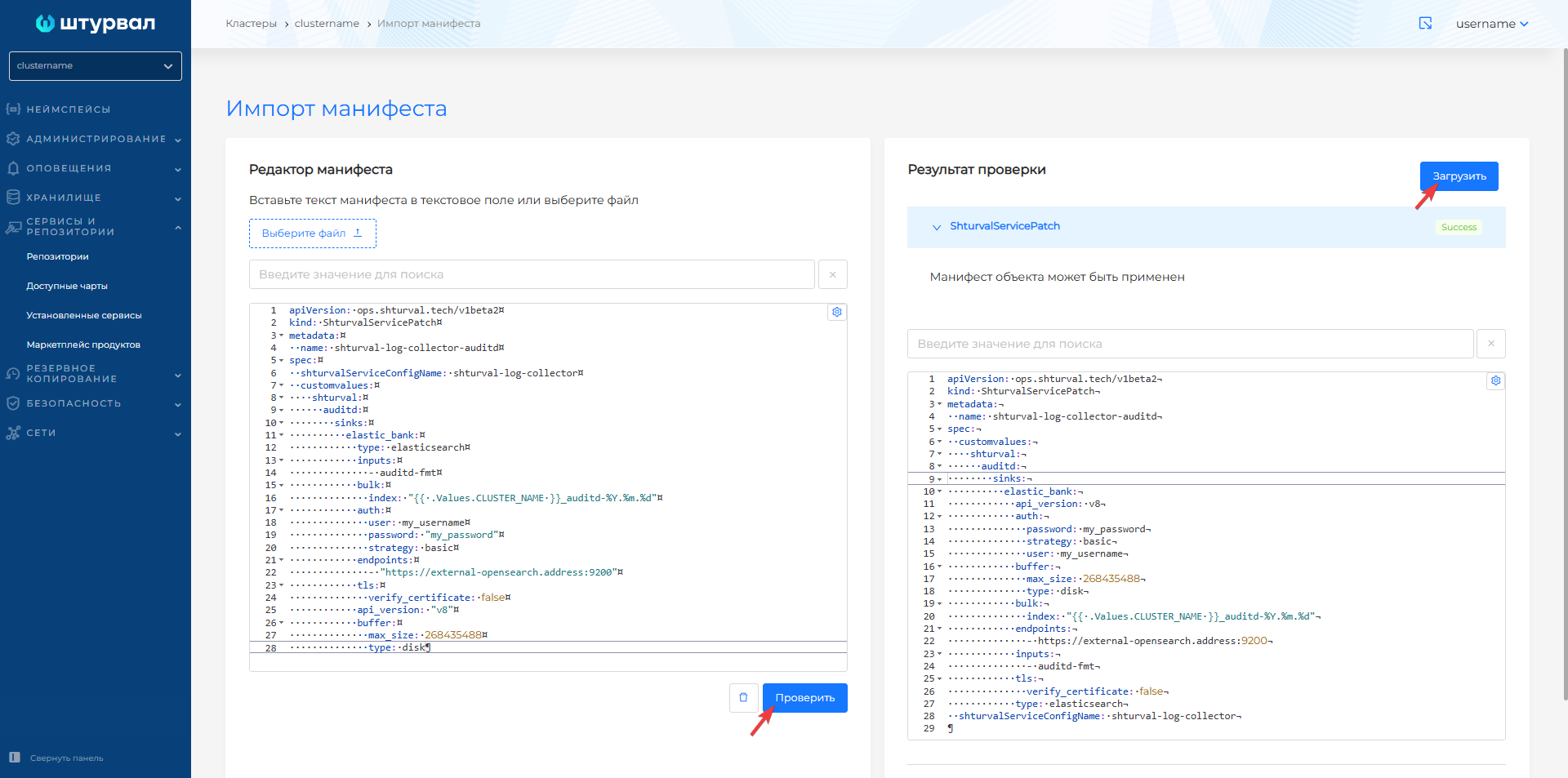
Screenshot: importing a ShturvalServicePatch
Illustration: importing a ShturvalServicePatch into the cluster
Redirecting logs to syslog
To redirect logs to the syslog server, ShturvalServicePatch is also used. The example below redirects k8s_audit logs to syslog via a sink of type socket:
apiVersion: ops.shturval.tech/v1beta2
kind: ShturvalServicePatch
metadata:
  name: shturval-log-collector-syslog
spec:
  shturvalServiceConfigName: shturval-log-collector
  customvalues:
    shturval:
      k8s_audit:
        sinks:
          syslog:
            type: socket
            inputs:
              - critical_level
            address: "11.12.13.14:5000"
            mode: tcp
            encoding:
              codec: syslog
              syslog:
                rfc: rfc5424
syslog-sink parameters:
| Parameter | Description | Data type | Example |
|---|---|---|---|
k8s_audit.sinks.syslog.inputs | Transform name in pipeline k8s-audit; in the supplied values - critical_level | array | critical_level |
k8s_audit.sinks.syslog.address | Syslog server address | string | 11.12.13.14:5000 |
k8s_audit.sinks.syslog.mode | Transfer protocol type | string | tcp |
k8s_audit.sinks.syslog.encoding.codec | Formatting codec: syslog - RFC format, json - JSON over socket | string | syslog |
k8s_audit.sinks.syslog.encoding.syslog.rfc | RFC standard: rfc5424 (modern, default) or rfc3164 (legacy) | string | rfc5424 |
Screenshot: syslog ShturvalServicePatch
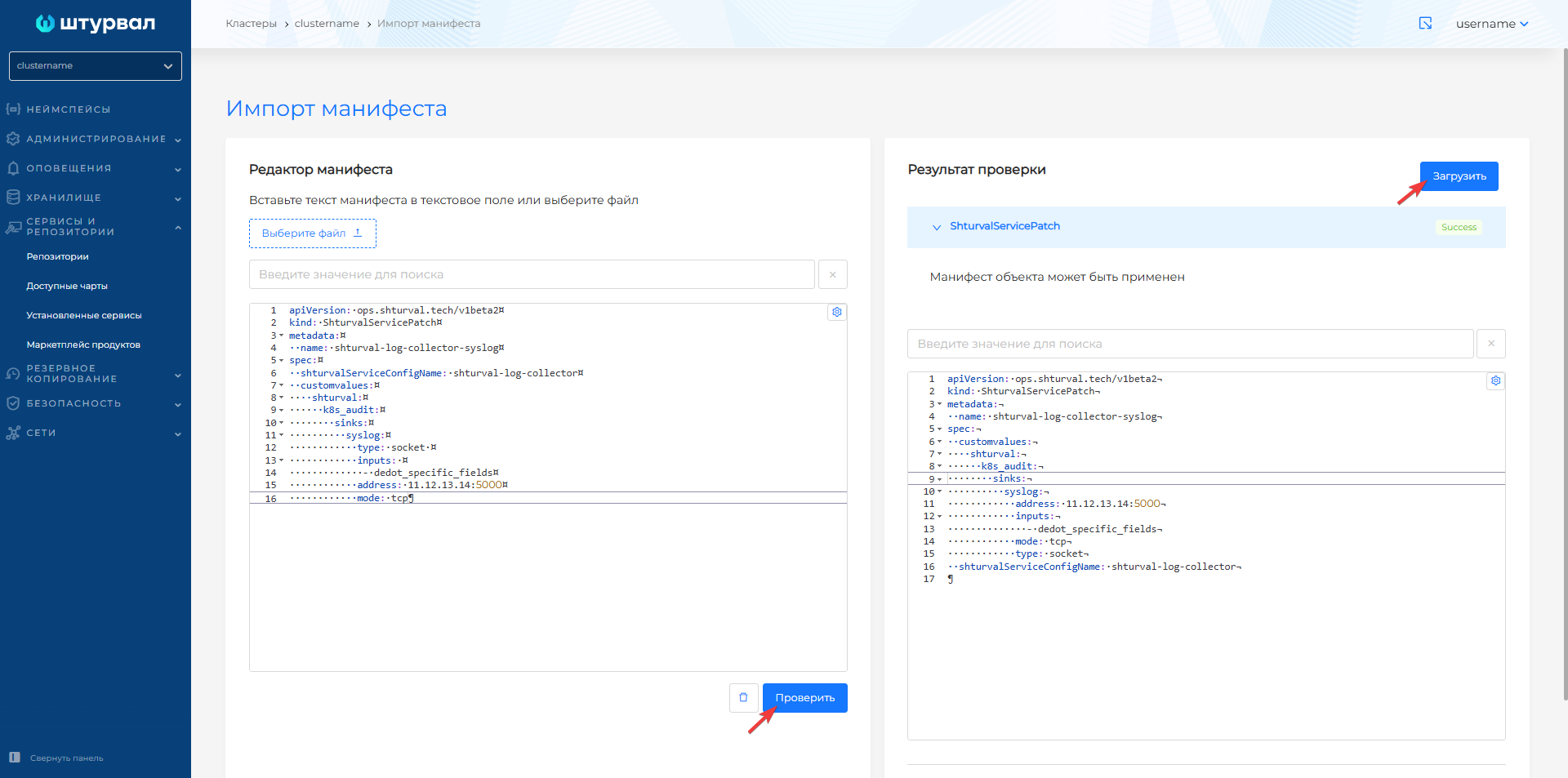 The
The encoding.syslog parameters correspond to socket sink in the Vector documentation.
Checking configuration
After applying ShturvalServicePatch, make sure that the configuration is correct and the logs are being delivered.
Step 1: Check the transforms names in the pipeline
The node name in the inputs field must match the name of an existing transform in the pipeline. For example, for k8s-audit:
- Go to Administration → Custom Resources.
- Select API group
observability.kaasops.ioand resourceClusterVectorPipeline. - Open the pipeline manifest (for example,
k8s-audit) and in thespec.transformsblock, find the name you need (usuallycritical_level).
Via CLI:
kubectl get clustervectorpipeline k8s-audit -o jsonpath='{.spec.transforms}' | jq 'keys'
Step 2: Check SSP status
- Go to Services and repositories → Installed services → Local log collection module.
- The service status should change to
Patched. - Your SSP should be displayed on the Applied ShturvalServicePatch tab.
Step 3: Check Vector configuration
Check the Vector pod logs for errors (for example, unknown input or inputs references unknown component if the name is incorrect in inputs):
kubectl logs -n logging -l app.kubernetes.io/name=vector --tail=100
If a configuration file is available within the pod, you can run inline validation:
kubectl exec -n logging deploy/vector -- vector validate /etc/vector/vector.yaml
Step 4. Check delivery on the receiver side
Make sure the syslog server is receiving messages. When using encoding.codec: syslog, messages must arrive in RFC 5424 format (or RFC 3164 if configured). Please note that when using the UDP protocol (mode: udp), delivery is not guaranteed; For critical data in production, it is recommended to use TCP.