Architecture of monitoring services
VictoriaMetrics, vmagent, vmalert, Grafana.
Monitoring in the Shturval platform is built on VictoriaMetrics and Grafana. This page shows the component architecture, data flows, and service placement.
To collect metrics, the platform includes VM Agent. It is included in the recommended system services when installing a client cluster.
VM Agent by default collects system component metrics and forwards them to the VictoriaMetrics cluster located in the management cluster.
General scheme
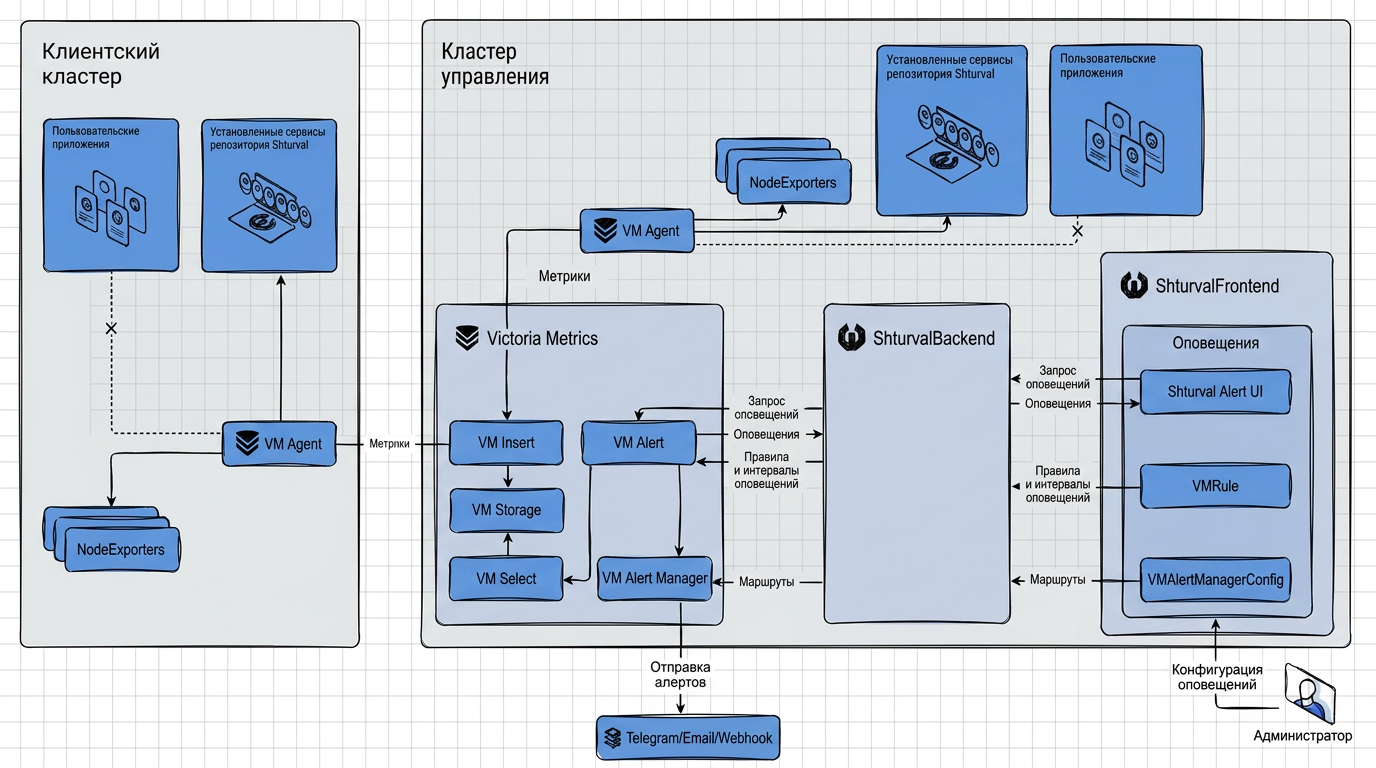
By default, monitoring services are deployed:
- Monitoring module. Centralized collection of metrics (VictoriaMetrics) (shturval-monitoring) - in the management cluster.
- Control component of the monitoring module (VictoriaMetrics Agent) (shturval-metrics-collector)
- in the management cluster and client cluster.
VictoriaMetrics components
| Component | Chart | Purpose |
|---|---|---|
| VM Storage | shturval-monitoring | Metrics Storage Component |
| VM Insert | shturval-monitoring | Centralized metrics collection component, receives metrics from VM Agent |
| VM Select | shturval-monitoring | The component executes incoming requests, retrieving the necessary data from VM Storage |
| VM Agent | shturval-metrics-collector | Local collection of metrics, sending to VM Insert |
| VM Alert | shturval-metrics-collector | The component ensures that alerts are sent that meet certain conditions |
| Alert Manager | shturval-metrics-collector | The component is responsible for routing events and sending alerts. |
Accommodation:
- VM Insert, Select, Storage - only in the management cluster.
- VM Agent, VM Alert, Alert Manager - in the management cluster and in client clusters.
Compatible with Prometheus Operator
VictoriaMetrics Operator out of the box supports Custom Resources from Prometheus Operator: PodMonitor, ServiceMonitor, PrometheusRule, Probe and AlertmanagerConfig. This allows existing manifests to be used without modification.
Additional features are described in the official VictoriaMetrics Operator documentation.
Metrics stream
- VM Agent in each cluster collects metrics at a specified frequency.
- Metrics are sent to VM Insert of the management cluster.
- VM Storage stores data.
- To retrieve metrics for VM Alert, request data from VM Storage via VM Select.
- VM Alert sends alerts for display in the GUI and in Alert Manager, which routes notifications (Email, Telegram, Webhook).
The collected metrics are available for viewing in pre-installed Grafana dashboards.
Alerting
Based on the received metrics, alerts are generated in the VictoriaMetrics cluster. In the GUI, an alert report is available on the View alerts page.
To configure alert and aggregation rules, use VM Alert Manager.
Additionally, it is possible to configure sending alerts via various channels:
Application monitoring
In addition to system metrics, the platform supports the collection of user application metrics, see section How to set up application monitoring.
Redirecting metrics
By default, the VM Agent sends metrics to the management cluster’s VictoriaMetrics. You can configure redirection of metrics from a client cluster or management cluster to external VictoriaMetrics in your infrastructure - How to redirect metrics.