Services
Alertmanager/General information
The dashboard is designed to monitor the status of Alertmanager. It provides data visualization of received and sent notifications. The dashboard displays information about the total number of notifications, the intensity of their receipt and sending, as well as notification processing delay metrics.
Screenshot
Illustration: Alertmanager/General information
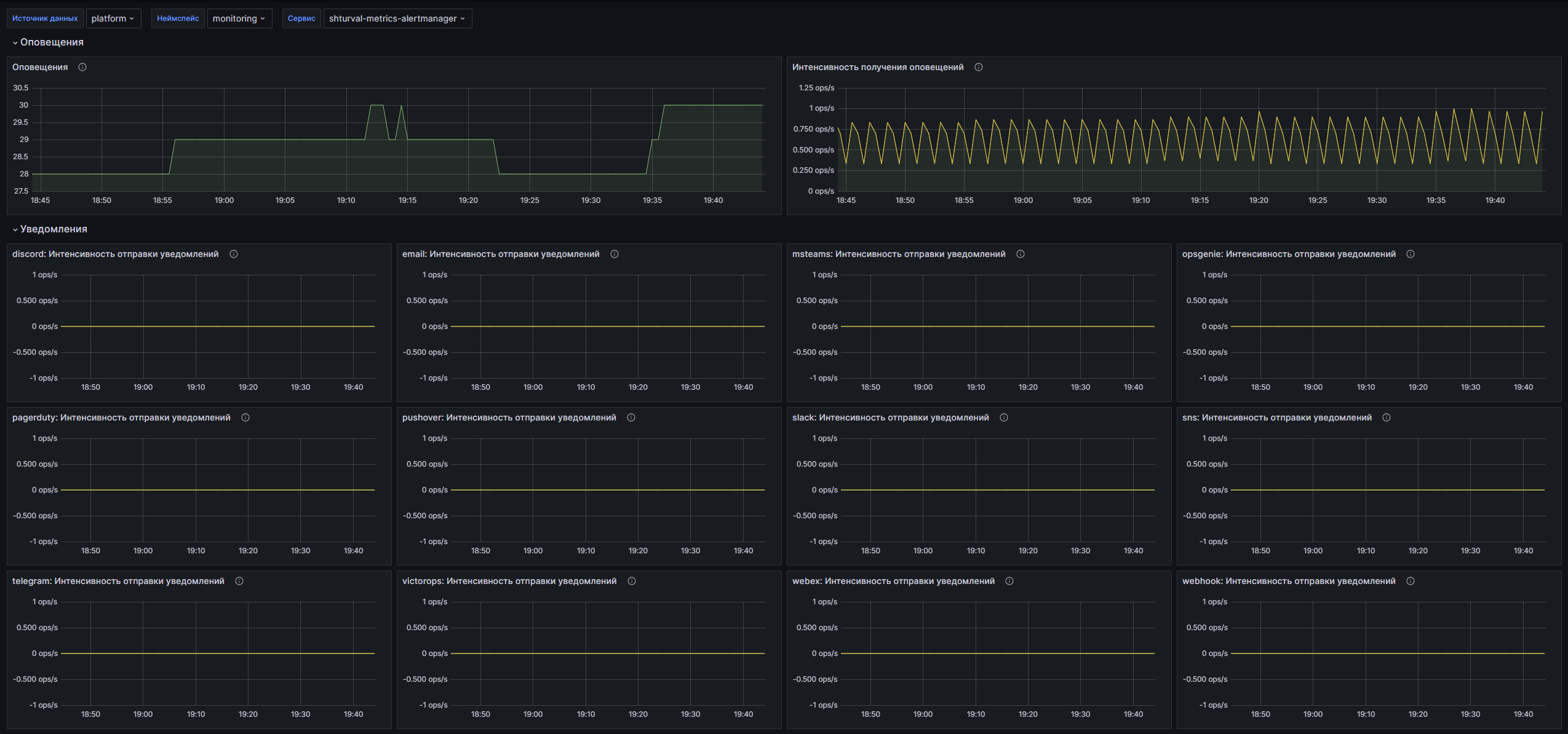
Dashboard structure
Alerts:
- Alerts: Time graph showing the total number of alerts received by Alertmanager.
- Alert Receipt Rate: A time graph showing the number of successfully received and invalid notifications.
Notifications:
- $integration: Notification Rate: A time graph showing the notification rate, including successful and unsuccessful notifications, for the selected integration.
- $integration: Notification Duration: Displays notification latency metrics showing the 99th percentile, median, and average notification time.
Customizable parameters
- datasource: Allows you to select the data source for displaying information.
- namespace: Allows you to select the Kubernetes namespace whose data will be displayed. Enables the option to select all namespaces.
- service: Allows you to select a specific service for analyzing notification metrics.
Certificates Expiration
The dashboard is designed to monitor the status of certificates, providing extensive information about their validity periods. It includes data on Kubernetes Secrets, certificates on nodes, as well as on any servers. It allows you to quickly estimate the number of certificates, identify expired and soon-to-expire certificates, and analyze errors in certificate loaders.
Screenshot
Illustration: Certificates Expiration
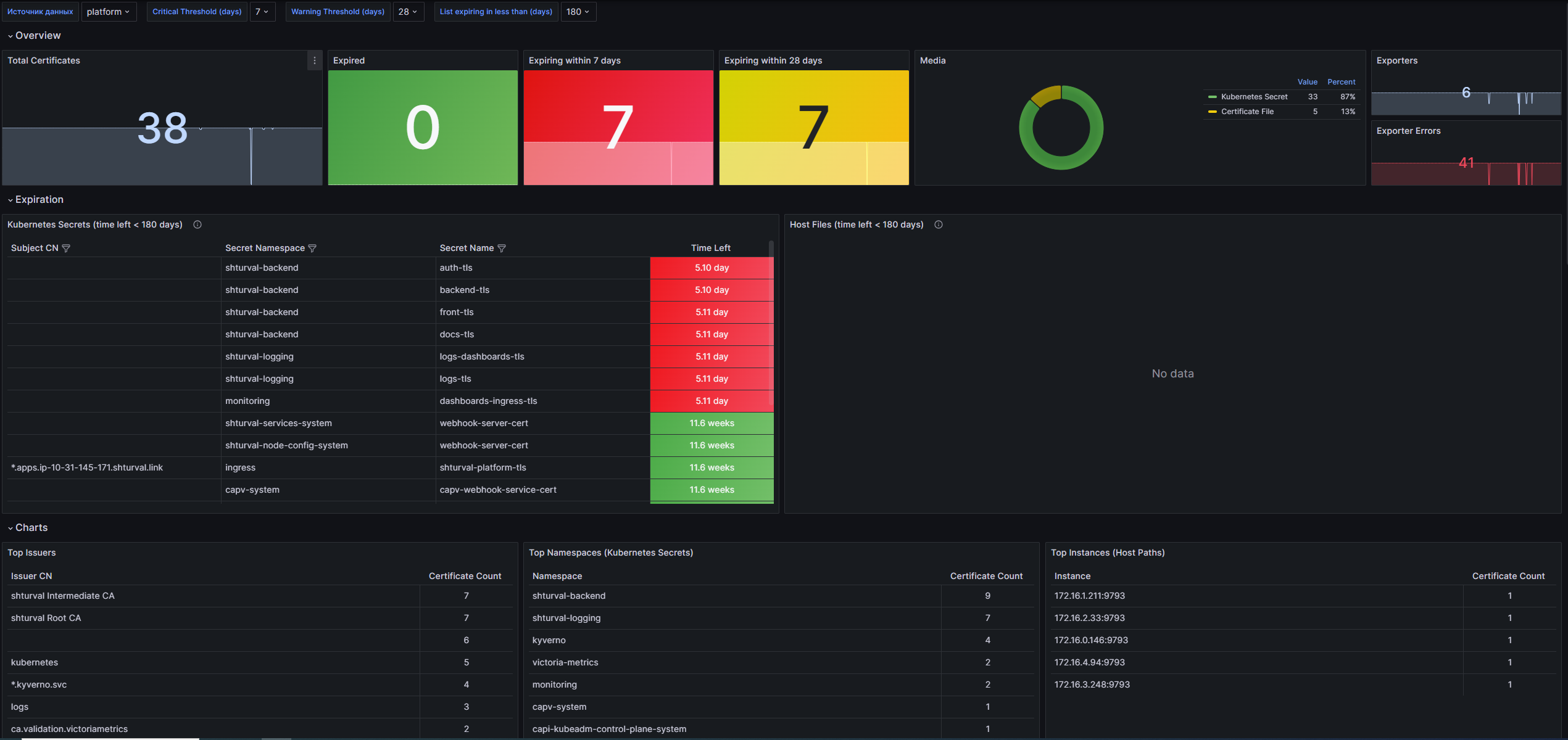
Dashboard structure
Overview:
- Total Certificates: Displays the total number of certificates calculated based on the
x509_cert_not_aftermetric. - Expired: Shows the number of certificates that have expired.
- Expiring within $critical_threshold days: Displays the number of certificates that will expire within a user-specified critical threshold.
- Expiring within $warning_threshold days: Shows the number of certificates that have expiredis within the warning threshold.
- Media: Pie chart showing the distribution of certificates by type: Kubernetes Secret, Kubeconfig Embedded and Certificate File.
- Exporters: Shows the total number of certificate uploader errors.
- Exporter Errors: Displays the sum of certificate uploader errors.
- Total Certificates: Displays the total number of certificates calculated based on the
Expiration:
- Kubernetes Secrets (time left < $list_threshold days): A table displaying Kubernetes Secrets that expire in less than the specified number of days.
Charts:
- Top Issuers: Table showing the 10 most common issuers based on number of certificates.
- Top Namespaces (Kubernetes Secrets): Table showing the 10 namespaces containing Kubernetes Secrets, with the most certificates.
- Top Instances (Host Paths): Table showing the 10 instances with the most file storage certificates.
- Kubernetes Secrets : Shortest Validity Period: Table displaying the 10 Kubernetes Secrets with the shortest remaining validity period.
- Host Paths : Shortest Validity Period: Table showing the 10 file paths with the shortest remaining validity period.
- Kubernetes Secrets : Longest Validity Period: Table displaying the 10 Kubernetes Secrets with the longest validity period.
- Host Paths : Longest Validity Period: Table showing the 10 file paths with the longest validity period.
Exporters:
- Reporting Exporters: Graph showing the number of downloader errors.
- Exporters with Errors: Graph showing the number of downloaders with errors.
- Error Rate: A graph showing the error rate in bootloaders over the last 15 minutes.
- Cumulative Errors: A graph showing the total number of errors to date.
- Top Exporters by Error Rate: Table with 10 loaders with the highest error rate.
- Top Exporters by Cumulative Errors: Table showing the 10 bootloaders with the most accumulated errors.
Customizable parameters
- Data Source: Allows you to select the data source for displaying information.
- Critical Threshold (days): Critical threshold (in days). Allows you to determine when certificates should be flagged as requiring attention.
- Warning Threshold (days): Warning threshold (in days). Allows you to set a time frame for early notification of certificates.
- List expiring in less than (days): Allows you to define a list of certificates that will expire in less than a specified number of days.
Cilium Agent
The dashboard provides the ability to monitor various performance metrics such as resource utilization, API latency, policy management, and network activity in the Kubernetes cluster. A set of panels helps you quickly identify problems and optimize the operation of your application’s network components.
Screenshot
Illustration: Cilium Agent
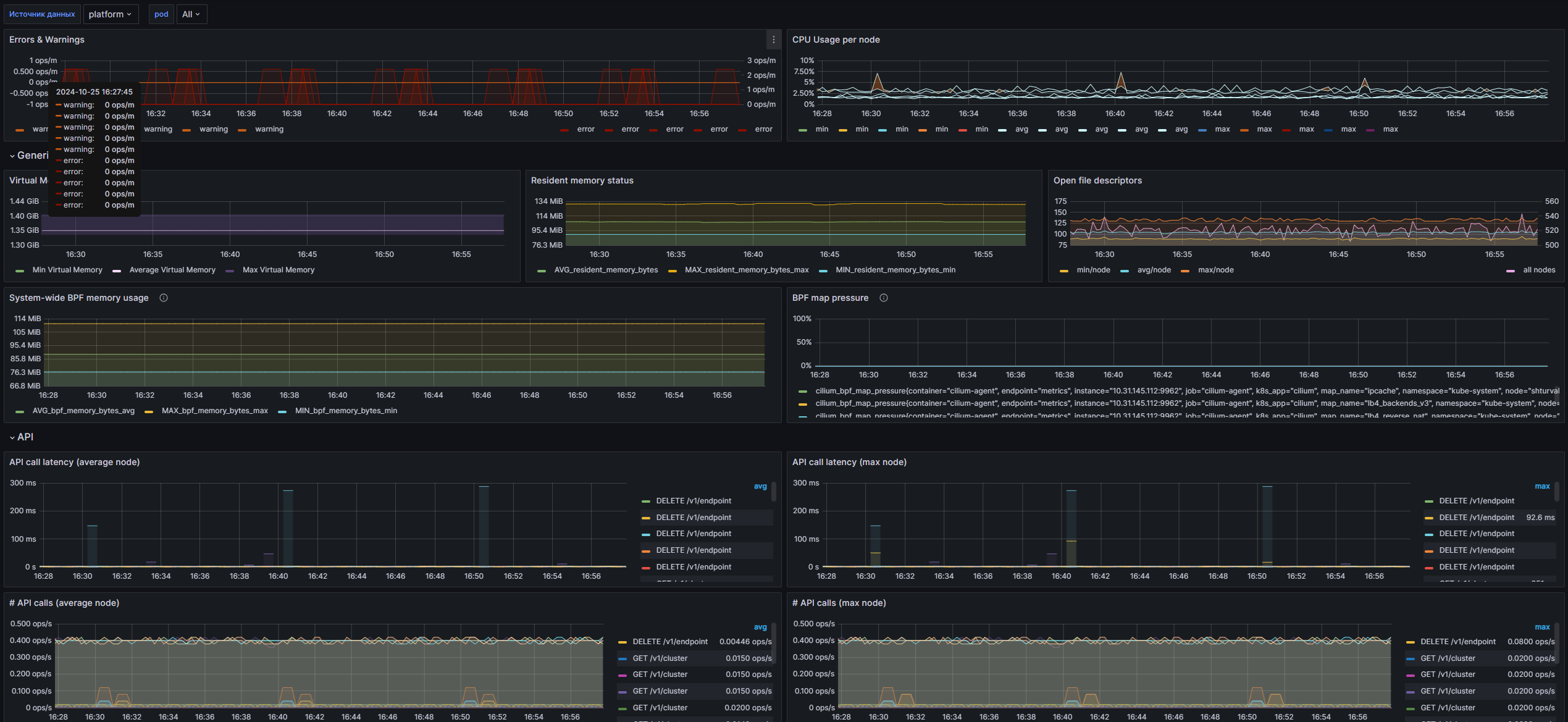
Dashboard structure
Errors & Warnings: A time graph showing the number of errors and warnings encountered in the Cilium cluster, broken down by level.
CPU Usage per node: Time graph showing CPU usage on each node, including minimum, average and maximum values.
Generic:
- Virtual Memory Bytes: Time graph showing virtual memory metrics, including minimum, average and maximum values for each pod.
- Resident memory status: Time graph showing resident memory status with minimum, average and maximum values.
- Open file descriptors: Time graph showing open file descriptors usage in the cluster with minimum, average and maximum values.
- System-wide BPF memory usage: A time graph showing the system’s BPF memory usage, including minimum, average, and maximum values.
- BPF map pressure: A time graph showing the full percentage of BPF maps labeled by map name.
API:
- API call latency (average node): Time graph showing the average latency of API calls for each node.
- API call latency (max node): Time graph showing the maximum waiting time for API calls for each node.
- # API calls (average node): TimeA graph showing the average number of API calls for each node.
- # API calls (max node): Time graph showing the maximum number of API calls for each node.
- API return codes (average node): Time graph showing the average number of API call return codes for each node.
- API return codes (sum all nodes): A time graph showing the total number of API call return codes across all nodes.
Cilium:
BPF Functionality is not included in the box:
- # system calls (average node): Displays the average number of system calls for each node.
- # system calls (max node): Displays the maximum number of system calls for each node.
- system call latency (avg node): Displays the average system call latency for each node.
- system call latency (max node): Displays the maximum system call latency for each node.
- map ops (average node): Time graph showing average BPF map operations for each node.
- map ops (max node): A time graph showing the maximum BPF map operations for each node.
- map ops (sum failures): Time graph showing the total number of BPF card operations that failed.
kvstore Functionality is not included in the box:
- # operations (sum all nodes): Displays the total number of storage operations across all nodes.
- # operations (max node): Displays the maximum number of storage operations for each node.
- latency (average node): Displays the average latency of storage operations for each node.
- latency (max node): Displays the maximum latency of storage operations for each node.
- Events received (average node): Displays the average number of events received for each node.
Cilium network information:
- Forwarded Packets: A time graph showing the number of packets forwarded by direction.
- Forwarded Traffic: Time graph showing the volume of forwarded traffic by direction.
- IPv4 Conntrack TCP: Time graph showing TCP connection statistics for IPv4.
- IPv6 Conntrack TCP: Time graph showing TCP connection statisticsfor IPv6.
- IPv4 Conntrack Non-TCP: Time graph showing statistics of non-TCP connections for IPv4.
- IPv6 Conntrack Non-TCP: Time graph showing statistics of non-TCP connections for IPv6.
- Allocated Addresses: Time graph showing the number of allocated IP addresses.
- Datapath Conntrack Dump Resets: Time graph showing statistics of contract theft resets.
- Service Updates: A time graph showing the frequency of service updates with average values by activity.
- Connectivity Health: Time graph showing the availability status of nodes and health endpoints.
- Dropped Egress Packets: A time graph showing the number of dropped routing packets.
- Node Events: Time graph showing the number of events on nodes with average values by event type.
- Dropped Egress Traffic: Time graph showing the amount of dropped egress traffic.
- Nodes: Time graph showing the number of nodes in the cluster with minimum, average and maximum values.
Policy Functionality is not included in the box:
- L7 forwarded request: Displays the number of forwarded, received and rejected requests at the L7 level.
- Cilium drops Ingress: Time graph showing the number of incoming packets dropped by reason.
Endpoints:
- Endpoint regeneration time (90th percentile): Time graph showing endpoint regeneration time (90th percentile).
- Endpoint regeneration time (99th percentile): Time graph showing endpoint regeneration time (99th percentile).
- Endpoint regenerations: A time graph showing the total number of endpoint regenerations broken down by the final result.
- Cilium endpoint state: A time graph showing the status of the endpoints in the cluster, broken down by state.
Controllers:
- Controllers: A time graph showing the execution of controllers and the number of errors that occur.
- Controller Durations: A time graph showing the average execution time of controllers broken down by status.
Kubernetes integration:
- apiserver latency (average node): Time graph,showing the average server API latency for each node.
- apiserver latency (max node): A time graph showing the maximum server API latency for each node.
- apiserver #calls (sum all nodes): A time graph showing the total number of server API calls for all nodes.
- apiserver calls (sum all nodes): A time graph showing the total number of server API calls across all nodes.
- Valid, Unnecessary K8s Events Received: A time graph showing the number of valid but unnecessary Kubernetes events.
- Invalid, Unnecessary K8s Events Received: Time graph showing the number of invalid and unnecessary Kubernetes events.
- Valid, Necessary K8s Events Received: A time graph showing the number of valid and necessary Kubernetes events.
- Invalid, Necessary K8s Events Received: A time graph showing the number of invalid but necessary Kubernetes events.
- CiliumNetworkPolicy Events: A time graph showing the number of events associated with CiliumNetworkPolicy policies.
- NetworkPolicy Events: A time graph showing the number of events associated with NetworkPolicy policies.
- Pod Events: Timeline showing events associated with pods.
- Node Events: Timeline showing events associated with nodes.
- Service Events: Timeline showing events related to services.
- Endpoints Events: A timeline showing events associated with endpoints.
- Namespace Events: Timeline showing events related to namespaces.
Customizable parameters
- datasource: Allows you to select the data source for displaying information.
- pod: Allows you to select a pod for more accurate data monitoring and analysis.
Cilium Operator
The dashboard is designed to monitor operator metrics of Cilium version 1.12, which uses monitoring of network interactions, IP address management and performance. It provides information on metrics such as CPU utilization, resident memory status, EC2 API interactions, and interface creation. The dashboard allows you to monitor system health and performance in real time.
Screenshot
Illustration: Cilium Operator

Dashboard structure
CPUUsage per node: Time graph showing CPU usage for each node as a percentage. The graph includes minimum, average and maximum metric values.
Resident memory status: A time graph showing the resident memory status for the operator, including average, maximum and minimum values in bytes.
IPAM Functionality is not included in the box:
- IP Addresses: A time graph showing the average number of IP addresses by type, providing information about address distribution.
- EC2 API Interactions: The dashboard visualizes interactions with the EC2 API, displaying response times for various operations and response codes.
- Number of nodes: The panel shows the current number of nodes managed by the operator, with metrics by category.
- Interfaces with addresses available: The panel displays the number of interfaces that have addresses available, which helps in managing IP addresses.
- Metadata Resync Operations: The panel displays the frequency of metadata synchronization operations, counting the number of operations per minute.
- EC2 client side rate limiting: The panel shows the EC2 client side rate limiting metrics, displaying the average response time to operations.
- Interface Creation: The panel visualizes interface creation operations, displaying the average number of operations by status and subnet ID.
Customizable parameters
- datasource: Allows you to select the data source for displaying information.
Kyverno
The dashboard is designed to monitor the Kubernetes management policy. It provides visualization of key metrics related to policy execution, policy status, and performance. The dashboard provides the ability to monitor the current results of policy execution, the success rate of checks, as well as the use of resources (CPU and memory) both by requests and by limits. The dashboard helps you quickly identify problems with policies and optimize cluster resources.
Screenshot
Illustration: Kyverno
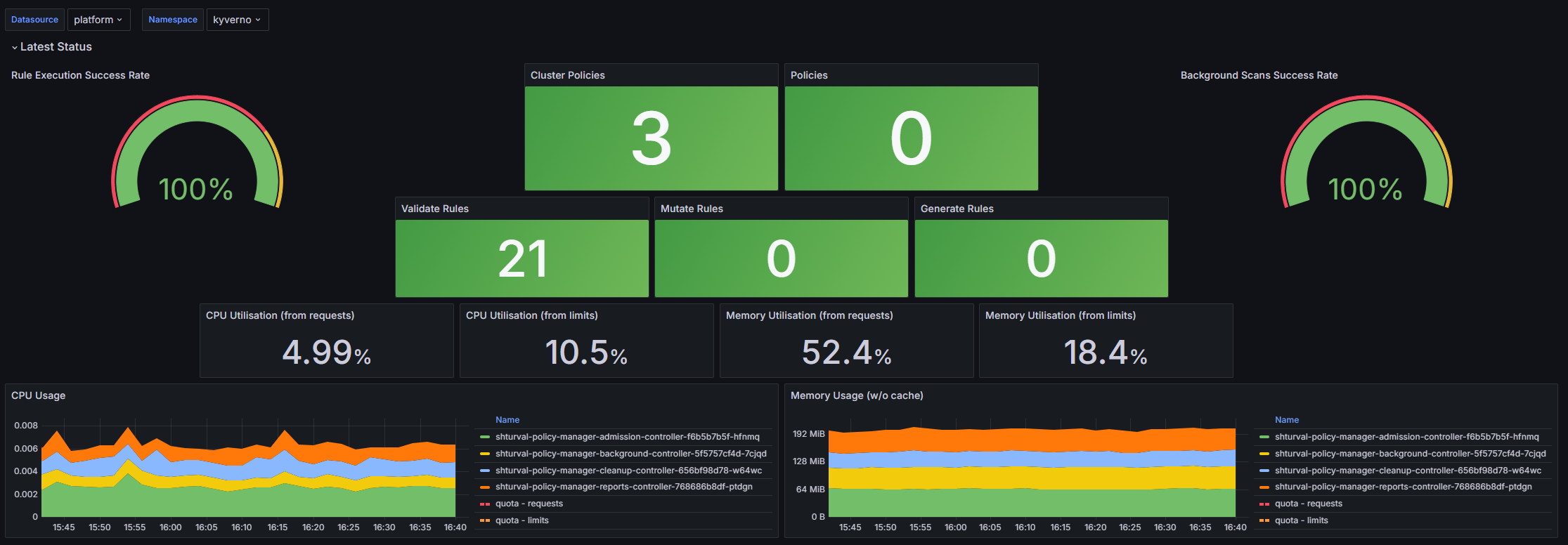
Dashboard structure
Latest Status:
- Rule Execution Success Rate: Displays the percentage of successful execution of policy rules.
- Cluster Policies: Displays the number of active cluster policies.
- Policies: Displays the number of active policies with namespaces.
- Background Scans Success Rate: Displays the levelThe success rate of background policy checks.
- Validate Rules: Displays information about the number of verification rules.
- Mutate Rules: Displays information about the number of mutation rules.
- Generate Rules: Displays information about the number of generation rules.
- CPU Utilization (from requests): Displays CPU usage according to policy requests, within the specified namespace.
- CPU Utilization (from limits): Displays CPU usage according to policy limits, within the specified namespace.
- Memory Utilization (from requests): Displays memory usage according to policy requests, within the specified namespace.
- Memory Utilization (from limits): Displays memory usage according to policy limits, within the specified namespace.
- CPU Usage: Time graph showing CPU usage by pod, taking into account requests and limits.
- Memory Usage (w/o cache): Time graph showing memory usage by pod without cache.
Policy-Rule Results:
- Admission Review Results (per-rule): A timeline showing the review results of requests based on each rule.
- Background Scan Results (per-rule): A timeline showing the results of background scans based on each rule.
- Policy Failures: Displays the number of policy failures grouped by type.
- Admission Review Results (per-policy): A timeline showing the review results of requests based on each policy.
- Background Scan Results (per-policy): A timeline showing the background scan results per policy.
- Cluster Policies and Namespaces w/Failed: Displays information about cluster policies and namespaces where failures occurred.
Policy-Rule Info:
- Active Policies (by policy type): A time graph showing the number of active policies grouped by type.
- Active Policies (by policy validation action): A time graph showing the number of active policies grouped by validation action.
- Active Policies running in background mode: A time graph showing the number of active policies running in the background.
- Active Namespaced Policies (by namespaces): A time graph showing the number of active namespaced policies grouped by namespace.
- Active Rules (by rule type): Time graph showing the numberNumber of active rules, grouped by type.
Policy-Rule Execution Latency:
- Average Rule Execution Latency: A time graph showing the average latency of rules execution.
- Average Policy Execution Latency: A time graph showing the average latency of policy execution.
- Overall Average Rule Execution Latency: Displays the overall average rule execution latency.
- Overall Average Policy Execution Latency: Displays the overall average policy execution latency.
Admission Review Latency:
- Avg - Admission Review Duration (by operation): Time graph showing the average duration of the admission review by operation.
- Avg - Admission Review Duration (by resource kind): A time graph showing the average duration of an admission review by resource type.
- Rate - Incoming Admission Requests (last 5m): Displays the rate of incoming admission requests over the last 5 minutes.
- Avg - Overall Admission Review Duration: Displays the average duration of all admission reviews.
Policy Changes:
- Policy Changes (by change type): A timeline showing policy changes grouped by change type.
- Policy Changes (by policy type): A timeline showing policy changes grouped by policy type.
- Total Policy Changes: Displays the total number of policy changes.
- Rate - Policy Changes Happening (last 5m): Displays the rate of policy changes over the last 5 minutes.
Admission Requests:
- Admission Requests (by operation): Timeline showing the number of admission requests by operation.
- Admission Requests (by resource kind): Time graph showing the number of admission requests by resource type.
- Total Admission Requests: Displays the total number of admission requests.
Customizable parameters
- datasource: Allows you to select the data source for displaying information.
- namespace: Allows you to filter metrics by a specific namespace in Kubernetes using the values of the
kube_namespace_status_phaselabel.
Go Runtime Exporter
The dashboard is designed to monitor the performance parameters of applications written in Go. It allows you to monitor memory usage, number of objects in memory, and garbage collector performance in real time. Dashbord offers pre-configured schedules and alert rules for quick analysis and diagnostics of application performance.
Screenshot
Illustration: Go Runtime Exporter
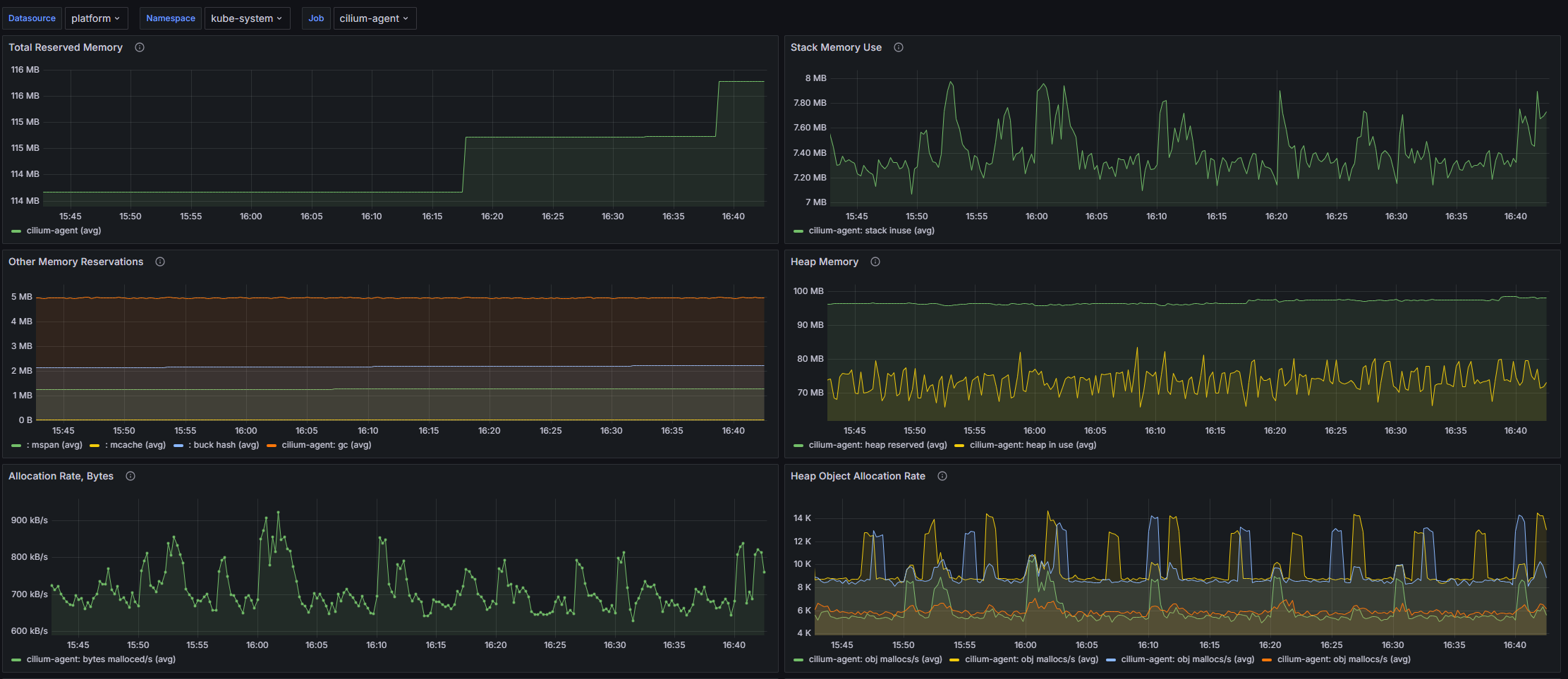
Dashboard structure
- Total Reserved Memory: A time graph showing the average value of the total amount of reserved memory in all namespaces of the application.
- Stack Memory Use: A time graph showing the average stack memory usage across all application namespaces.
- Other Memory Reservations: A time graph showing the average value of memory reservations for other needs, not including the stack and heap, across all application namespaces.
- Heap Memory: A time graph showing the average values associated with heap memory, including reserved, used and allocated memory.
- Allocation Rate, Bytes: A time graph showing the average memory allocation rate in bytes per second across all application namespaces.
- Heap Object Allocation Rate: Time graph showing the average rate of object allocation in the heap in all application namespaces.
- Number of Live Objects: A time graph showing the average number of live objects in memory across all application namespaces.
- Goroutines: Time graph showing the average number of Go routines in all namespaces of the application.
- GC min & max duration: A time graph showing the average minimum and maximum garbage collection (GC) durations.
- Next GC, Bytes: A time graph showing the average number of bytes used before the next garbage collection.
Customizable parameters
- datasource: Allows you to select the data source for displaying information.
- namespace: Allows you to select the Kubernetes namespace whose data will be displayed. Enables the option to select all namespaces.
- job: Allows you to select a specific task for which metrics will be displayed, filtering the results according to the selected task and namespace.
Vector Cluster Monitoring
The dashboard is designed to monitor Kubernetes clusters using Vector.dev. It provides information about CPU load, memory usage, network activity and service status. The dashboard helps you track various metrics and performance indicators both at the control plane and at the level of applications running in containers.
Screenshot
Illustration: Vector Cluster Monitoring
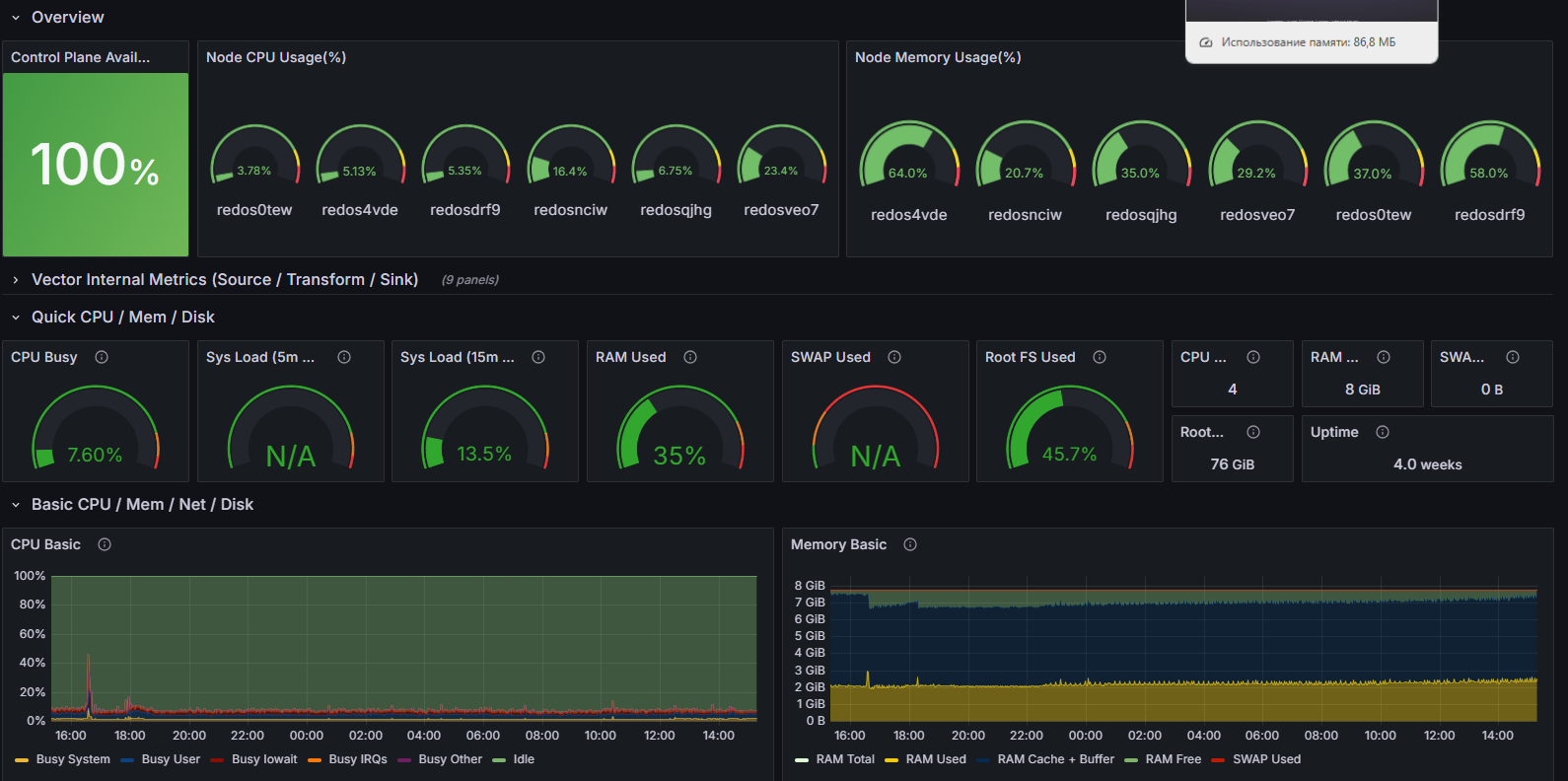
Dashboard structure
Overview:
- Control Plane Availability: Displays the availability of the cluster’s control plane, measured by the number of ready containers in the “kube-system” namespace.
- Vector pod count per Node: Displays the number of Vector pods on each node in the cluster.
- Node CPU Usage(%): Displays the ratio of CPU resources used on nodes.
- Node Memory Usage(%): Displays the percentage of memory usage on nodes.
- Vector Namespace Pods: Displays the number of Vector pods in the selected namespace.
Vector Internal Metrics (Source / Transform / Sink):
- Input events count (events/sec): A time graph showing the number of incoming events per second for components of type “source”.
- Input events bytes rate (bytes/sec): Time graph showing the processing speed of incoming event bytes.
- Transform events count (events/sec): A pie chart showing the number of events processed by components of type “transform”.
- Transform events bytes rate (bytes/sec): A time graph showing the byte processing rate for events that have been transformed.
- Transform utilization: Time graph showing the load factor of components of the “transform” type.
- Output events bytes count (events/sec): A time graph showing the total number of bytes processed by sink components.
- Output events count (events/sec): A pie chart showing the number of output events per second.
- Output events bytes rate (bytes/sec): Time graph showing the processing speed of output event bytes.
- Output utilization: Time graph showing the load factor for components of the “sink” type.
Quick CPU / Mem / Disk:
- CPU Busy: Displays the load on all processor cores.
- Sys Load (5m avg): Displays the average load for the last 5 minutes.
- Sys Load (15m avg): Displays the average load for the last 15 minutes.
- RAM Used: Displays the memory used.
- SWAP Used: Displays the swap memory usage.
- Root FS Used: Displays the usage of the root file system.
- CPU Cores: Displays the total number of CPU cores.
- RAM Total: Displays the total amount of RAM.
- SWAP Total: Displays the total amount of swap-memory.
- RootFS Total: Displays the total file system count of the root partition.
- Uptime: Displays the system uptime.
Basic CPU / Mem / Net / Disk:
- CPU Basic: Time graph showing basic information about CPU load, including time in different operating modes.
- Memory Basic: A time graph showing the total and used amount of RAM.
- Network Traffic Basic: A time graph showing network traffic information for each interface.
- Disk Space Used Basic: A time graph showing the percentage of disk space used for all mounted file systems.
Customizable parameters
- datasource: Allows you to select the data source for displaying information.
- node: Allows the user to select a specific node to monitor.
- job: Allows you to select a specific task for which metrics will be displayed, filtering the results according to the selected task and namespace.
- namespace: Allows you to select the Kubernetes namespace whose data will be displayed. Enables the option to select all namespaces.
Grafana review
The dashboard is designed to monitor and analyze data related to the performance and health of the Grafana system. It allows you to track metrics such as the number of alerts, the total number of dashboards, information about builds, requests to Grafana and their duration. The dashboard helps in quickly identifying problems in the application and optimizing performance.
Screenshot
Illustration: Grafana review
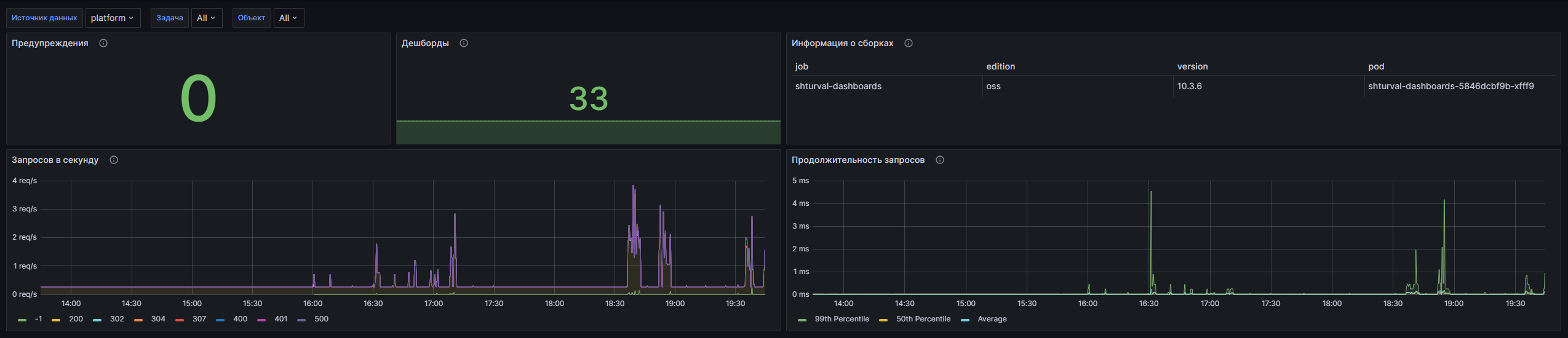
Dashboard structure
- Warnings: Displays the total number of all warnings in the system at the current moment.
- Dashboards: Displays the total number of dashboards available in the system.
- Build Information: Displays summary information about Grafana builds, including key metrics.
- Requests per second: A time graph showing the total number of requests to Grafana per second. Helps monitor system load in real time.
- Request Durations: Time graph showing percentile (99th and 50th) durations of HTTP requests to Grafana, as well as the average request execution time.
Customizable parameters
- datasource: Allows you to select the data source for displaying information.
- job: Allows you to select a joba specific task for which metrics will be displayed, filtering the results according to the selected task and namespace.
- pod: Allows you to select a pod for more accurate data monitoring and analysis.
Trivy Operator - Vulnerabilities
The dashboard is designed to monitor vulnerabilities in Kubernetes clusters using Trivy Operator from Aqua Security. It implements modern Grafana features, providing users with a centralized view of the security status of images, configurations, and RBAC scores. The dashboard helps in identifying vulnerabilities of varying degrees of severity (Critical, High, Medium, Low and Unknown) and presents information in a form convenient for analysis.
Screenshot
Illustration: Trivy Operator - Vulnerabilities
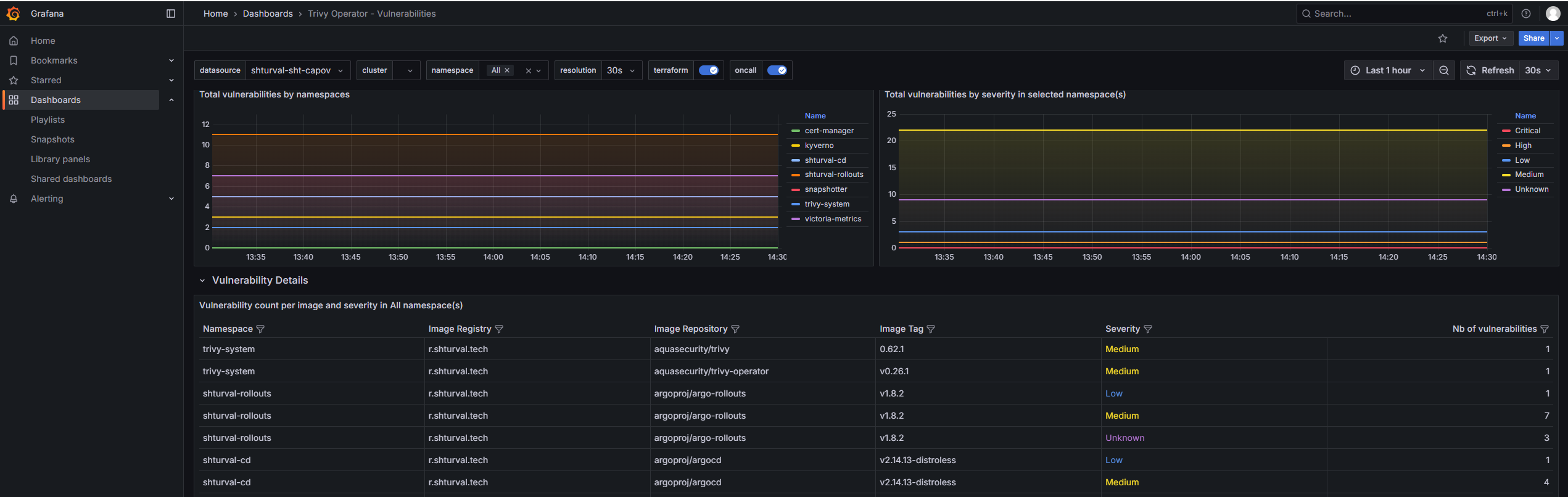
Dashboard structure
Vulnerabilities:
- CRITICAL: Displays the total number of vulnerabilities with a severity level of “Critical” in the selected namespace and cluster.
- HIGH: Displays the total number of vulnerabilities with a severity level of “High” in the selected namespace and cluster.
- MEDIUM: Displays the total number of vulnerabilities with a severity level of “Medium” in the selected namespace and cluster.
- LOW: Displays the total number of vulnerabilities with a severity level of “Low” in the selected namespace and cluster.
- UNKNOWN: Displays the total number of vulnerabilities with severity level “Unknown” in the selected namespace and cluster.
- TOTAL: Displays the total count of all vulnerabilities in the selected namespace and cluster.
- Total vulnerabilities by namespaces: A timeline showing the total number of vulnerabilities in images by namespaces.
- Total vulnerabilities by severity in selected namespace(s): Time graph showing the distribution of vulnerabilities by severity in selected namespaces.
Vulnerability Details:
- Vulnerability count per image and severity in $namespace namespace(s): Table showing the number of vulnerabilities by image and severity in the selected namespaces.
- Detailed CVE vulnerabilities in $namespace namespace(s): A table representing detailed information about CVE vulnerabilities in selected namespaces. Disabled in operator
Config Audit Reports:
- CRITICAL: Displays the number of critical configuration audits in the selected namespace and cluster.
- HIGH: Displays the number of high configuration audits in the selected namespace and cluster.
- MEDIUM: Displays the number of average configuration audits in the selected namespace and cluster.
- LOW: Displays the number of low configuration audits in the selected namespace and cluster.
- TOTAL: Displays the total number of configuration audits in the selected namespace and cluster.
- Total config audit report by namespaces: Timeline showing the total number of configuration audits by namespaces.
- Total config audit report by severity: Time graph showing the distribution of configuration audits by severity.
RBAC Assessments Not used:
- CRITICAL: Displays the number of RBAC critical scores in the selected namespace and cluster.
- HIGH: Displays the number of high RBAC scores in the selected namespace and cluster.
- MEDIUM: Displays the number of average RBAC scores in the selected namespace and cluster.
- LOW: Displays the number of low RBAC scores in the selected namespace and cluster.
- TOTAL: Displays the total number of RBAC scores in the selected namespace and cluster.
- Total RBAC Assessments by namespaces: A timeline showing the total number of RBAC assessments by namespaces.
- Total RBAC Assessments by severity: A time graph showing the distribution of RBAC assessments by severity.
Exposed Secrets Not used:
- Total Exposed Secrets by namespaces: A time graph showing the total number of exposed secrets by namespace.
Customizable parameters
- datasource: Allows you to select the data source for displaying information.
- cluster: Allows you to select the Kubernetes cluster whose data will be displayed.
- namespace: Allows you to select the Kubernetes namespace whose data will be displayed. Enables the option to select all namespaces.
- resolution: Setting the time interval for the data provided by the dashboard (available values: 1s, 15s, 30s, 1m, 3m, 5m).
Backend API Monitoring
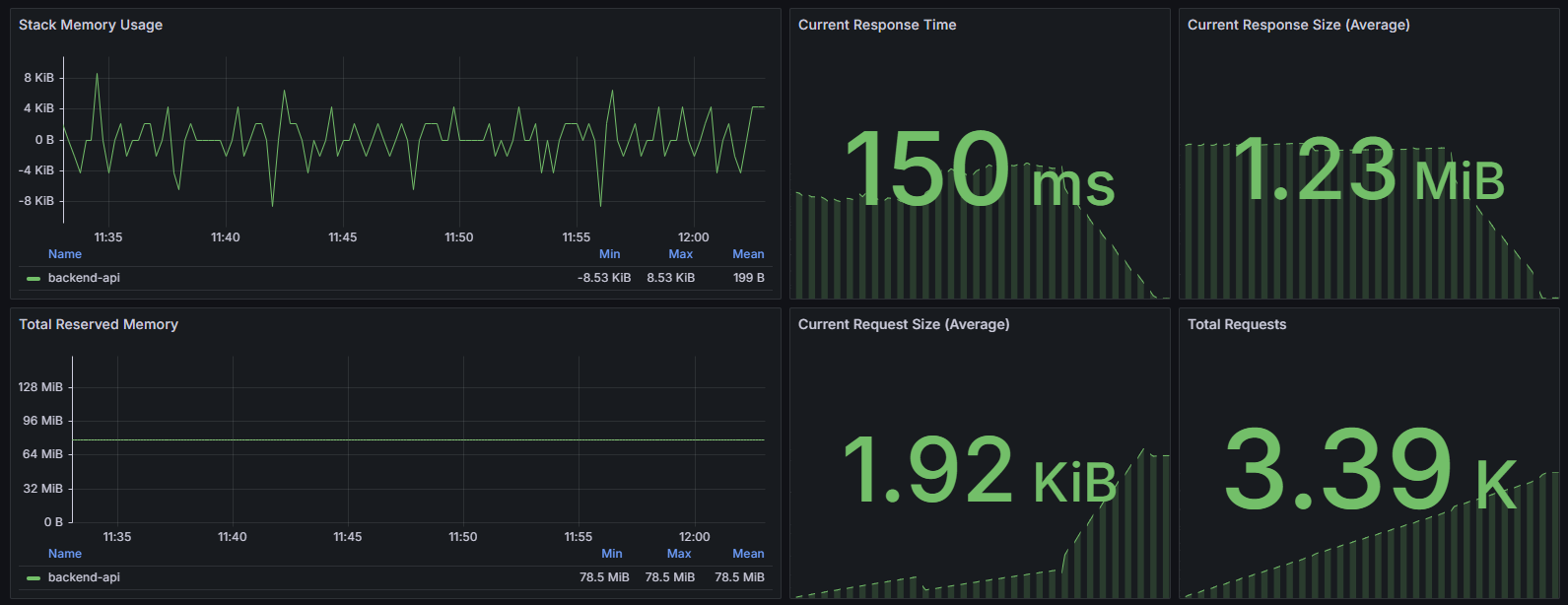
The dashboard is designed to monitor the performance and status of the Backend API. It provides a comprehensive overview of key metrics including memory usage, response time, request and response sizes, number ofquality and success of requests, as well as statistics on the most loaded endpoints. Technical indicators from the Prometheus monitoring system are used, which allows you to evaluate the effectiveness of the API and identify bottlenecks in its performance in real time.
Screenshot
Illustration: Backend API Monitoring
Dashboard structure
- Stack Memory Usage: Displays the time derivative of memory usage (stack_inuse_bytes) for the backend-api container, which allows you to track how stack memory changes over time.
- Current Response Time: Shows the current average API response time by dividing the sum of the duration of all requests by the number of requests for the selected interval.
- Current Response Size (Average): Average size of API responses, calculated as the ratio of the total size of responses to their number per interval.
- Total Reserved Memory: A time graph showing the average system memory allocation (sys_bytes) for the backend-api, which reflects the total amount of memory allocated to the process.
- Current Request Size (Average): The average size of incoming requests, calculated as the ratio of the total size of requests to their number.
- Total Requests: The total number of API requests for the period, aggregated by container.
- Go Runtime Metrics: A time graph of the number of goroutines in a Go application backend-api, which is an indicator of executor load.
- Success Rate (non-4|5xx responses): The percentage of successful responses that are not client-side (4xx) and server-side (5xx) errors for each URL.
- Client requests: A timeline showing the top 10 rotating requests by URL, method, and response code.
- Top Endpoints by Requests: A table displaying the top 10 endpoints by number of requests with details by URL, method and response code.
Customizable parameters
- Datasource: Allows you to select the data source used to obtain metrics.
- job: Allows you to filter by the value of the
joblabel in Prometheus metrics. Used to select a set of data related to the desired process or service.
Cluster API Controller Manager
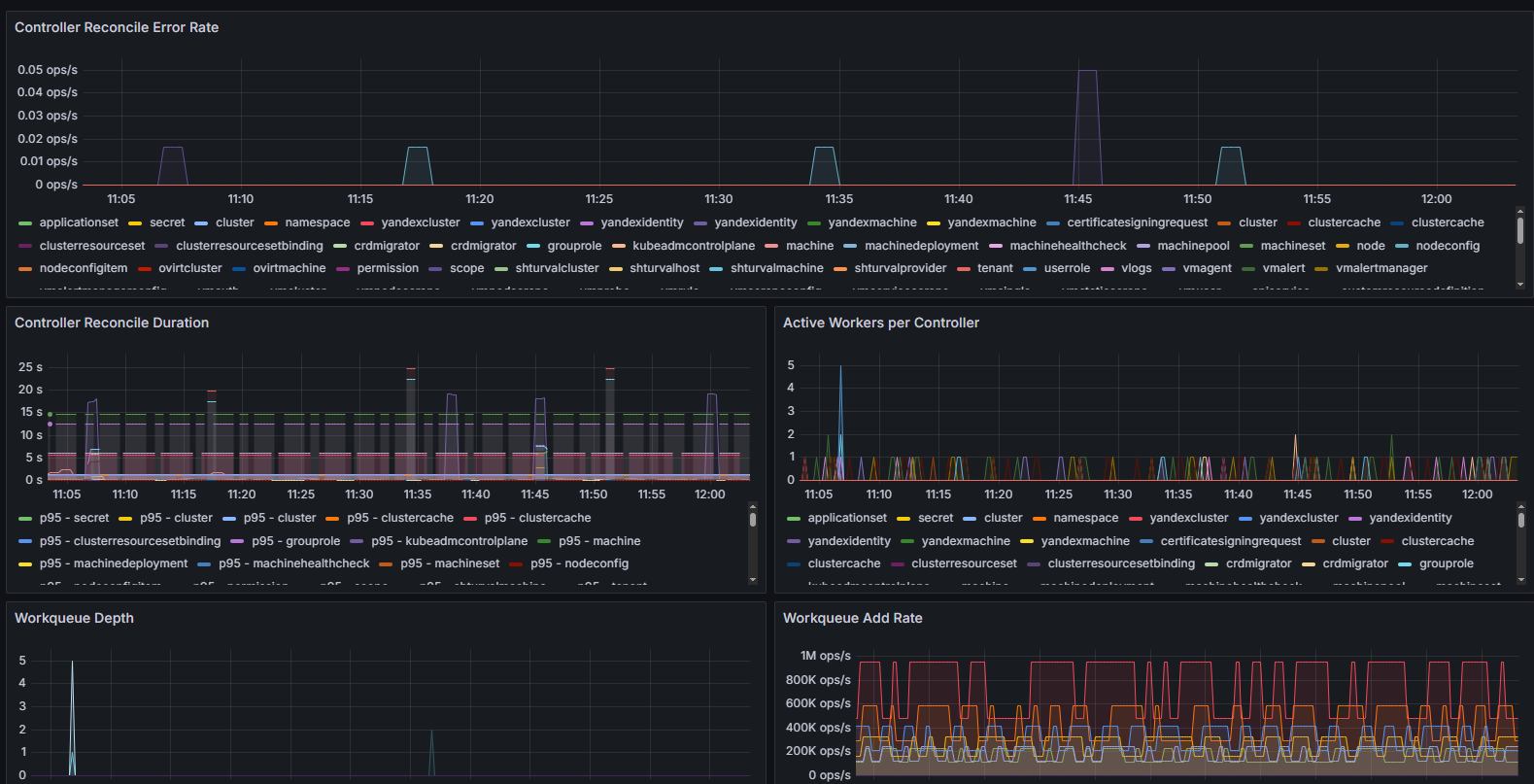
The dashboard is designed to monitor the operation of Cluster API Controller Manager in the Kubernetes cluster. It provides a comprehensive overview of cluster connectivity status, cluster health, controller performance, and key performance-related metrics. Uses Prometheus metrics that reflect metrics such as reconciliation errors, operation execution times, work queue depth, and leadership status. This allows DevOps and SRE professionals to quickly identify and respond to problems in the cluster management system.
Screenshot
Illustration: Cluster API Controller Manager
Dashboard structure
Metrics only on the master
- Cluster Connection Status: A pie chart displaying the connection status of each cluster. Uses the minimum value of the
capi_cluster_cache_connection_upmetric across cluster names and namespaces. Allows you to quickly determine which connections are active. - Cluster Health Status: Displays the aggregated health status of each cluster. Uses the minimum value of the
capi_cluster_cache_healthcheckmetric, grouped by cluster name and namespace. - Controller Reconcile Error Rate: Time graph showing the rate of errors occurring during controller reconcile (
controller_runtime_reconcile_errors_total). Allows you to monitor the stability of controllers. - Controller Reconcile Duration: A time graph showing the 95th and 50th percentiles of reconcile durations for each controller, based on histograms from Prometheus (
controller_runtime_reconcile_time_seconds_bucket). This helps analyze performance and latency. - Active Workers per Controller: A time graph displaying the number of active workers (worker threads) per controller (
controller_runtime_active_workers), which allows you to evaluate the load and parallelism of execution. - Workqueue Depth: A time graph showing the depth of controller work queues (
workqueue_depth), which helps identify potential bottlenecks in task processing. - Workqueue Add Rate: Displays the rate at which new tasks are added to the controllers’ work queues (
workqueue_adds_total), indicating the level of work activity. - Webhook Latency (p95): Time graph with 95th percentile latency of controller webhooks (
controller_runtime_webhook_latency_seconds_bucket), allowing you to identify problems with external calls. - SSA Cache Hit Rate: A time graph displaying the percentage of SSA (Server-Side Apply) cache hits for each controller and resource type (
kind). Calculated as the ratio of the number of hits to the total number of requests (= hits + misses). An important metric for assessing the effectiveness of caching. - Memory Usage: Status panel displaying the amount of process memory used in bytes (
go_memstats_alloc_bytes). - Goroutines: Panel showingShows the current number of active goroutines in the controller process (
go_goroutines), which helps track the load on Go runtime. - Leader Election Status: Leadership status within the selection of a master among controllers (
leader_election_master_status) with the name of the leader. - Certificate Errors: Displays the number of certificate reading errors (
certwatcher_read_certificate_errors_total), an important metric for the security and correct operation of TLS. - Cluster Connection Details: A table detailing the current state of connection to clusters (
capi_cluster_cache_connection_up) with automatic formatting by labels.
Customizable parameters
- Datasource: Allows you to select the data source used to obtain metrics.
- job: Filter by the
jobfield, which allows you to select metrics for specific jobs in Prometheus. Optionally can include all values.
These parameters provide flexible configuration of data sources and the ability to filter the displayed information by monitoring tasks in a cluster environment.
Kube-VIP
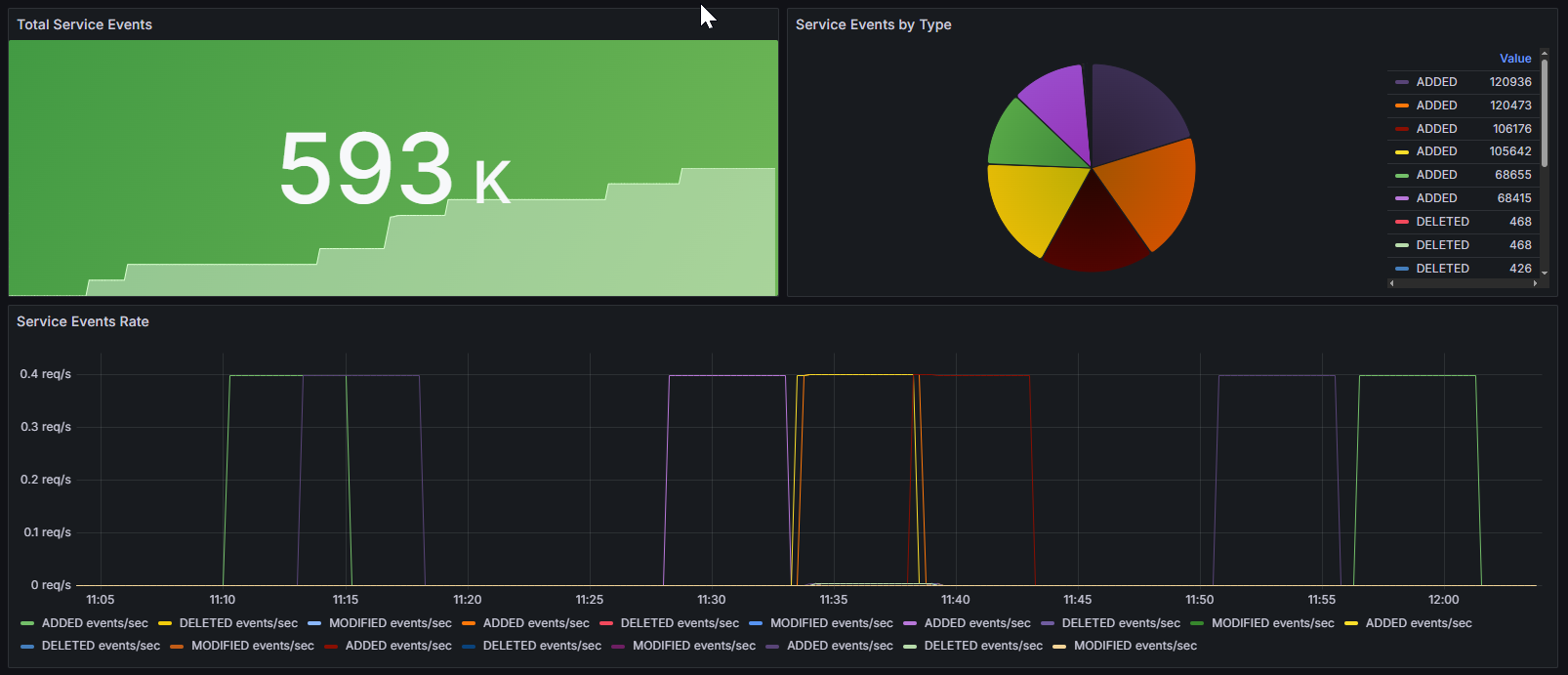
The dashboard is designed to monitor events related to the operation of the Kube-VIP service in Kubernetes clusters. It allows you to track the total number of events, the distribution of events by type, and the rate of occurrence of events over time, which is critical for analyzing the state of network virtualization of VIP addresses in a cluster. Metrics collected by Prometheus are used to provide detailed and up-to-date monitoring of network services and their events.
Screenshot
Illustration: Kube-VIP
Dashboard structure
- Total Service Events: Displays the total number of service events, aggregating the
kube_vip_manager_all_services_eventsmetric. Allows you to quickly assess the total volume of events related to Kube-VIP. - Service Events by Type: A pie chart showing the distribution of all events by type (
type) from thekube_vip_manager_all_services_eventsmetric. This helps to visually determine which types of events predominate and analyze their relationship. - Service Events Rate: Time graph displaying the rate of occurrence of events of various types (
type) according to therate(kube_vip_manager_all_services_events[5m])metric. Allows you to evaluate the dynamics and frequency of occurrence of events, which is important for prompt response and analysis of system behavior.
Customizable parameters
- datasource: Allows you to select the data source used to obtain metrics.