Setting up Audit Logs
Audit policy, storage of audit logs.
Introduction
Audit Logs record calls to the Kubernetes API server and help determine:
- what happened;
- when the event occurred;
- who initiated the action;
- with what resource the action was performed;
- where the event was recorded;
- where the request was initiated from;
- where the request was sent.
Audit events are generated at kube-apiserver. For each request, an audit event is created at different stages of processing, then the event is processed by the audit policy and recorded in the backend. The audit policy determines which events are recorded and at what level of detail, and the backend is responsible for maintaining the records.
The Shturval platform uses a log backend for Audit Logs: events are written to a file on the Control Plane nodes, collected by the logging module, sent to VLogs and displayed in the platform GUI.
Enabling audit logging increases the memory consumption of the API server because additional audit context is stored for each request. The amount of consumption depends on the configured audit policy.
When audit logs are available in the GUI
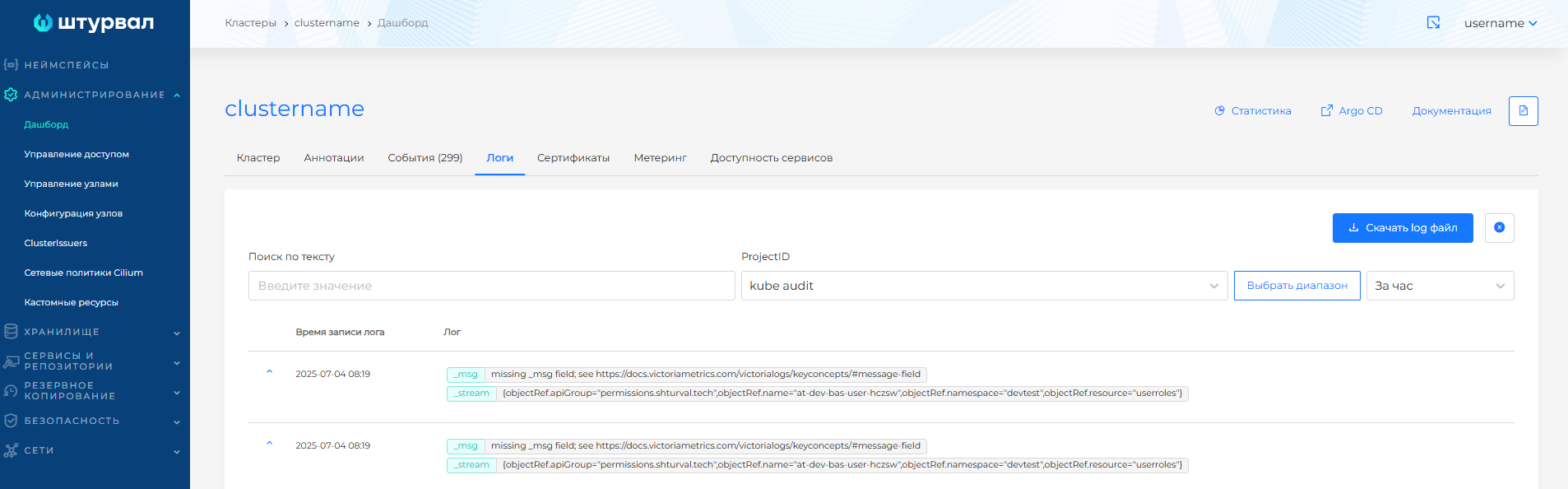
- The cluster is deployed with advanced security settings - then the audit policy is configured automatically, a kube audit project is created in VLogs, logs are collected by the log collection module (Vector) and are available on the Logs tab of the cluster dashboard.
- If the cluster is created without advanced security settings, the audit policy can be configured manually. To display logs on the dashboard, the log collection module must be enabled and Audit Logs collection from
/var/log/kube-api-audit/audit.logmust be configured.
Screenshot: Audit Logs on the “Logs” tab
Audit Policy
Audit Policy is specified by a YAML file in the format Kubernetes Audit Policy. The rules are processed in order: the first matching rule determines the audit level for the event.
Audit levels available:
None— do not record events that match the rule.Metadata— record request metadata: user, time, resource, action and other fields without the request and response body.Request— record metadata and request body without response body. This level does not apply to non-resource requests.RequestResponse— record metadata, request body and response body. This level does not apply to non-resource requests.
The event maybe written at one of the stages of request processing:
RequestReceived— the request was received by the audit handler and has not yet been passed further along the chain of handlers.ResponseStarted— response headers have been sent, but the response body has not yet been sent. The stage is created only for long-running requests, for examplewatch.ResponseComplete— the response body has been completely sent.Panic— panic occurred while processing the request.
The policy is passed to kube-apiserver via the --audit-policy-file flag. If the flag is not specified, audit events are not recorded. The policy file must have the rules field; A policy without rules is considered incorrect.
To prepare YAML, you can use the web-based audit policy editor.
Minimum policy for recording all requests at level Metadata:
apiVersion: audit.k8s.io/v1
kind: Policy
rules:
  - level: Metadata
Configuring audit policy manually
If the cluster is created without advanced security settings, Audit Policy can be added manually via node configuration.
- Go to the Administration → Node Configuration section of the desired cluster.
- Create or edit a Node Configuration CI (NCI) object. In the node selector, select the
node-role.kubernetes.io/control-planelabel (no value) to apply the settings to the Control Plane nodes. - If Audit Policy has already been added via NCI, modify the existing manifest or create a new NCI with a higher priority.
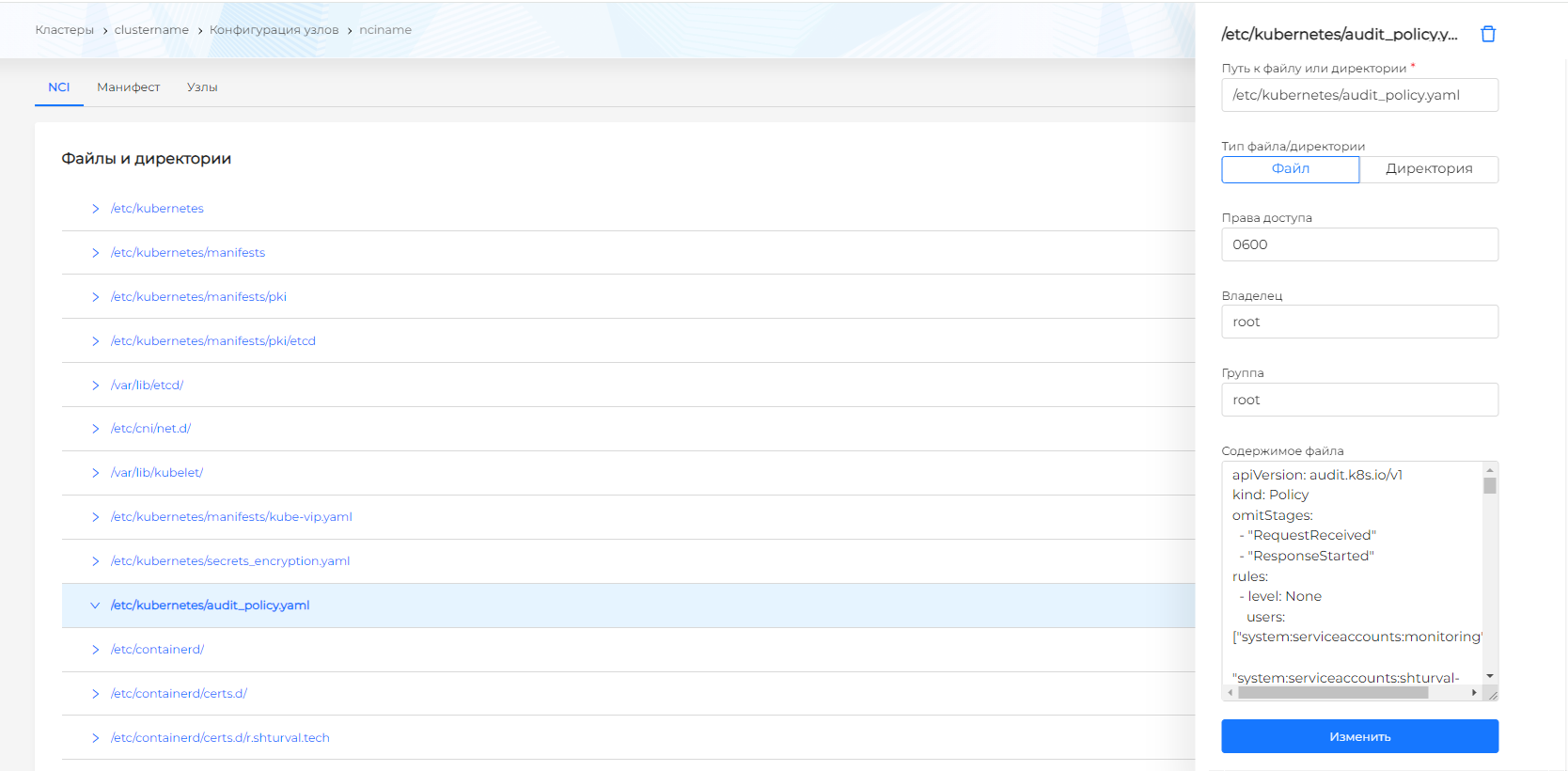
- In the Customizable sections block, select Files and directories → Manage → + and add the file:
- Path:
/etc/kubernetes/audit_policy.yaml - Type: file
- Content: Audit policy YAML.
- Path:
- Click Add, then Finish.
Screenshot: NCI setup
After NCI is applied, Control Plane nodes are restarted sequentially.
Setting up the API server
Edit the manifest kube-apiserver on Control Plane nodes: /etc/kubernetes/manifests/kube-apiserver.yaml.
Add launch arguments:
spec:
  containers:
  - command:
    - --audit-policy-file=/etc/kubernetes/audit_policy.yaml
    - --audit-log-path=/var/log/kube-api-audit/audit.log
    - --audit-log-maxage=30
    - --audit-log-maxbackup=10
    - --audit-log-maxsize=100
    - --audit-log-mode=batch
Mount the policy file and log directory:
    volumeMounts:
    - mountPath: /etc/kubernetes/audit_policy.yaml
      name: audit-policy
    - mountPath: /var/log/kube-api-audit/
      name: audit-log
      readOnly: false
Add hostPath for policy and logs:
  volumes:
  - hostPath:
      path: /etc/kubernetes/audit_policy.yaml
      type: File
    name: audit-policy
  - hostPath:
      path: /var/log/kube-api-audit/
      type: DirectoryOrCreate
    name: audit-log
Audit logs are written to /var/log/kube-api-audit/audit.log. If “Shturval” logging services are used, Vector collects events from this file and redirects them to the VLogs instance - VLSingle in the namespace of the management cluster.
Examples of recommended policies
Below are examples of policies for the management cluster and client clusters. They differ from automatically mounted ones in the absencesystem service account activity log exceptions. For example, to exclude actions of system ServiceAccounts in the management cluster in the “rules” block, first add a rule with a logging level of None:
  - level: None
    users: ["system:serviceaccounts:monitoring",
            "system:serviceaccounts:shturval-backend",
            "system:serviceaccounts:ingress",
            "system:nodes",
            "system:serviceaccounts:trivy-system",
            "system:serviceaccounts:cert-manager",
            "system:serviceaccounts:metallb-system",
            "system:serviceaccounts:kyverno",
            "system:serviceaccounts:shturval-operator-system",
            "system:serviceaccounts:kube-system",
            "system:serviceaccount:shturval-cert-expiration:shturval-cert-expiration",
            "system:serviceaccount:shturval-services-system:default",
            "system:serviceaccount:kube-system:cilium-operator",
            "system:serviceaccount:kube-vip:shturval-vip-provider",
            "system:serviceaccount:kube-vip:shturval-vip",
            "system:kube-controller-manager",
            "system:kube-scheduler",
            "system:serviceaccount:kyverno:shturval-policy-manager",
            "system:serviceaccount:kyverno:shturval-policy-manager-cleanup-controller",
            "system:serviceaccount:shturval-node-config-system:default",
            "system:serviceaccount:cert-manager:shturval-cert-manager-webhook",
            "system:serviceaccount:cert-manager:shturval-cert-manager",
            "system:serviceaccount:monitoring:shturval-metrics-kube-state-metrics",
            "system:serviceaccount:kube-system:cilium",
            "system:serviceaccount:trivy-system:shturval-scanner",
            "system:apiserver",
            "system:serviceaccount:logging:fluent-operator",
            "system:serviceaccount:kube-system:generic-garbage-collector",
            "system:serviceaccount:kube-system:job-controller",
            "system:serviceaccount:monitoring:shturval-metrics-operator",
            "system:serviceaccount:kube-system:persistent-volume-binder",
            "system:serviceaccount:kube-system:job-controller",
            "system:serviceaccount:shturval-services-system:default",
            "system:serviceaccount:trivy-system:shturval-scanner",
            "system:serviceaccount:rawfile-provisioner:shturval-local-csi-driver",
            "system:serviceaccount:ingress:shturval-ingress-controller",
            "system:serviceaccount:velero:shturval-backup-server",
            "system:serviceaccount:cert-manager:shturval-cert-manager-cainjector"]
    verbs: ["watch", "list", "create", "update", "get", "delete", "patch"]
Management Cluster Policy
apiVersion: audit.k8s.io/v1
kind: Policy
omitStages:
  - "RequestReceived"
  - "ResponseStarted"
omitManagedFields: true
rules:
  - level: Metadata
    verbs: ["delete"]
    resources:
      - group: "controlplane.cluster.x-k8s.io"
        resources: ["kubeadmcontrolplanes", "kubeadmcontrolplanetemplates"]
  - level: Request
    verbs: ["create", "update", "patch"]
    resources:
      - group: "controlplane.cluster.x-k8s.io"
        resources: ["kubeadmcontrolplanes", "kubeadmcontrolplanetemplates"]
  - level: Metadata
    verbs: ["delete"]
    resources:
      - group: "infrastructure.cluster.x-k8s.io"
        resources: ["basisclusters",
                    "basismachines",
                    "basismachinetemplates",
                    "basisproviders",
                    "ovirtclusters",
                    "ovirtmachines",
                    "ovirtmachinetemplates",
                    "ovirtproviders",
                    "vsphereclusteridentities",
                    "vsphereclusters",
                    "vsphereclustertemplates",
                    "vspheremachines",
                    "vspheremachinetemplates"]
      - group: "ops.shturval.tech"
        resources: ["shturvalserviceconfigs"]
      - group: "node.shturval.tech"
        resources: ["nodeconfigitems", "nodeconfigs"]
  - level: Request
    verbs: ["create", "update", "patch"]
    resources:
      - group: "infrastructure.cluster.x-k8s.io"
        resources: ["basisclusters",
                    "basismachines",
                    "basismachinetemplates",
                    "basisproviders",
                    "ovirtclusters",
                    "ovirtmachines",
                    "ovirtmachinetemplates",
                    "ovirtproviders",
                    "vsphereclusteridentities",
                    "vsphereclusters",
                    "vsphereclustertemplates",
                    "vspheremachines",
                    "vspheremachinetemplates"]
      - group: "cluster.x-k8s.io"
        resources: ["clusterclasses",
                    "clusters",
                    "machinedeployments",
                    "machinehealthchecks",
                    "machinepools",
                    "machines",
                    "machinesets"]
  - level: Request
    verbs: ["create", "delete", "update", "patch"]
    resources:
      - group: "rbac.authorization.k8s.io"
        resources: ["roles", "clusterroles"]
  - level: Request
    verbs: ["create", "delete"]
    resources:
      - group: "rbac.authorization.k8s.io"
        resources: ["clusterrolebindings", "rolebindings"]
  - level: Request
    verbs: ["create", "delete", "update", "patch"]
    resources:
      - group: "permissions.shturval.tech"
        resources: ["*"]
  - level: Metadata
    verbs: ["create", "delete", "update", "patch", "get"]
    resources:
      - group: ""
        resources: ["secrets", "configmaps"]
Policy for client cluster
apiVersion: audit.k8s.io/v1
kind: Policy
omitStages:
  - "RequestReceived"
  - "ResponseStarted"
omitManagedFields: true
rules:
  - level: Metadata
    verbs: ["delete"]
    resources:
      - group: ""
        resources: ["deployments", "statefulsets", "daemonsets", "pods/log", "pods"]
  - level: RequestResponse
    verbs: ["create", "update", "patch"]
    resources:
      - group: ""
        resources: ["deployments", "statefulsets", "pods"]
  - level: Request
    resources:
      - group: ""
        resources: ["pods/exec"]
    verbs: ["create", "delete", "update", "patch", "get"]
  - level: Request
    verbs: ["create", "delete", "update", "patch"]
    resources:
      - group: "rbac.authorization.k8s.io"
        resources: ["roles", "clusterroles"]
  - level: Request
    verbs: ["create", "delete"]
    resources:
      - group: "rbac.authorization.k8s.io"
        resources: ["clusterrolebindings", "rolebindings"]
  - level: Request
    verbs: ["create", "delete", "update", "patch"]
    resources:
      - group: "permissions.shturval.tech"
        resources: ["*"]
  - level: Metadata
    verbs: ["delete"]
    resources:
      - group: "cilium.io"
        resources: ["ciliumnetworkpolicies"]
      - group: "ops.shturval.tech"
        resources: ["shturvalserviceconfigs"]
      - group: "node.shturval.tech"
        resources: ["nodeconfigitems", "nodeconfigs"]
  - level: Request
    verbs: ["create", "update", "patch"]
    resources:
      - group: "cilium.io"
        resources: ["ciliumnetworkpolicies"]
  - level: Metadata
    verbs: ["create", "delete", "update", "patch"]
    resources:
      - group: "velero.io"
        resources: ["backups", "restores"]
  - level: Metadata
    verbs: ["create", "delete", "update", "patch", "get"]
    resources:
      - group: ""
        resources: ["secrets", "configmaps"]
Log backend options
Log backend writes audit events to a file in JSON Lines format. The kube-apiserver flags are used for configuration:
--audit-log-path— path to the log file. If the flag is not specified, the log backend is disabled. The value-means output to standard stream.--audit-log-maxage— maximum number of days to store old audit log files.--audit-log-maxbackup— the maximum number of audit log files that are saved during rotation.--audit-log-maxsize— maximum size of the audit log file in megabytes before rotation.--audit-log-mode— event processing mode:batch,blockingorblocking-strict.
In blocking mode, the API server waits for each audit event to be processed before responding. In batch mode, events are buffered and processed in batches. In blocking-strict mode, an audit failure at stage RequestReceived causes the entire request to kube-apiserver to fail.
By default, batching and throttling are enabled for the webhook backend and disabled for the log backend. When using batch mode, parameters must be selected taking into account the load on the API server and the recording speed of the backend.
To monitor the state of the audit subsystem, the kube-apiserver metrics are used:
apiserver_audit_event_totalis the total number of audit events exported.apiserver_audit_error_totalis the total number of events discarded due to an export error.
Log backend and webhook backend support limiting the size of recorded events. By default, truncate is disabled; for log backend it is enabled by the audit-log-truncate-enabled flag, and the maximum batch and event size is set by the audit-log-truncate-max-batch-size and audit-log-truncate-max-event-size flags.
Event format
Audit events have the Kubernetes API structure from the audit.k8s.io group. For patch requests, the request body is written as a JSON array of patch operations, rather than as a full Kubernetes object:
[
  {
    "op": "replace",
    "path": "/spec/parallelism",
    "value": 0
  },
  {
    "op": "remove",
    "path": "/spec/template/spec/containers/0/terminationMessagePolicy"
  }
]
Where to look at the logs
- Cluster dashboard → “Logs” tab - with advanced security settings and running log collection in VLogs. For Audit Logs, the kube audit project is used.
- VLogs — when Shturval logging services are enabled, events are sent to the VLogs instance (
VLSingle) in the management cluster namespace. - Export to SIEM — see Export of logs to SIEM.
See also:
- Node configuration - work with NCI.
- Web-based audit policy editor — build audit policy YAML.