Cilium Network Policies (network segmentation)
Network segmentation and traffic control in a cluster using Cilium Network Policies.
Introduction
Cilium Network Policies is a network segmentation mechanism in a Kubernetes cluster based on Cilium. Policies determine what traffic is allowed between pods, namespaces, services, cluster nodes and external addresses. Anything that is not allowed by the policies for the selected direction is blocked by Cilium.
In the Shturval platform, the cluster network is provided by Cluster Network Management Module (shturval-networking, Cilium CNI). To manage policies the following are used:
CiliumNetworkPolicy— Cilium namespace policy;CiliumClusterwideNetworkPolicy— Cilium cluster policy;- Kubernetes
NetworkPolicy- standard Kubernetes policy with a smaller set of capabilities.
The official Cilium documentation describes these formats in Network Policy and the general policy language in Overview of Network Policy.
When to use
Use Cilium Network Policies when needed:
- isolate applications in different namespaces;
- allow access to the application only from the Ingress Controller or specific pods;
- limit outgoing application traffic to DNS, KubeAPI, internal services or external domains;
- describe the rules at the L3/L4 levels: pods, namespaces, CIDR, entities, services, ports and protocols;
- add L7 restrictions, such as HTTP method and path or DNS name;
- explicitly deny some traffic using deny policies.
Where to configure
There are two main configuration methods available in the platform:
- GUI - in the target cluster, open the Cluster Administration → Cilium Network Policies section. In it you can create, view and change cluster and namespace policies, as well as monitor their status. The GUI editor does not display Kubernetes
NetworkPolicy. - Manifests - policies can be applied via manifest import or via
kubectlif the user has the necessary rights.
To manage outgoing traffic through a dedicated egress-IP, the platform also has a separate Egress Gateway page for CiliumEgressGatewayPolicy resources. This is not a replacement for CiliumNetworkPolicy: Egress Gateway controls the routing of outgoing traffic, and Cilium Network Policies controls whether flows are allowed or denied.
For more information about working in the GUI, see Cilium Network Policies.
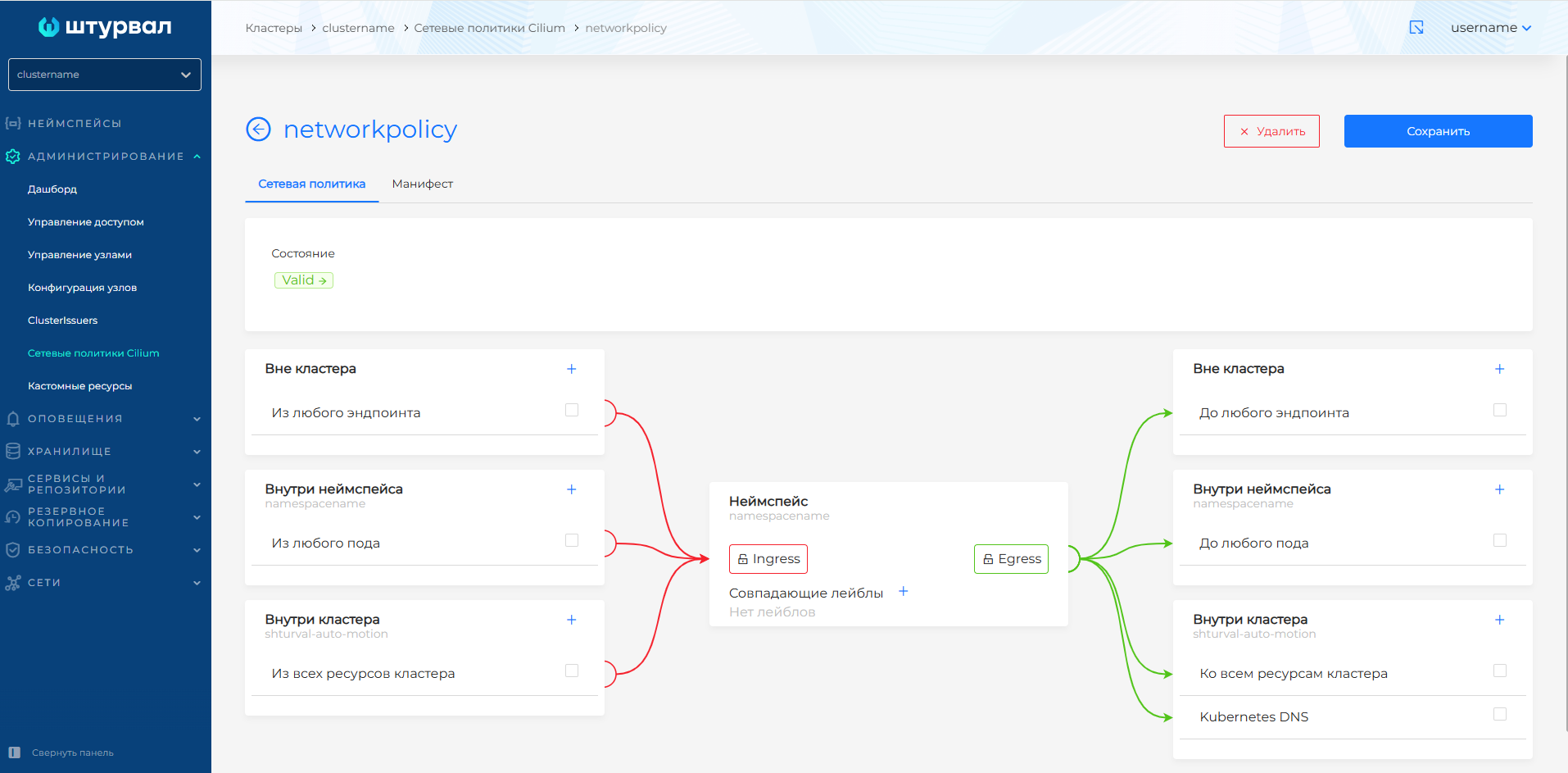
Screenshot: network policy status
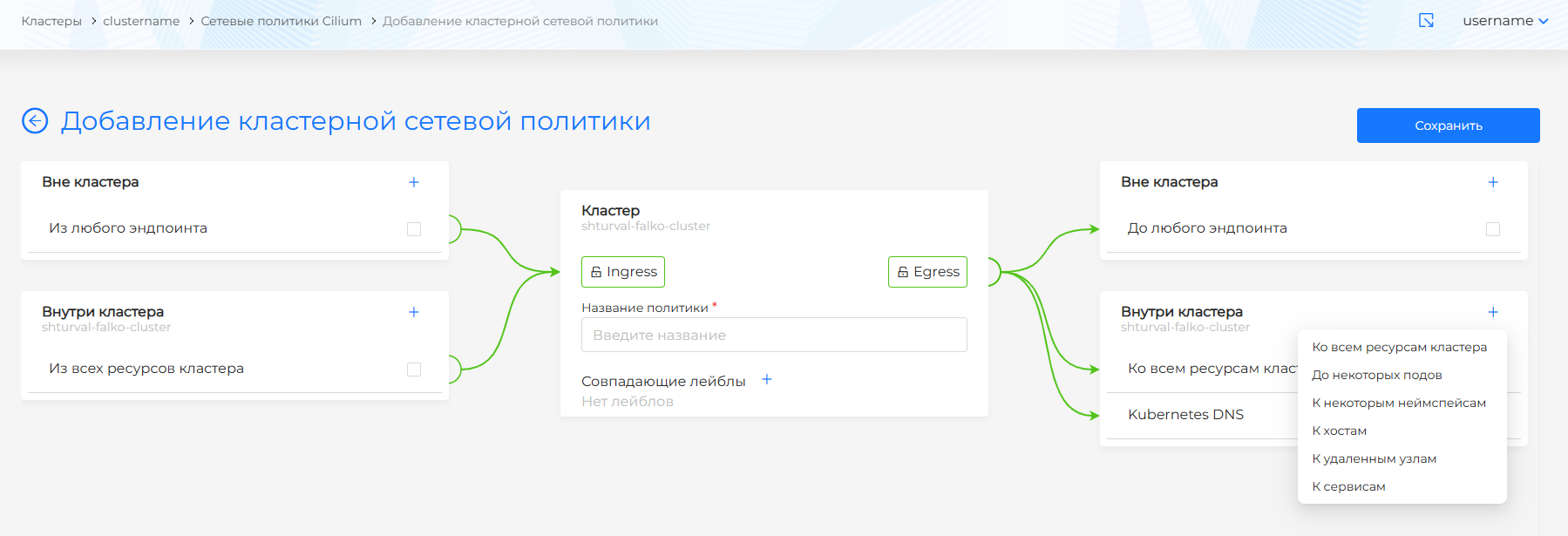
Screenshot: cluster network policy editor
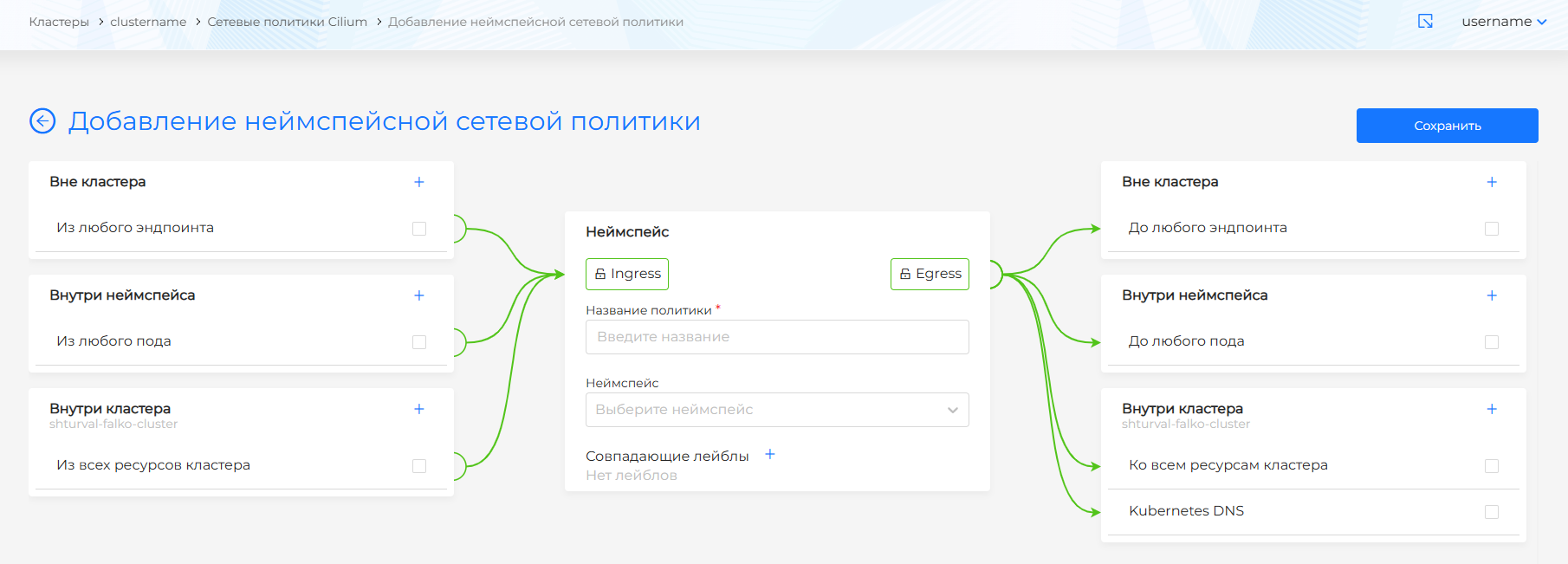
Screenshot: namespace network policies editor
Policy formats
| Format | Scope | Opportunities | When to use |
|---|---|---|---|
NetworkPolicy | Namespace | Standard Kubernetes L3/L4 rules for ingress and egress | If the standard Kubernetes API is sufficient |
CiliumNetworkPolicy | Namespace | Cilium advanced rules: L3-L7, entities, FQDN, HTTP/DNS, deny rules | To isolate an application or namespace |
CiliumClusterwideNetworkPolicy | Whole cluster | Same specification as CiliumNetworkPolicy, but without metadata.namespace; can optionally use nodeSelector | For general cluster level rules, such as DNS or access to system endpoints |
Note: Start with namespace CiliumNetworkPolicy. Cluster policies affect the entire cluster, so an error in a selector or deny rule can affect several applications at once.
How Cilium enforces policies
Default behavior
In Cilium mode, by default, a pod has unlimited ingress and egress until it is selected by a policy. After this, the default deny model is enabled for the selected direction:
| Situation | Behavior |
|---|---|
| Pod not selected by any policy | Ingress and egress are allowed |
Pod selected by policy with section ingress | For ingress, only traffic that matches the allow rules is allowed |
Pod selected by policy with section egress | For egress, only traffic that matches the allow rules is allowed |
Pod selected by policies with ingress and egress | Both directions are limited independently |
Cilium policies operate on an allowlist model: a rule allows matched traffic, and unmatched traffic is discarded in accordance with the enforcement mode. If multiple allow rules are applied to the same pod, a union of all matching rules is allowed.
Enforcement modes
Cilium supports three policy enforcement modes:
default- standard mode: endpoints are not limited until they are selected by the policy;always- policies are enabled for all endpoints, even if they are not selected by rightssilt;never- policies are not applied, even if rules exist.
The platform documentation and examples below assume standard Cilium behavior: without policies, traffic is allowed, after selecting a pod, only explicitly described flows are allowed by the policy.
Allow and deny
The normal sections ingress and egress allow traffic. Sections ingressDeny and egressDeny explicitly prohibit traffic and take precedence over allow rules. This means that a deny rule will block a matching flow even if another policy allows it.
Limitations of Cilium deny policies:
- deny does not support L7 prohibitions, for example banning a specific HTTP URL;
- deny does not support
toFQDNs, that is, denying a specific domain name through an FQDN rule.
CiliumNetworkPolicy structure
The minimum policy contains apiVersion, kind, metadata and spec. spec specifies the endpoints selector and ingress/egress rules:
apiVersion: cilium.io/v2
kind: CiliumNetworkPolicy
metadata:
  name: example-policy
  namespace: app
spec:
  description: "Allow ingress from frontend to backend"
  endpointSelector:
    matchLabels:
      app: backend
  ingress:
    - fromEndpoints:
        - matchLabels:
            app: frontend
Key fields:
| Field | Destination |
|---|---|
metadata.name | Policy name in Kubernetes |
metadata.namespace | Namespace to which CiliumNetworkPolicy belongs; CiliumClusterwideNetworkPolicy field is not specified |
spec.description | A human-readable description of the purpose of the policy; Cilium does not interpret this field |
spec.endpointSelector | Selects the pods to which the policy applies |
spec.nodeSelector | Selects nodes; only available for CiliumClusterwideNetworkPolicy |
spec.ingress | Allow rules for incoming traffic to selected endpoints |
spec.egress | Allow rules for outgoing traffic from selected endpoints |
spec.ingressDeny | Deny rules for incoming traffic |
spec.egressDeny | Deny rules for outgoing traffic |
Selectors and namespaces
endpointSelector
endpointSelector selects the pods that are affected by the policy. The selector is based on Kubernetes LabelSelector.
Examples:
# All pods in namespace policy
endpointSelector: {}
# Only pods with app.kubernetes.io/name=backend
endpointSelector:
  matchLabels:
    app.kubernetes.io/name: backend
For CiliumNetworkPolicy, the endpointSelector selector is always applied only within the namespace where the policy is created. You cannotspecify a namespace in endpointSelector: this would violate namespace isolation in Kubernetes.
fromEndpoints and toEndpoints
fromEndpoints selects ingress traffic sources, and toEndpoints selects egress traffic destinations. In these selectors you can use the pod namespace label:
fromEndpoints:
  - matchLabels:
      io.kubernetes.pod.namespace: frontend
      app.kubernetes.io/name: web
If you need to allow traffic between namespaces, explicitly specify the namespace label in fromEndpoints or toEndpoints. Without this, the empty selector usually means endpoints in scopeia policy, not the entire cluster.
Namespace labels
Cilium supports selecting endpoints based on namespace labels using labels like io.cilium.k8s.namespace.labels.<label-name>. This is convenient if you need to allow traffic not to a specific namespace, but to all namespaces with a given role, for example env=prod or team=payments.
Filtration levels
L3: sources and destinations
L3 rules determine which endpoints or external addresses can communicate. Cilium supports several ways to describe L3:
| Method | Fields | What to use |
|---|---|---|
| Endpoints | fromEndpoints, toEndpoints | Traffic between Cilium-managed pods by labels |
| Services | toServices | Egress to Kubernetes Service without manual IP enumeration |
| Entities | fromEntities, toEntities | Cilium special categories: world, cluster, host, remote-node, kube-apiserver and others |
| Nodes | fromNodes, toNodes, nodeSelector | Traffic taking into account cluster nodes |
| CIDR | fromCIDR, toCIDR, toCIDRSet | External networks with stable IPs or subnets |
| DNS/FQDN | toFQDNs | External services by DNS name |
Note: CIDR rules depend on the stability of IP addresses. For external services with changing IPs, use toFQDNs more often together with a DNS access rule.
L4: ports and protocols
L4 rules limit traffic by ports and protocols through the toPorts field. If the L4 rule is not specified, matching L3 traffic is allowed on all ports and protocols. If the L4 rule is specified, only the specified ports and protocols are allowed.
Example egress only on TCP port 443:
egress:
  - toFQDNs:
      - matchName: api.example.com
    toPorts:
      - ports:
          - port: "443"
            protocol: TCP
Cilium also supports port ranges via endPort. For TLS traffic, you can restrict SNI via serverNames if L7 proxy enforcement is enabled.
L7: HTTP, DNS and Kafka
L7 rules are specified inside L4 rules. Cilium supports:
- HTTP - method, path, Host and headers;
- DNS -
matchNameandmatchPattern; - Kafka - Kafka rules are in beta/deprecated status in the Cilium documentation and are not recommended for new scenarios without a separate compatibility check.
When an L7 rule is violated, Cilium typically returns an application-level response, such as HTTP 403 or DNS REFUSED, rather than simply discarding the packet.
Example HTTP rule:
apiVersion: cilium.io/v2
kind: CiliumNetworkPolicy
metadata:
  name: allow-public-api
  namespace: app
spec:
  description: "Allow GET /public from frontend to backend"
  endpointSelector:
    matchLabels:
      app: backend
  ingress:
    - fromEndpoints:
        - matchLabels:
            app: frontend
      toPorts:
        - ports:
            - port: "80"
              protocol: TCP
          rules:
            http:
              - method: "GET"
                path: "/public$"
DNS and FQDN policies
toFQDNs allows egress to external resources by DNS name. Cilium obtains IP addresses for FQDN rules from DNS responses, whichThis is seen by the DNS proxy, and takes into account the TTL of DNS records.
FQDN policies usually require two egress rules:
- Allow DNS queries to clustered DNS.
- Allow connection to the domain via
toFQDNs.
Example: Allow the application to only go to api.github.com:
apiVersion: cilium.io/v2
kind: CiliumNetworkPolicy
metadata:
  name: allow-api-github
  namespace: app
spec:
  description: "Allow egress to api.github.com and DNS"
  endpointSelector:
    matchLabels:
      app: mediabot
  egress:
    - toEndpoints:
        - matchLabels:
            io.kubernetes.pod.namespace: kube-system
            k8s-app: kube-dns
      toPorts:
        - ports:
            - port: "53"
              protocol: ANY
          rules:
            dns:
              - matchPattern: "*"
    - toFQDNs:
        - matchName: api.github.com
      toPorts:
        - ports:
            - port: "443"
              protocol: TCP
Features of matchName and matchPattern:
matchName: api.github.commatches only the exact name;matchPattern: "*.github.com"matches subdomains, for examplesupport.github.com, but notgithub.com;matchPattern: "*"resolves DNS queries to any names and adds IP from responses to Cilium’s DNS cache.
Note: For DNS/L7 policy, Cilium recommends intercepting DNS traffic only to a trusted cluster DNS, such as kube-dns. If you point the DNS proxy to an untrusted resolver, it can influence the IP addresses that Cilium considers allowed for toFQDNs.
Basic scenarios
Allow access to KubeAPI
For operators and controllers that need the Kubernetes API, use entity kube-apiserver:
apiVersion: cilium.io/v2
kind: CiliumNetworkPolicy
metadata:
  name: allow-kube-apiserver
  namespace: operators
spec:
  description: "Allow egress to kube-apiserver"
  endpointSelector: {}
  egress:
    - toEntities:
        - kube-apiserver
Allow DNS in the platform
DNS is needed by applications that access Kubernetes Service or external FQDNs. In the platform you usually need to allow egress to kube-dns and shturval-caching-dns:
apiVersion: cilium.io/v2
kind: CiliumNetworkPolicy
metadata:
  name: allow-dns
  namespace: app
spec:
  description: "Allow egress to kube-dns and shturval-caching-dns"
  endpointSelector: {}
  egress:
    - toEndpoints:
        - matchLabels:
            io.kubernetes.pod.namespace: kube-system
            k8s-app: kube-dns
      toPorts:
        - ports:
            - port: "53"
              protocol: UDP
            - port: "53"
              protocol: TCP
            - port: "9153"
              protocol: TCP
    - toEndpoints:
        - matchLabels:
            io.kubernetes.pod.namespace: kube-system
            app.kubernetes.io/name: shturval-caching-dns
      toPorts:
        - ports:
            - port: "53"
              protocol: UDP
            - port: "9253"
              protocol: TCP
Allow incoming traffic from Ingress Controller
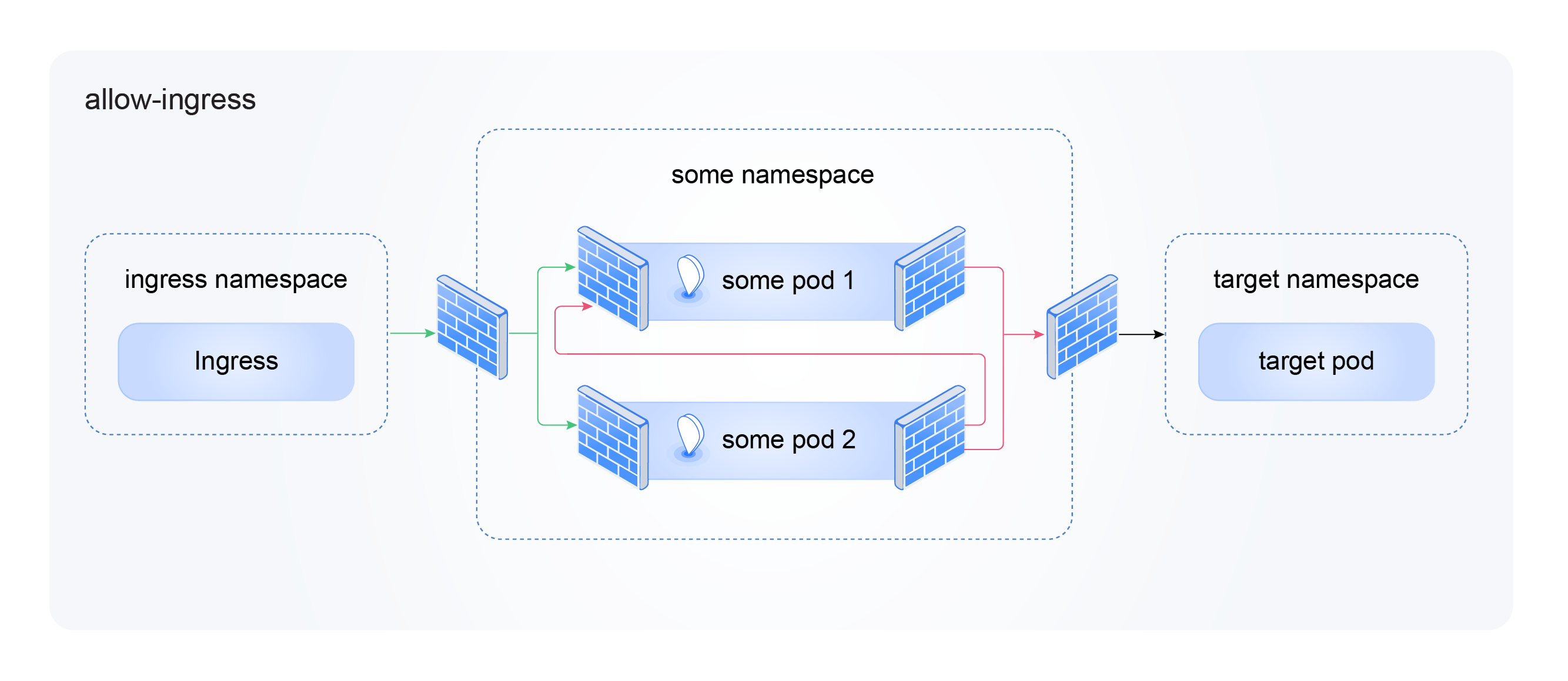
For an application published via Ingress, enable ingress from the Ingress Controller:
allow-ingress scheme
apiVersion: cilium.io/v2
kind: CiliumNetworkPolicy
metadata:
  name: allow-ingress
  namespace: app
spec:
  description: "Allow ingress from ingress-controller"
  endpointSelector: {}
  ingress:
    - fromEndpoints:
        - matchLabels:
            app.kubernetes.io/name: shturval-ingress-controller
            io.kubernetes.pod.namespace: ingress
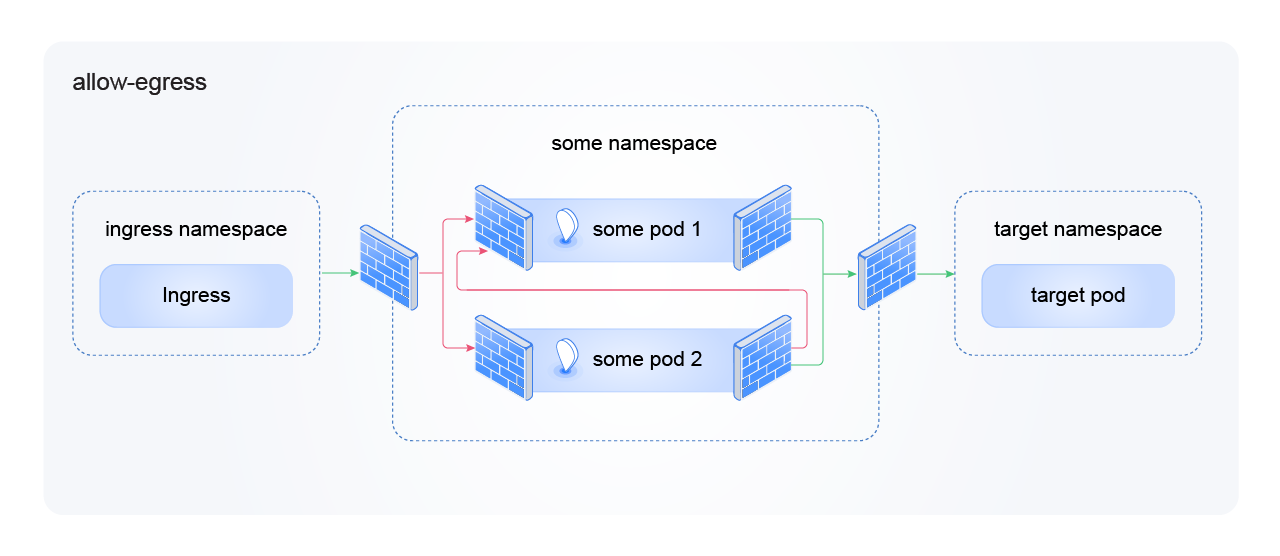
Allow egress to the backend application
allow-egress scheme
apiVersion: cilium.io/v2
kind: CiliumNetworkPolicy
metadata:
  name: allow-egress-to-backend
  namespace: frontend
spec:
  description: "Allow egress to backend app only"
  endpointSelector: {}
  egress:
    - toEndpoints:
        - matchLabels:
            io.kubernetes.pod.namespace: backend
            app.kubernetes.io/name: api
      toPorts:
        - ports:
            - port: "8080"
              protocol: TCP
If the frontend accesses the backend by the DNS name Service, add a separate rule for DNS.
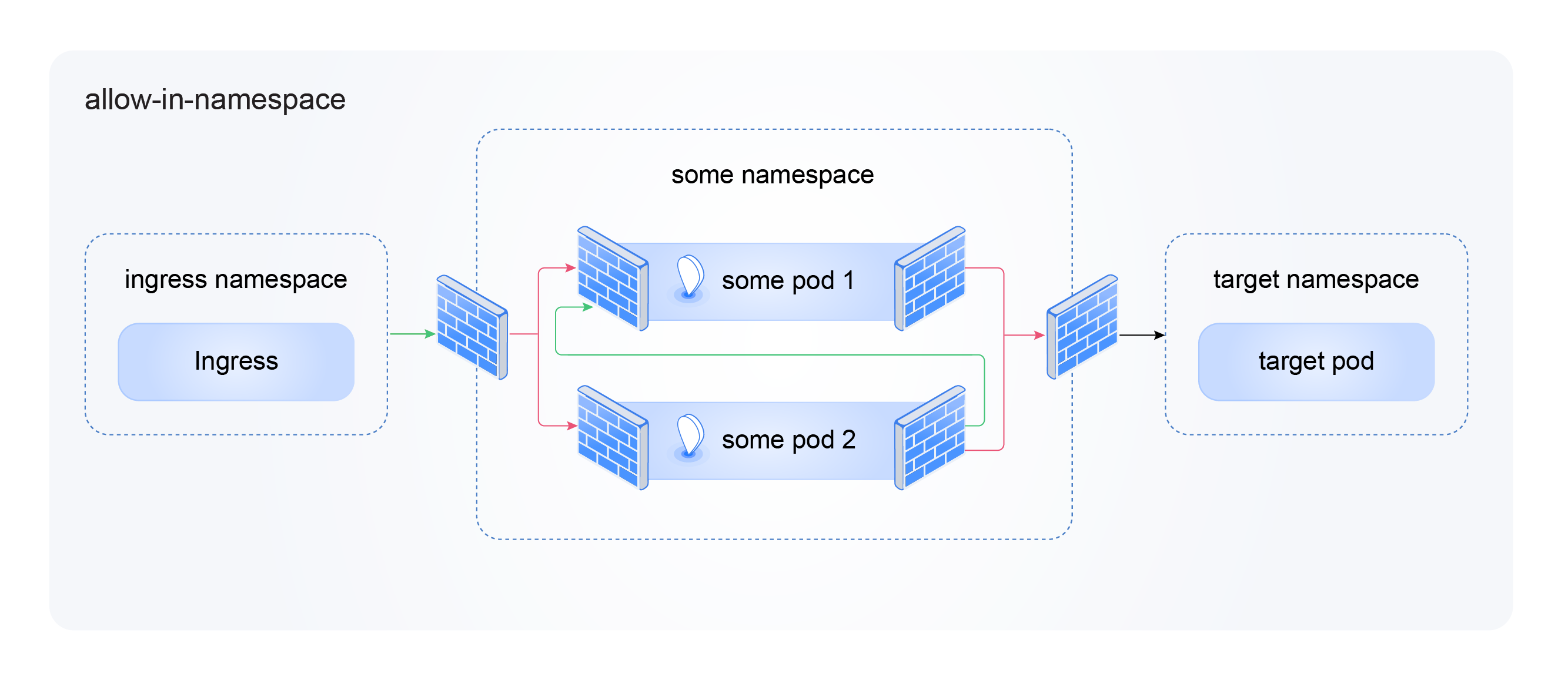
Allow traffic inside the namespace
allow-in-namespace scheme
apiVersion: cilium.io/v2
kind: CiliumNetworkPolicy
metadata:
  name: allow-in-namespace
  namespace: app
spec:
  description: "Allow all traffic within namespace"
  endpointSelector: {}
  ingress:
    - fromEndpoints: [{}]
  egress:
    - toEndpoints: [{}]
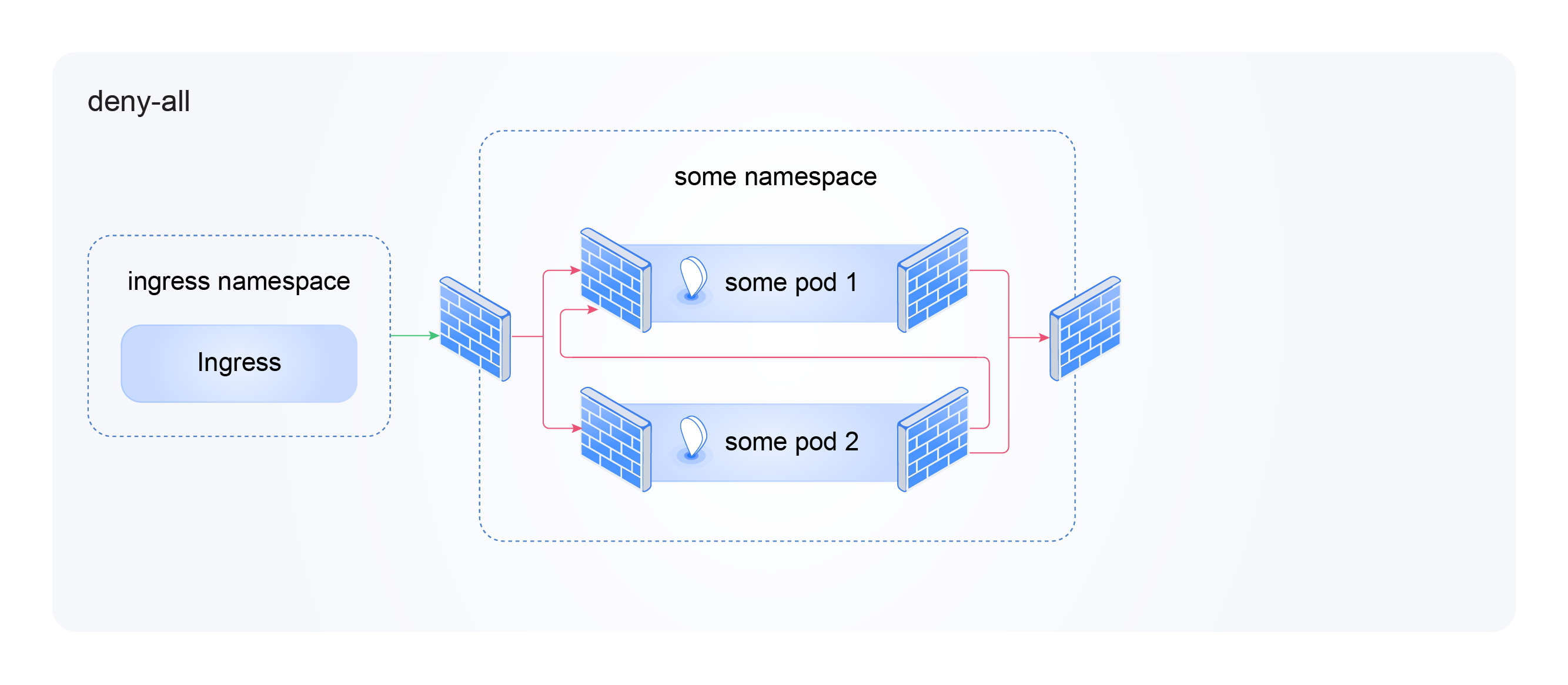
Complete namespace isolation
This policy transfers all pods in the namespace to default-deny for ingress and egress. Apply it only after you have prepared the necessary permitting rules.
deny-all scheme
apiVersion: cilium.io/v2
kind: CiliumNetworkPolicy
metadata:
  name: deny-all
  namespace: app
spec:
  description: "Deny all traffic in this namespace"
  endpointSelector: {}
  ingress:
    - {}
  egress:
    - {}
Explicitly disable external ingress
An example of a cluster deny policy: deny ingress from entity world, but leave the rest of the allow traffic according to other rules:
apiVersion: cilium.io/v2
kind: CiliumClusterwideNetworkPolicy
metadata:
  name: external-lockdown
spec:
  description: "Deny ingress from world to all Cilium-managed endpoints"
  endpointSelector: {}
  ingressDeny:
    - fromEntities:
        - world
  ingress:
    - fromEntities:
        - all
Step-by-step example: web application with Ingress and DNS
Scenario: application my-app runs in namespace my-app, is accessible externally via Ingress Controller and uses DNS.
1. Determine the required threads
| Direction | Source or destination | Why |
|---|---|---|
| Ingress | Ingress Controller | Users log into the application |
| Egress | kube-dns and shturval-caching-dns | Resolve Kubernetes Service and external names |
| Egress, optional | kube-apiserver | Only if the application is operator/controller |
| Egress, optional | Internal backend or external FQDN | If an application calls other services |
2. Check labels
Check the application labels:
kubectl get pods -n my-app --show-labels
Check the Ingress Controller labels:
kubectl get pods -n ingress -l app.kubernetes.io/name=shturval-ingress-controller --show-labels
3. Apply the policy
apiVersion: cilium.io/v2
kind: CiliumNetworkPolicy
metadata:
  name: my-app-policy
  namespace: my-app
spec:
  description: "Web app: ingress from controller and DNS egress"
  endpointSelector: {}
  ingress:
    - fromEndpoints:
        - matchLabels:
            app.kubernetes.io/name: shturval-ingress-controller
            io.kubernetes.pod.namespace: ingress
  egress:
    - toEndpoints:
        - matchLabels:
            io.kubernetes.pod.namespace: kube-system
            k8s-app: kube-dns
      toPorts:
        - ports:
            - port: "53"
              protocol: UDP
            - port: "53"
              protocol: TCP
            - port: "9153"
              protocol: TCP
    - toEndpoints:
        - matchLabels:
            io.kubernetes.pod.namespace: kube-system
            app.kubernetes.io/name: shturval-caching-dns
      toPorts:
        - ports:
            - port: "53"
              protocol: UDP
            - port: "9253"
              protocol: TCP
4. Check operation
kubectl get ciliumnetworkpolicy -n my-app
kubectl get pods -n my-app
kubectl logs -n my-app <pod-name>
Check access to the application through Ingress. If the application stops resolving names or responding to requests, check the labels and the presence of DNS rules.
Common mistakes
| Error | What’s going on | How to fix |
|---|---|---|
| Added ingress policy and forgot DNS egress | The application accepts incoming traffic, but cannot resolve names | Add egress to kube-dns and shturval-caching-dns |
Did not specify namespace label in fromEndpoints or toEndpoints | The rule does not match a pod from another namespace | Add io.kubernetes.pod.namespace: <namespace> |
| Used cluster policy instead of namespace | The rule affected more applications than expected | For application scripts use CiliumNetworkPolicy |
| Mixed many policy types without a scheme | The resulting allow set is difficult to understand | Document policy assignment in description and group rules by application |
Apply deny-all before allowing rules | The application has lost incoming or outgoing access | First prepare allow rules, then enable isolation |
Used toFQDNs but did not resolve DNS | FQDN rule does not receive DNS data | Add egress to clustered DNS with rules.dns |
Expected *.example.com to resolve example.com | The top-level domain did not match the wildcard pattern | Add separate matchName: example.com |
| Specified only UDP/53 for DNS | Some DNS queries may not work | Allow UDP/53 and TCP/53, and for platform DNS components take into account the required ports |
Observability and verification
To debug network traffic and policies, you can enable CiliumHubble. Hubble UI visualizes network flows and helps you understand which rule allowed or blocked a connection.
Instructions for enabling: How to enable Hubble UI.
Also use:
kubectl get ciliumnetworkpolicy -A
kubectl get ciliumclusterwidenetworkpolicy
kubectl describe ciliumnetworkpolicy -n <namespace> <policy-name>
For problems with network communication, see Troubleshooting the network module.
Links
- Overview of Network Policy - a general overview of the Cilium policy language.
- Network Policy - Kubernetes
NetworkPolicy,CiliumNetworkPolicy,CiliumClusterwideNetworkPolicy. - Policy Enforcement Modes - policy enforcement modes and default-deny.
- Layer 3 Policies - endpoints, services, entities, CIDR, DNS/FQDN.
- Layer 4 Policies - ports, protocols, ICMP, TLS SNI.
- Layer 7 Policies - HTTP, DNS and Kafka.
- Deny Policies - priority of deny rules.
- Using Kubernetes Constructs In Policy - namespaces, service accounts, clusterwide policies.