Kyverno: checking and changing resources
Policy manager, policy report, policy examples.
Introduction
In the Security section of the cluster, pages for managing security policies based on Kyverno are available:
- Security Policy Manager - list of policies, creation, viewing, modification and deletion.
- Security policy report - results of analysis in the context of policies and namespaces, upload to CSV/PDF.
Application configuration analysis module - shturval-policy-manager. Policies of the types Generate (adding data to a resource), Mutate (changing a resource), Validate (checking and blocking if necessary) are supported. More information about rule types can be found in the official Kyverno documentation.
A summary report on the policies of all platform clusters and other places to display analysis results are described on the page What reports are in the platform and where are they located.
Security Policy Manager
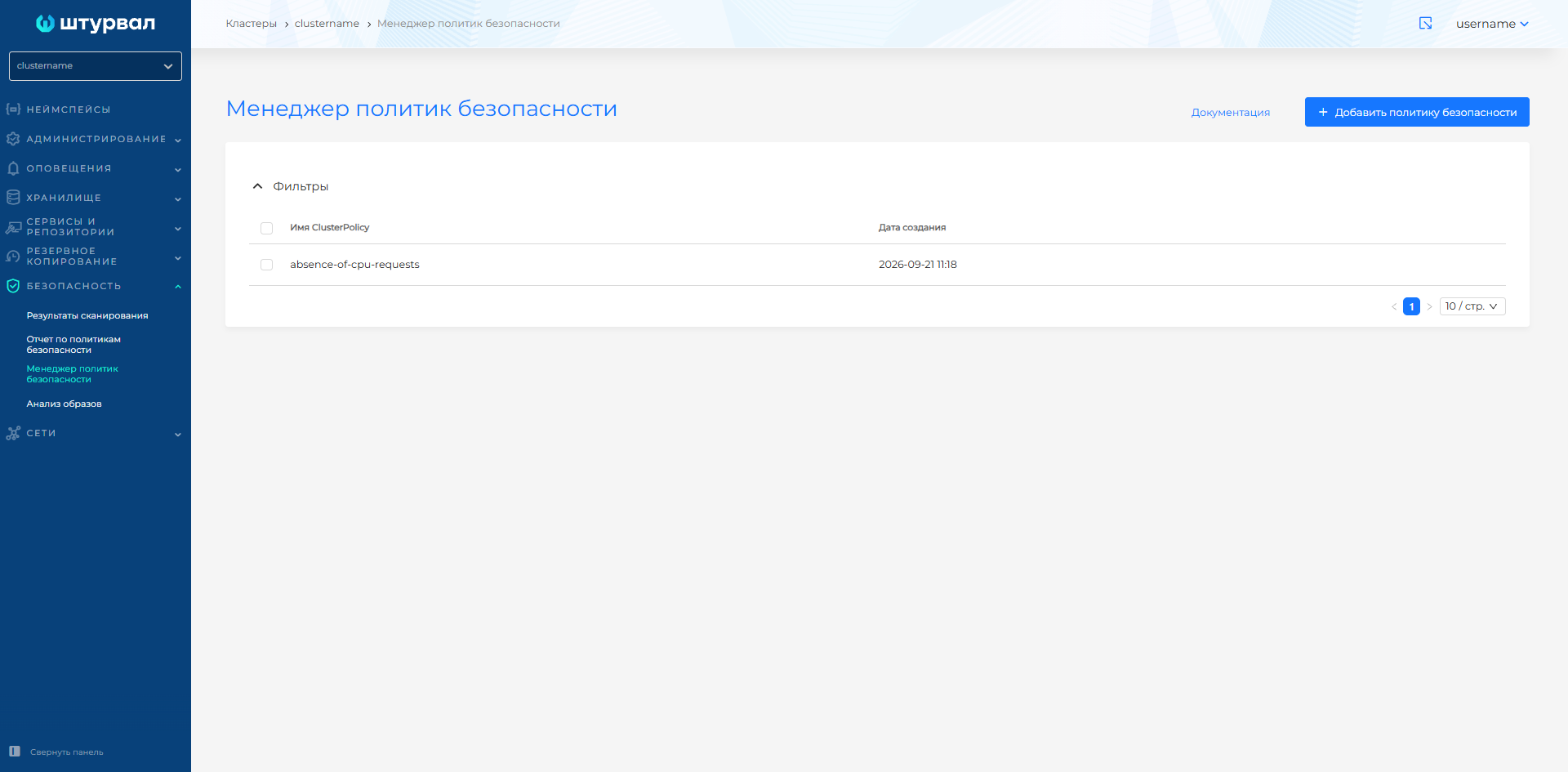
The page is a table with a list of security policies. Columns:
- Name—filtering is available;
- Date of creation—sorting is available.
The page allows you to create, view, edit, and delete policies. In the policy list you can delete one policy or several at once. How to select objects and confirm deletion: Bulk deletion.
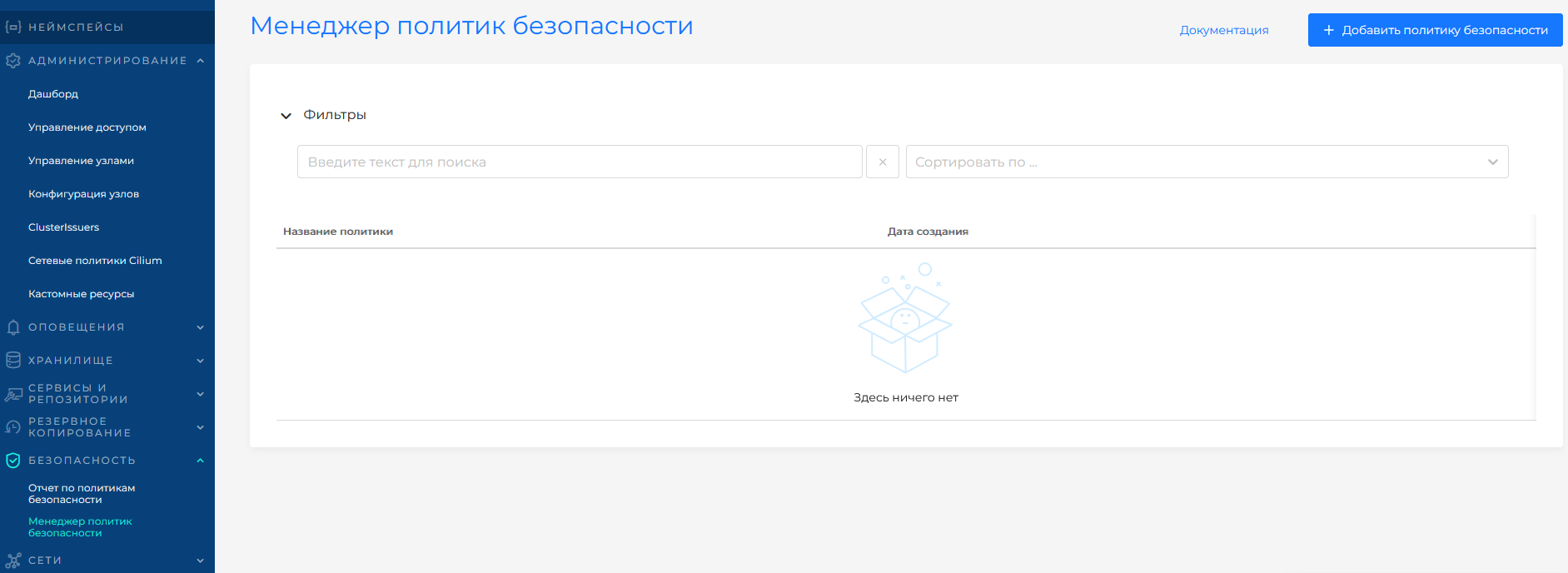
Screenshot: list of security policies
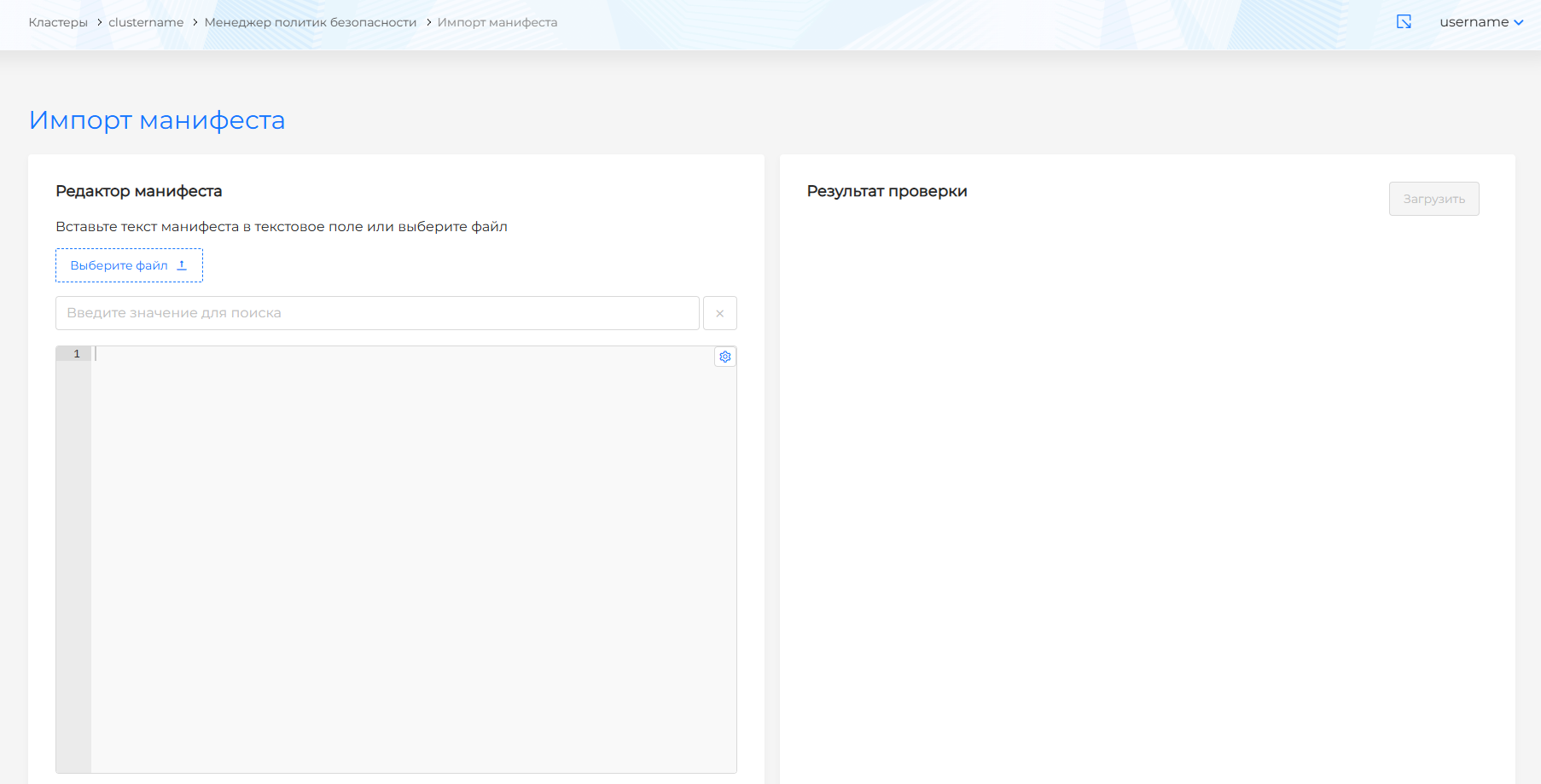
To add a policy, use Import Manifest: Click +Add Security Policy, paste YAML and validate. After successful verification, click Download.
Screenshots: importing a policy manifest
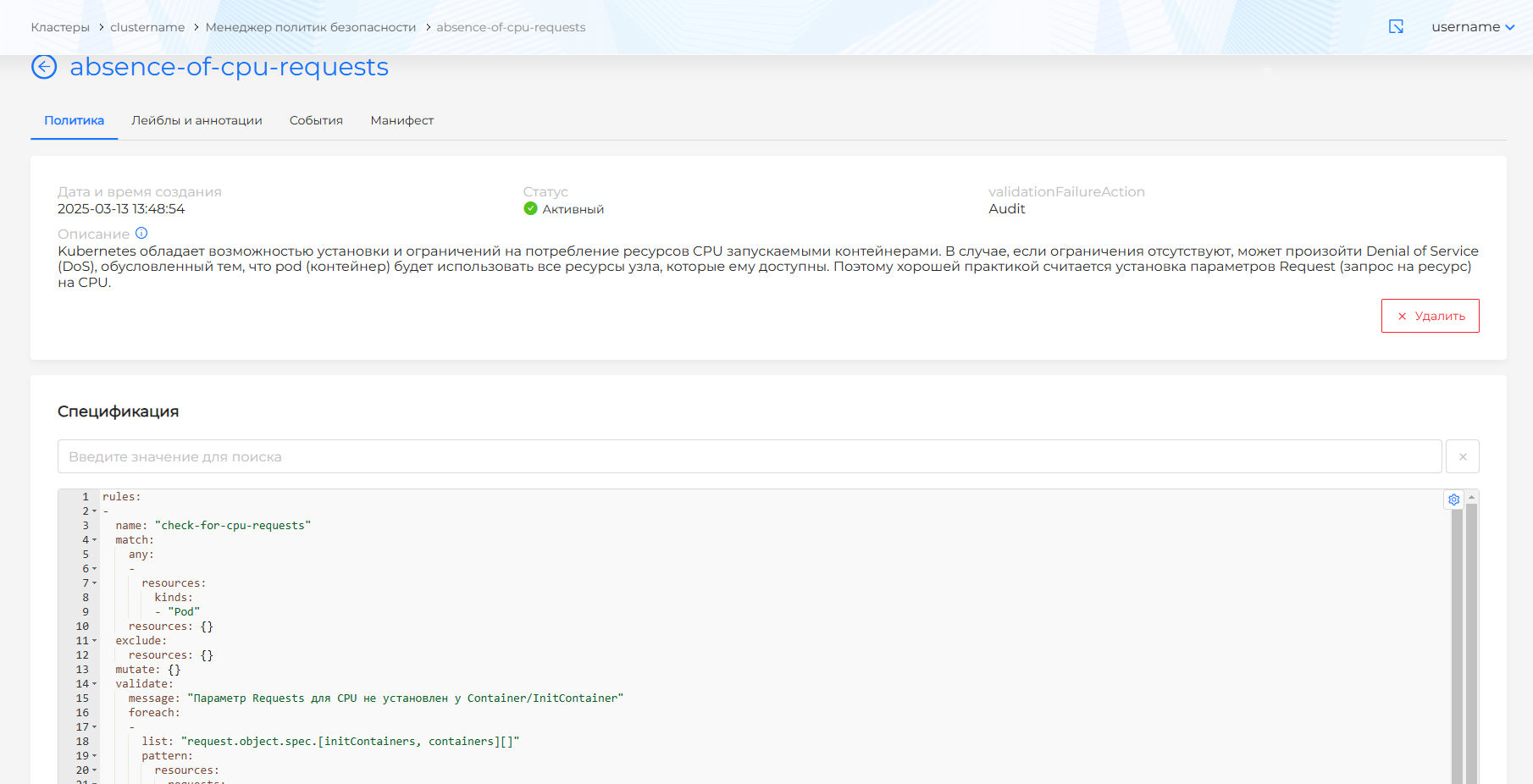
The policy view page has four tabs: policy, labels and annotations, events, manifest.
Screenshot: viewing security policy
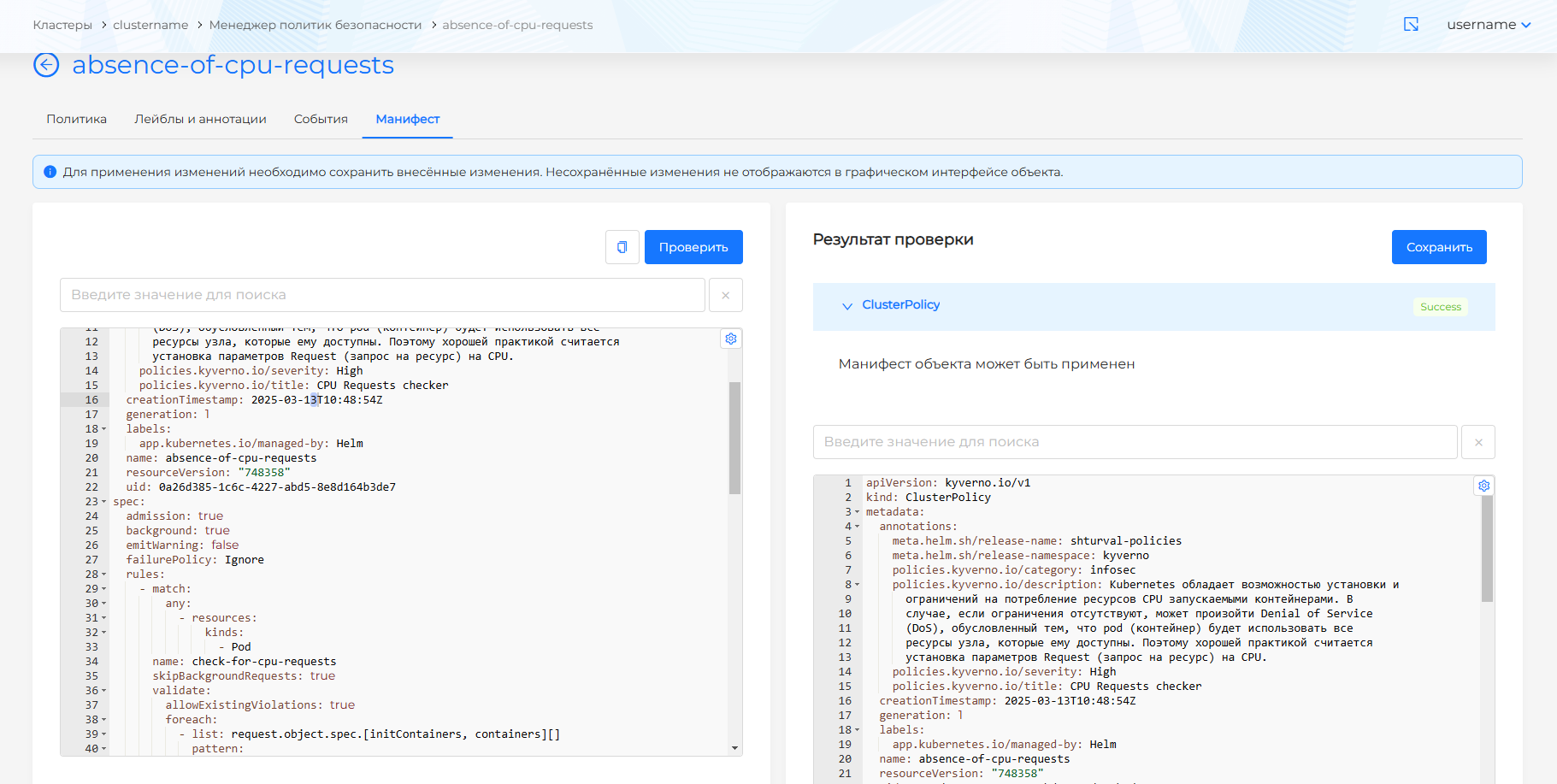
The policy can be changed via YAML on the Manifest tab: make changes, click Verify - the verification result will be displayed on the right side of the screen. Expand the validation result block to see the full manifest, then save your changes.
Screenshot: editing a policy manifest
What custom resources does Kyverno create?
When installing Kyverno several types of custom resources Kubernetes appear in the cluster:
ClusterPolicyandPolicy(groupskyverno.io) - Kyverno policies themselves:- ClusterPolicy — cluster policies (valid in all namespaces);
- Policy — namespace policies (limited to a specific namespace).
ClusterPolicyReportandPolicyReport(groupwgpolicyk8s.io) — reports on policy triggering:- aggregate the results of resource checks (successful, with warnings and errors);
- used by the
shturval-policy-managermodule to build reports in the GUI.
- Additional service resources (may vary according to Kyverno version):
UpdateRequest/GenerateRequest— internal queue for generating/updating resources according to Generate rules;- background scan reports in the form of PolicyReports.
These resources are displayed in the platform GUI:
- in the Security → Security Policy Manager section (ClusterPolicy);
- in the Security Policy Report (ClusterPolicyReport);
- in the Administration → Custom Resources section (view all Kyverno CRs if necessary).
Security policies report
The Security Policy Report page presents the results of an analysis of objects for compliance with Kyverno policies. Available to view:
- in the context of politician;
- in terms of namespaces.
Screenshots: report on policies and namespaces
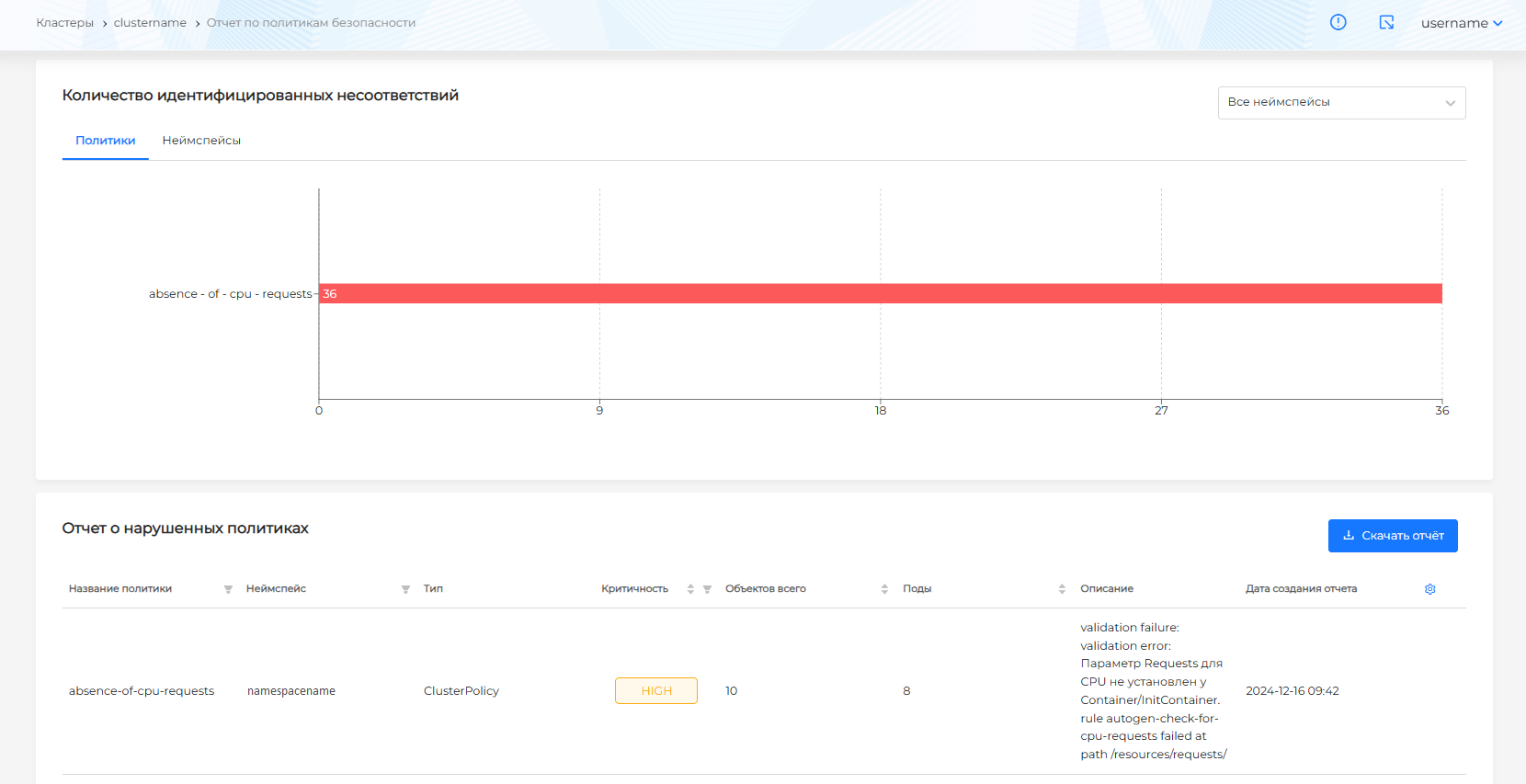
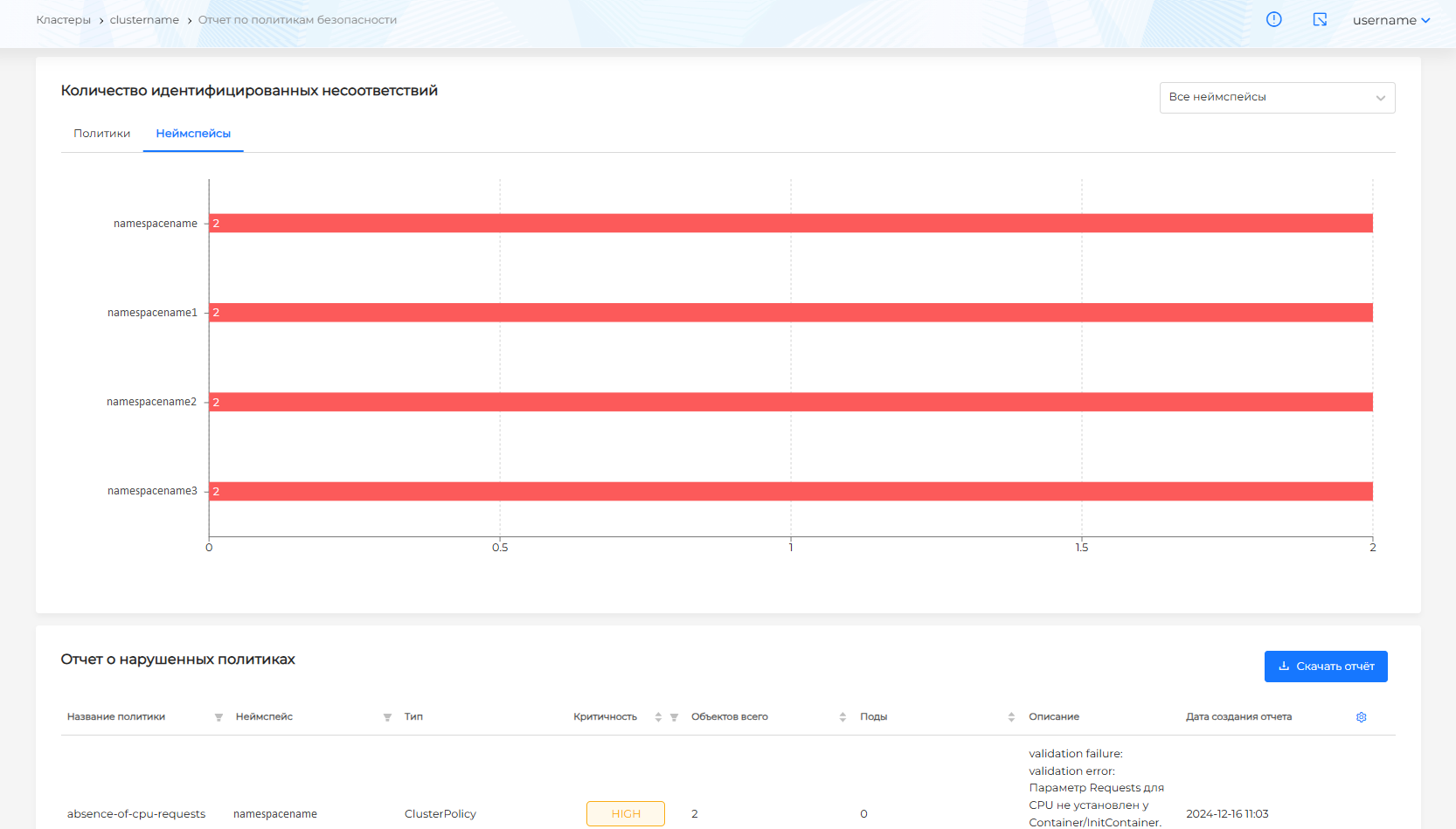
Additionally, filtering by system or user namespaces is available. By default, a report on all namespaces is displayed. To filter namespaces, select the desired filter from the drop-down list in the upper right corner.
Screenshot: filtering the report by namespace

The report can be downloaded in CSV or PDF format. If there is no data in the report, an empty file is generated when downloading in CSV format. Download CSV file name: Violated policies report.
Import CSV to Microsoft Excel
Excel 2019 and later
- Create a new Excel file and go to the Data tab.
Screenshot: “Data” tab

- On the left side of the panelOr select From text/CSV, specify the downloaded report file and click Import.
Screenshot: importing a CSV file

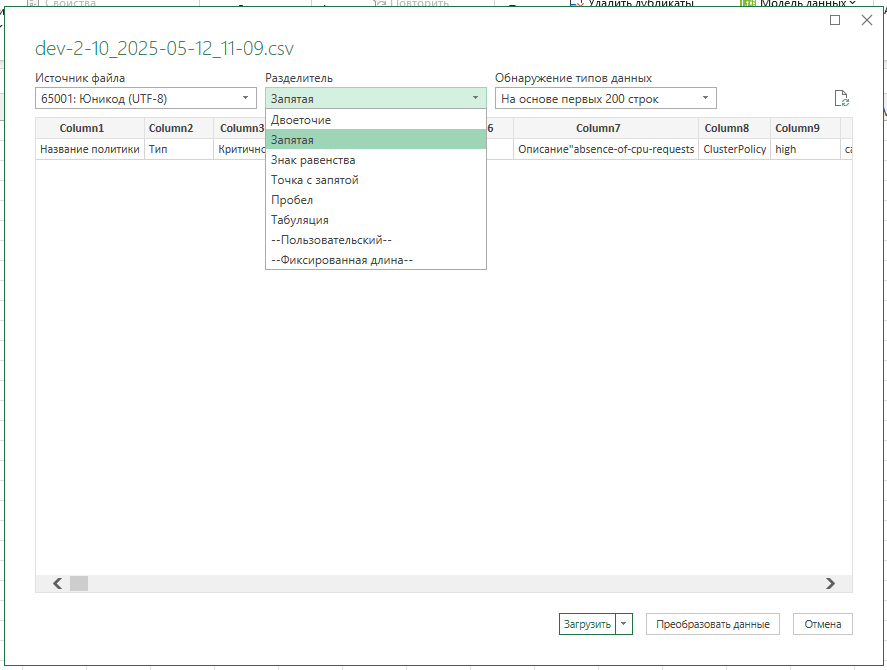
- In the window that appears, select the delimiter Comma and click Load.
Screenshot: separator selection
Excel 2018 and below
- Create a new Excel file and go to the Data tab.
Screenshot: “Data” tab

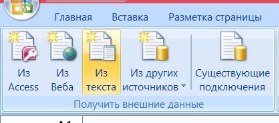
- In the left part of the panel, select From text, specify the downloaded report file and click Import.
Screenshot: importing a text file
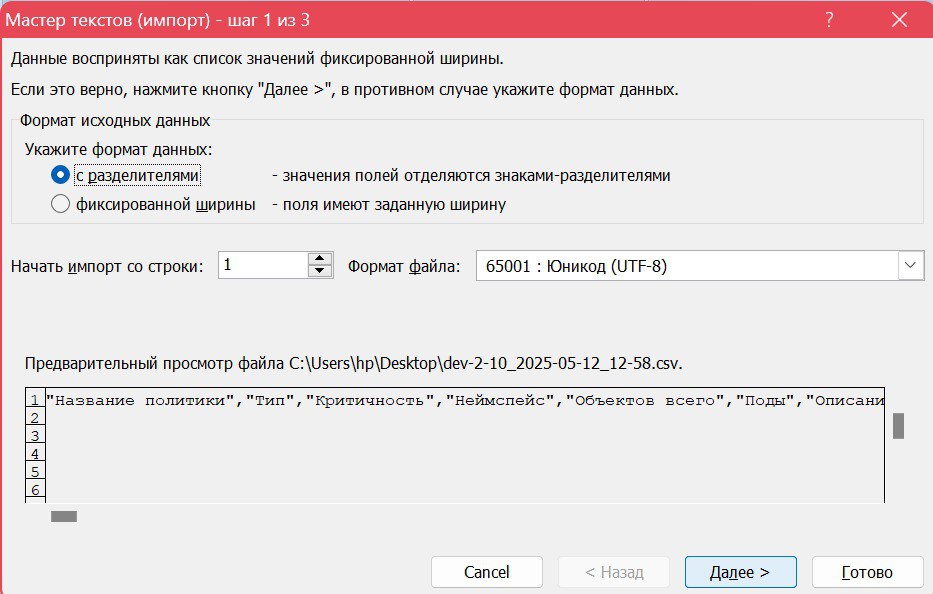
- In the Import Wizard, select the data format Delimited and click Next.
Screenshot: data format
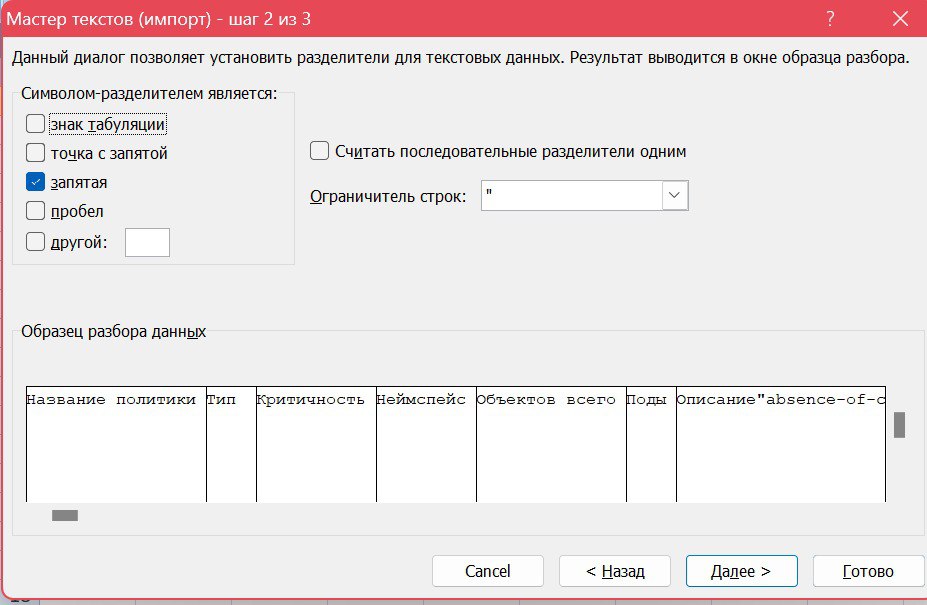
- Specify the separator Comma and click Next.
Screenshot: separator selection
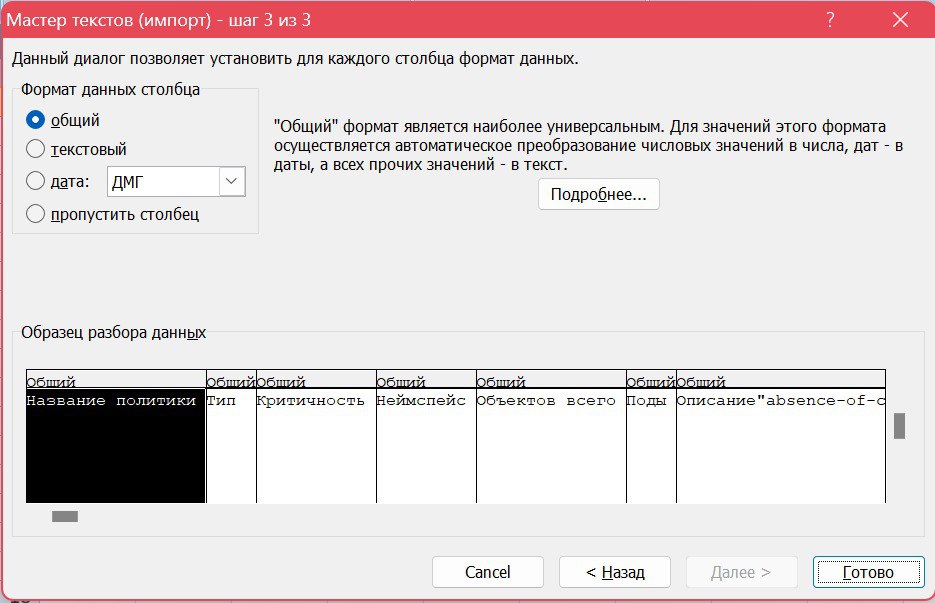
- Select the General column format and click Finish.
Screenshot: column format
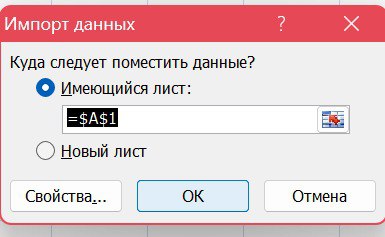
- Specify the sheet and starting cell to import and click OK.
Screenshot: placement of imported data
Working with Kyverno from the console
In addition to the GUI, you can work with Kyverno in the usual way via kubectl.
Policies (ClusterPolicy/Policy)
List of cluster policies:
kubectl get clusterpolicies.kyverno.io
List of namespace policies in the desired namespace:
kubectl get policies.kyverno.io -n <namespace>
View the manifest of a specific policy:
kubectl get clusterpolicy absence-of-cpu-requests -o yaml
Create or update a policy from a file:
kubectl apply -f ./policy.yaml
Removing a policy:
kubectl delete clusterpolicy absence-of-cpu-requests
Reports on policies (PolicyReport / ClusterPolicyReport)
List of reports on policies (cluster level):
kubectl get clusterpolicyreports.wgpolicyk8s.io
List of reports in a specific namespace:
kubectl get policyreports.wgpolicyk8s.io -n <namespace>
View the report:
kubectl get policyreport <report-name> -n <namespace> -o yaml
The reports show:
- resourcesys to whom the policy was applied;
- results (pass / fail / warn);
- validation message and policy name.
Kyverno Service Resources
When debugging the triggering of Generate rules or when parsing background scans, the following service resources can be useful:
kubectl get updaterequests.kyverno.io -A
kubectl get generaterequests.kyverno.io -A # if CRD is present in the version you are using
However, in most cases, it is enough for the administrator to:
- manage policies via ClusterPolicy/Policy;
- analyze results via PolicyReport/ClusterPolicyReport (in the GUI and/or via
kubectl).
Recommended policies
Below are typical policies for strengthening cluster security. To add a policy, open Import Manifest in the Policy Manager, paste the YAML (from the examples below or from an external set), click Verify, then Upload.
Policies can be enabled in Audit mode (report only) or Enforce mode (blocking creation and updating in case of non-compliance). For gradual implementation, first use Audit and test the policy in a test environment, then move it to Enforce if necessary. In the examples below, the default mode is Audit; change validationFailureAction in the manifest if necessary.
When designing policies, also consider failurePolicy: the value Ignore does not block the request if the check fails due to an error, such as a webhook not being available.
Additional examples are in the Kyverno policies - best-practices repository.
absence-of-cpu-requests
The policy checks that all containers (including init containers) have resources.requests.cpu set. Lack of requests can result in node exhaustion (DoS) and disrupt HPA operation.
apiVersion: kyverno.io/v1
kind: ClusterPolicy
metadata:
  annotations:
    meta.helm.sh/release-name: shturval-policies
    meta.helm.sh/release-namespace: kyverno
    policies.kyverno.io/category: infosec
    policies.kyverno.io/description: Kubernetes has the ability to set and restrict
      on the consumption of CPU resources by running computersntainers. In case the restrictions
      are missing, Denial of Service (DoS) may occur due to the fact that
      The pod (container) will use all the node resources that are available to it. Therefore
      It is considered good practice to set Request parameters (request for a resource)
      on the CPU.
    policies.kyverno.io/severity: High
    policies.kyverno.io/title: CPU Requests checker
  labels:
    app.kubernetes.io/managed-by: Helm
  name: absence-of-cpu-requests
spec:
  admission: true
  background: true
  failurePolicy: Ignore
  rules:
  - match:
      any:
      - resources:
          kinds:
          -Pod
    name: check-for-cpu-requests
    skipBackgroundRequests: true
    validate:
      foreach:
      - list: request.object.spec.[initContainers, containers][]
        pattern:
          resources:
            requests:
              cpu: ?*
      message: Requests parameter for CPU is not set for Container/InitContainer
  schemaValidation: true
  validationFailureAction: Audit
  webhookTimeoutSeconds: 10
absence-of-ram-requests-limits
The policy checks for the presence of resources.requests.memory and resources.limits.memory for containers (including init containers). The absence of limits and requests increases the risk of DoS on the node.
apiVersion: kyverno.io/v1
kind: ClusterPolicy
metadata:
  annotations:
    meta.helm.sh/release-name: shturval-policies
    meta.helm.sh/release-namespace: kyverno
    policies.kyverno.io/category: infosec
    policies.kyverno.io/description: Kubernetes has the ability to limit
      on the consumption of RAM resources by launched containers. In case such
      parameters are not set, there is a possibility of Denial of Service (DoS) due to
      in that the pod (container) will use all the node resources that are available to it.
      Therefore, it is considered good practice to set Request parameters (request for
      resource) and Limits (maximum allowable amount of resources) on RAM.
    policies.kyverno.io/severity: High
    policies.kyverno.io/title: RAM Requests and Limits checker
  generation: 1
  labels:
    app.kubernetes.io/managed-by: Helm
  name: absence-of-ram-requests-limits
spec:
  admission: true
  background: true
  failurePolicy: Ignore
  rules:
  - match:
      any:
      - resources:
          kinds:
          - Pod
    name: check-for-ram-requests
    skipBackgroundRequests: true
    validate:
      foreach:
      - list: request.object.spec.[initContainers, containers][]
        pattern:
          resources:
            requests:
              memory: ?*
      message: Requests parameter for RAM is not set for Container/InitContainer
  - match:
      any:
      - resources:
          kinds:
          - Pod
    name: check-for-ram-limits
    skipBackgroundRequests: true
    validate:
      foreach:
      - list: request.object.spec.[initContainers, containers][]
        pattern:
          resources:
            limits:
              memory: ?*
      message: The Limits parameter for RAM is not set for Container/InitContainer
  schemaValidation: true
  validationFailureAction: Audit
  webhookTimeoutSeconds: 10
automated-satoken-mount-used
Do not use automatic substitution of Service Account Token in the pod (automountServiceAccountToken) if it is not required: the token gives access to the API server, which most pods do not need.
apiVersion: kyverno.io/v1
kind: ClusterPolicy
metadata:
  annotations:
    meta.helm.sh/release-name: shturval-policies
    meta.helm.sh/release-namespace: kyverno
    policies.kyverno.io/category: infosec
    policies.kyverno.io/description: 'By default, Kubernetes implements substitution
      ServiceAccount Token in pod. Using this Token you can interact with
      API server, which is NOT required by most pods. It is recommended to disable this
      opportunity and implement it only where it is truly required.   '
    policies.kyverno.io/severity: High
    policies.kyverno.io/title: automountServiceAccountToken is set to true
  generation: 1
  labels:
    app.kubernetes.io/managed-by: Helm
  name: automated-satoken-mount-used
spec:
  admission: true
  background: true
  failurePolicy: Ignore
  rules:
  - match:
      any:
      - resources:
          kinds:
          - Pod
    name: check-for-automount-serviceaccount-token
    skipBackgroundRequests: true
    validate:
      message: Added automatic substitution of ServiceAccount Token in Pod
      pattern:
        spec:
          automountServiceAccountToken: "false"
  schemaValidation: true
  validationFailureAction: Audit
  webhookTimeoutSeconds: 10
container-is-privileged
Deny Privileged Containers (privileged: true): Privileged mode can be usedto escalate privileges and further attack the cluster.
apiVersion: kyverno.io/v1
kind: ClusterPolicy
metadata:
  annotations:
    meta.helm.sh/release-name: shturval-policies
    meta.helm.sh/release-namespace: kyverno
    policies.kyverno.io/category: infosec
    policies.kyverno.io/description: 'The specified flag starts the container in privileged
      mode, which can be used by an attacker. For example, to increase
      privileges and development of attacks on the cluster. Most containers do not require use
      specified flag, so it is recommended NOT to use it.   '
    policies.kyverno.io/severity: High
    policies.kyverno.io/title: privileged flag in spec.containers is set to true
  generation: 1
  labels:
    app.kubernetes.io/managed-by: Helm
  name: container-is-privileged
spec:
  admission: true
  background: true
  failurePolicy: Ignore
  rules:
  - match:
      any:
      - resources:
          kinds:
          - Pod
    name: check-for-privileged
    skipBackgroundRequests: true
    validate:
      message: Container with privileged flag detected
      pattern:
        spec:
          containers:
          - =(securityContext):
              =(privileged): "false"
  schemaValidation: true
  validationFailureAction: Audit
  webhookTimeoutSeconds: 10
default-ns-is-used
Prohibition of placing resources in the namespace default: it is recommended to use separate namespaces for applications and commands.
apiVersion: kyverno.io/v1
kind: ClusterPolicy
metadata:
  annotations:
    meta.helm.sh/release-name: shturval-policies
    meta.helm.sh/release-namespace: kyverno
    pod-policies.kyverno.io/autogen-controllers: none
    policies.kyverno.io/category: infosec
    policies.kyverno.io/description: 'Using a namespace named "default" is not
      recommended. It is considered good practice to use specially created
      namespace for the needs of specialists and/or applications.   '
    policies.kyverno.io/severity: High
    policies.kyverno.io/title: deployment to default namespace
  generation: 1
  labels:
    app.kubernetes.io/managed-by: Helm
  name: default-ns-is-used
spec:
  admission: true
  background: true
  failurePolicy: Ignore
  rules:
  - match:
      resources:
        kinds:
        - Pod
    name: check-for-default-ns
    skipBackgroundRequests: true
    validate:
      message: Resource detected in default namespace
      pattern:
        metadata:
          namespace: '!default'
  - match:
      resources:
        kinds:
        - DaemonSet
        - Deployment
        -Job
        - CronJob
        -StatefulSet
    name: check-for-default-ns-pod-controller
    skipBackgroundRequests: true
    validate:
      message: Resource detected in default namespace
      pattern:
        metadata:
          namespace: '!default'
  schemaValidation: true
  validationFailureAction: Audit
  webhookTimeoutSeconds: 10
hostnetwork-is-used
Don’t use the host network (hostNetwork) unless necessary: from the network plugin’s point of view, the pod ends up on the host network, which bypasses network policies.
apiVersion: kyverno.io/v1
kind: ClusterPolicy
metadata:
  annotations:
    meta.helm.sh/release-name: shturval-policies
    meta.helm.sh/release-namespace: kyverno
    policies.kyverno.io/category: infosec
    policies.kyverno.io/description: 'Using the hostNetwork parameter allows
      bypass the requirements of network policies, because from the point of view of the network plugin in question
      The pod is on a different network (the host network).      '
    policies.kyverno.io/severity: medium
    policies.kyverno.io/title: hostNetwork is set to `true`
  generation: 1
  labels:
    app.kubernetes.io/managed-by: Helm
  managedFields:
  - apiVersion: kyverno.io/v1
  name: hostnetwork-is-used
spec:
  admission: true
  background: true
  failurePolicy: Ignore
  rules:
  - match:
      any:
      - resources:
          kinds:
          - Pod
    name: check-for-hostnetwork
    skipBackgroundRequests: true
    validate:
      message: 'The node network for the Pod has been used. It is recommended to remove or disable
        hostNetwork parameter '
      pattern:
        spec:
          =(hostNetwork): "false"
  schemaValidation: true
  validationFailureAction: Audit
  webhookTimeoutSeconds: 10
master-tolerations-are-set
Don’t schedule user pods on control plane nodes: tolerances that remove taint node-role.kubernetes.io/control-plane:NoSchedule allow running on Control Plane.
apiVersion: kyverno.io/v1
kind: ClusterPolicy
metadata:
  annotations:
    meta.helm.sh/release-name: shturval-policies
    meta.helm.sh/release-namespace: kyverno
    policies.kyverno.io/category: infosec
    policies.kyverno.io/description: 'Using tolerations allows you to run
      Pods on nodes that have the corresponding taints. It is considered good practice
      DO NOT run Pods on ControlPlane nodes that have taints by default:
      node-role.kubernetes.io/master:NoSchedule '
    policies.kyverno.io/severity: Medium
    policies.kyverno.io/title: Tolerations for scheduling on ControlPlane Nodes
  generation: 1
  labels:
    app.kubernetes.io/managed-by: Helm
  name: master-tolerations-are-set
spec:
  admission: true
  background: true
  failurePolicy: Ignore
  rules:
  - match:
      resources:
        kinds:
        - Pod
    name: check-for-tolerations
    skipBackgroundRequests: true
    validate:
      message: Tolerations detected running Pod on ControlPlane node with taints
        `node-role.kubernetes.io/control-plane:NoSchedule`
      pattern:
        spec:
          =(tolerations):
          - key: '!node-role.kubernetes.io/control-plane'
  schemaValidation: true
  validationFailureAction: Audit
  webhookTimeoutSeconds: 10
secrets-in-env-var
Warning or prohibiting storing secrets in environment variables: such values are easier to compromise; External secret management is recommended.
apiVersion: kyverno.io/v1
kind: ClusterPolicy
metadata:
  annotations:
    meta.helm.sh/release-name: shturval-policies
    meta.helm.sh/release-namespace: kyverno
    policies.kyverno.io/category: infosec
    policies.kyverno.io/description: 'Secrets specified as environment variables
      may be compromised. It is recommended to use third-party systems (Secret
      Management) to manage secrets.   '
    policies.kyverno.io/severity: High
    policies.kyverno.io/title: secrets are stored in env vars
  generation: 1
  name: secrets-in-env-var
spec:
  admission: true
  background: true
  failurePolicy: Ignore
  rules:
  - match:
      any:
      - resources:
          kinds:
          - Pod
    name: check-for-secrets-in-env
    skipBackgroundRequests: true
    validate:
      foreach:
      - list: request.object.spec.[initContainers, containers][]
        pattern:
          =(env):
          - =(valueFrom):
              X(secretKeyRef): "null"
      message: Secrets found in environment variables
  schemaValidation: true
  validationFailureAction: Audit
  webhookTimeoutSeconds: 10
service-nodeport-used
Recommendation not to use Service type NodePort: it is better to organize external access through Ingress; NodePort is more difficult to control with network policies.
apiVersion: kyverno.io/v1
kind: ClusterPolicy
metadata:
  annotations:
    meta.helm.sh/release-name: shturval-policies
    meta.helm.sh/release-namespace: kyverno
    policies.kyverno.io/category: infosec
    policies.kyverno.io/description: 'NodePort can be used to provide
      access from outside the cluster to applications. However, this approach is not an example
      good practices and cannot be controlled using NetworkPolicy. Recommended
      using alternatives - such as Ingress, to provide external access
      to cluster applications.   '
    policies.kyverno.io/severity: High
    policies.kyverno.io/title: service type is set to NodePort
  generation: 1
  labels:
    app.kubernetes.io/managed-by: Helm
  name: service-nodeport-used
spec:
  admission: true
  background: true
  failurePolicy: Ignore
  rules:
  - match:
      any:
      - resources:
          kinds:
          - Service
    name: check-for-nodeport
    skipBackgroundRequests: true
    validate:
      message: Service Type NodePort detected. It is recommended to use Ingress
      pattern:
        spec:
          type: '!NodePort'
  schemaValidation: true
  validationFailureAction: Audit
  webhookTimeoutSeconds: 10
sysadmin-capabilities-used
Prohibition or audit of adding capability SYS_ADMIN: it gives broad powers and can facilitate escape from the container.
apiVersion: kyverno.io/v1
kind: ClusterPolicy
metadata:
  annotations:
    meta.helm.sh/release-name: shturval-policies
    meta.helm.sh/release-namespace: kyverno
    policies.kyverno.io/category: infosec
    policies.kyverno.io/description: 'The specified Linux Capability has extremely large
      powers (according to the Linux Capabilities documentation: CAP_SYS_ADMIN - this
      capability is overloaded, Don''t choose CAP_SYS_ADMIN if you can possibly avoid
      it!). Most applications do not require this feature. Therefore it is necessary
      make sure that the specified capability appears as rarely as possible. Usage
      its capabilities can lead to information security problems, including “escape”
      from pod (container).     '
    polices.kyverno.io/severity: High
    policies.kyverno.io/title: SYS_ADMIN capability added to container
  generation: 1
  labels:
    app.kubernetes.io/managed-by: Helm
  name: sysadmin-capabilities-used
spec:
  admission: true
  background: true
  failurePolicy: Ignore
  rules:
  - match:
      any:
      - resources:
          kinds:
          - Pod
    name: check-for-sysadmin-capabilities-enabled
    skipBackgroundRequests: true
    validate:
      foreach:
      - deny:
          conditions:
            any:
            - key: SYS_ADMIN
              operator: AnyIn
              value: '{{ element.securityContext.capabilities.add || '''' }}'
        list: request.object.spec.[initContainers, containers][]
      message: The SYS_ADMIN parameter is set in the Capabilities description for Container/InitContainer
  schemaValidation: true
  validationFailureAction: Audit
  webhookTimeoutSeconds: 10
Additional materials
- Kyverno policies - best-practices - repository with example policies.
- Official Kyverno Documentation.