What is VEX
VEX and connection to vulnerability reports.
VEX (Vulnerability Exploitability eXchange) is a document format that allows vendors and operators to indicate whether a specific vulnerability (CVE) is applicable in a given product, component, or image. The goal is to reduce noise in scan reports: not all CVEs found are actually exploitable in your context (package version used, disabled feature, sandbox, etc.).
The VEX document links the artifact (for example, a container image), the vulnerability (CVE identifier) and the applicability status (affected / not_affected / fixed, and others), optionally with a justification. This helps:
- focus on really applicable vulnerabilities;
- reasonably exclude false positives in reports and policies (for example, “banning pods with critical vulnerabilities” taking into account VEX).
The VEX specification is developed within CISA and is associated with SBOM (Software Bill of Materials) formats. VEX support in scanning tools (including Trivy) allows such documents to be taken into account when generating reports and filtering vulnerabilities.
Use in the Shturval platform
In the platform, image scanning is based on Trivy (Container Image Scanning Module, shturval-scanner). For every unfixed vulnerability in a platform component, the Shturval release ships a VEX report that explains why that CVE cannot be exploited in Shturval. Marked vulnerabilities are removed from the active list so that the GUI and policies (for example, blocking pods with critical CVEs) only count vulnerabilities that actually apply.
When the module is enabled, the cluster creates VulnerabilityReports. They are shown in the Security section on the Image Analysis page.
Platform VEX is enabled with a ShturvalServicePatch (SSP) on shturval-scanner: the operator reads documents from the VEX repository during the scan.
What you see in the GUI after enabling VEX
After you enable VEX, the Image Analysis page keeps only the CVEs that still need to be handled. Vulnerabilities that Shturval marked as not applicable disappear from the table — the Critical / High / Medium / Low summary does not count them either. That is expected: they were removed because they are not exploitable on the platform, not because the scanner missed them.
To see which vulnerabilities were excluded, you can set trivy.showSuppressed: true in the SSP. It is off by default, and excluded CVEs are not stored anywhere. When suppressed vulnerabilities are enabled, the report contains data in report.modifiedFindings. Each entry has the CVE identifier, status, exclusion reason, and source (VEX).
aquasecurity.github.io → VulnerabilityReport.List reports (the Modified column is the number of excluded CVEs):
kubectl get vulnerabilityreports -A
report.modifiedFindings for a specific report:
kubectl get vulnerabilityreport <name> -n <namespace> -o jsonpath='{.report.modifiedFindings}'
Enable VEX with SSP
Set shturval-scanner to Auto before applying the SSP, otherwise it may not take effect. How to create an SSP: How to manage CustomValues.
Manifest parameters:
| Parameter | Description | Type | Example |
|---|---|---|---|
vexRepo.enabled | Lets Trivy look up the VEX repository (--vex repo). Disabled by default. | boolean | true |
vexRepo.baseUrl | Repository base URL without /vex/{release}. | string | https://public.shturval.tech/repository/shturval_bin_public |
vexRepo.release | Release whose VEX documents are used. Final URL: {baseUrl}/vex/{release}. | string | "2.15.0" |
vexRepo.name | Entry name in repository.yaml. Default shturval. | string | shturval |
vexRepo.insecure | Skip TLS verification for the VEX repository. | boolean | false |
vexRepo.skipUpdate | Do not refresh VEX during the scan (--skip-vex-repo-update). Use only when the scanner must not contact the repository. | boolean | false |
vexRepo.preload | Download VEX in the scan-job init container (trivy vex repo download). For a closed circuit with a mirror, keep true and skipUpdate: false. | boolean | false |
trivy.showSuppressed | Store excluded vulnerabilities in report.modifiedFindings. Default false. | boolean | true |
If the repository requires authentication, set vexRepo.username and vexRepo.password, or vexRepo.token.
apiVersion: ops.shturval.tech/v1beta2
kind: ShturvalServicePatch
metadata:
  name: shturval-scanner-vex
spec:
  shturvalServiceConfigName: shturval-scanner
  patchOrder: 100
  customvalues:
    trivy:
      showSuppressed: true
    vexRepo:
      enabled: true
      baseUrl: https://public.shturval.tech/repository/shturval_bin_public
      release: "2.15.0"
      name: shturval
      insecure: false
      skipUpdate: false
      preload: false
VEX files list images as r.shturval.tech/.... In a closed circuit the scanner pulls the same images from your mirror. For the markup to match, the report must keep the r.shturval.tech name instead of replacing it with the mirror address.
Set the mirror in trivy.configFile.registry.mirrors: layers come from the mirror, the original name stays in the report. Do not use trivy.registry.mirror — it rewrites the name to the mirror FQDN, and VEX no longer recognizes the images.
In the example, replace mirror.example.com with the address of your mirror.
If the cluster can reach the mirror, set preload: true and skipUpdate: false: Trivy downloads VEX from the mirror at {baseUrl}/vex/{release}. Use skipUpdate: true only when the scanner must not contact the repository. How to put VEX on the mirror: Working with the mirror after installation.
apiVersion: ops.shturval.tech/v1beta2
kind: ShturvalServicePatch
metadata:
  name: shturval-scanner-vex
spec:
  shturvalServiceConfigName: shturval-scanner
  patchOrder: 100
  customvalues:
    trivy:
      showSuppressed: true
      "-registry": {}
      configFile:
        registry:
          mirrors:
            r.shturval.tech:
              - mirror.example.com
        insecure: true
    vexRepo:
      enabled: true
      baseUrl: https://mirror.example.com/repository/shturval_bin_public
      release: "2.15.0"
      name: shturval
      insecure: true
      skipUpdate: false
      preload: true
The "-registry": {} key removes a registry name rewrite that is already set on the service. If you leave it in place, images in the report get the mirror address again, and VEX no longer recognizes them.
Prepare an SSP manifest for
shturval-scannerusing the example above. Set the platform version invexRepo.releaseand the repository address invexRepo.baseUrl.Import the manifest through Importing manifests.
Screenshot: importing SSP
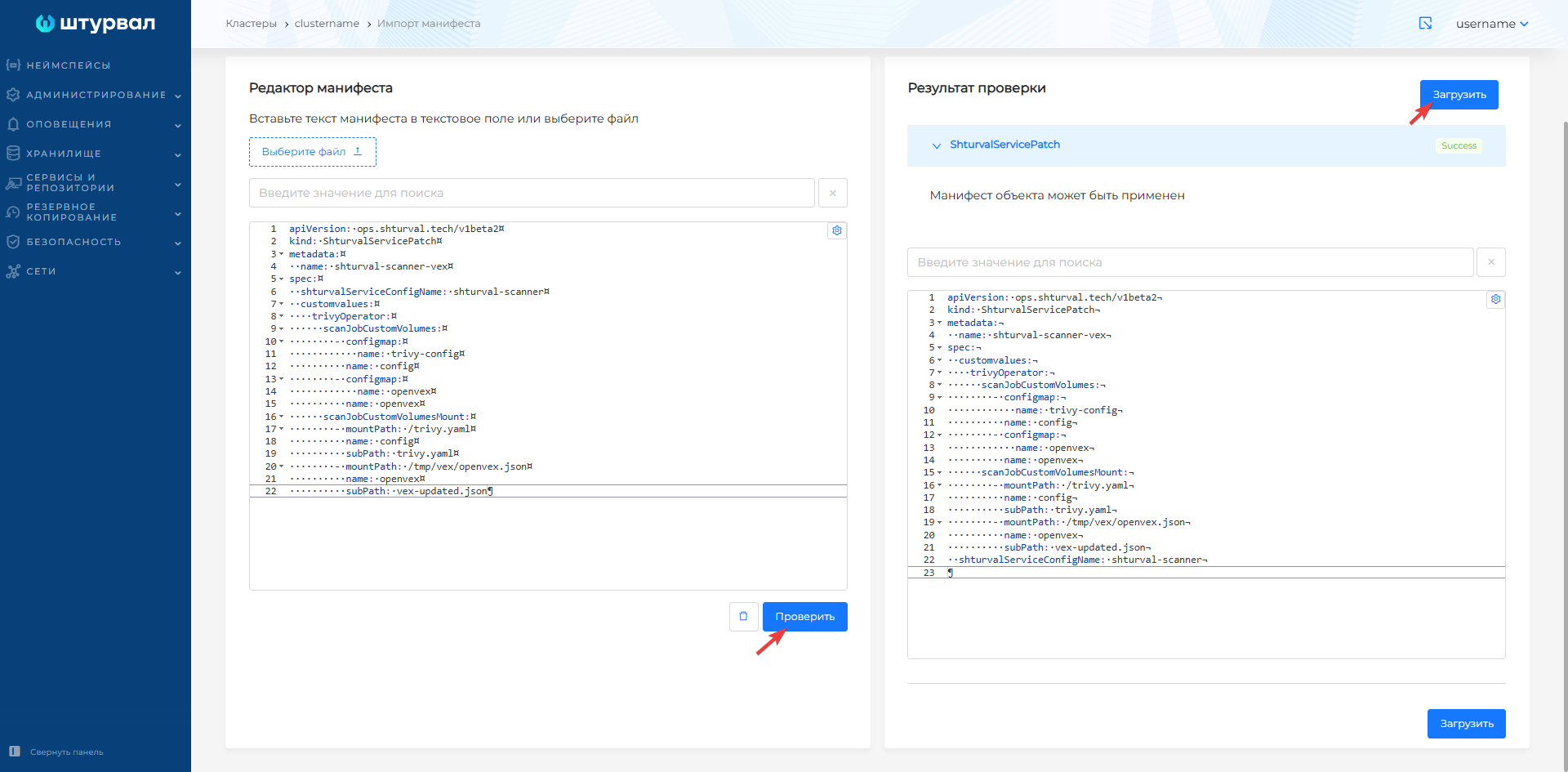
Open Services and repositories → Installed services → Container image scanning module (
shturval-scanner). The Applied ShturvalServicePatch tab should show the SSPshturval-scanner-vex. When it is applied, the Service tab status is Patched.Connect to the cluster in the CLI and delete previously created
VulnerabilityReportobjects:kubectl get vulnerabilityreports -A -o json | jq -r '.items[] | "\(.metadata.namespace) \(.metadata.name)"' | while read ns name; do kubectl delete vulnerabilityreport "$name" -n "$ns"; doneScreenshot: deleting VulnerabilityReports
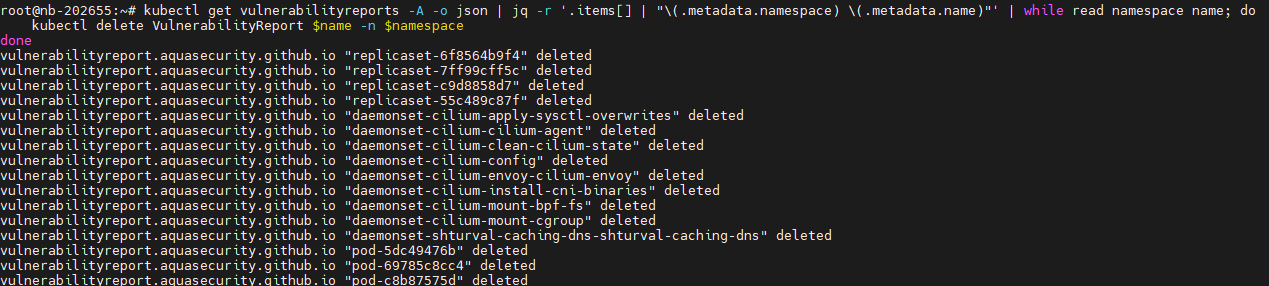
Container image scanning restarts automatically.
Check that scanning starts and new
VulnerabilityReportsappear:kubectl get vulnerabilityreports -AScreenshot: new VulnerabilityReports

In the cluster GUI open Security → Image Analysis and confirm that marked vulnerabilities are gone from the main list.
Screenshots: report before and after enabling VEX
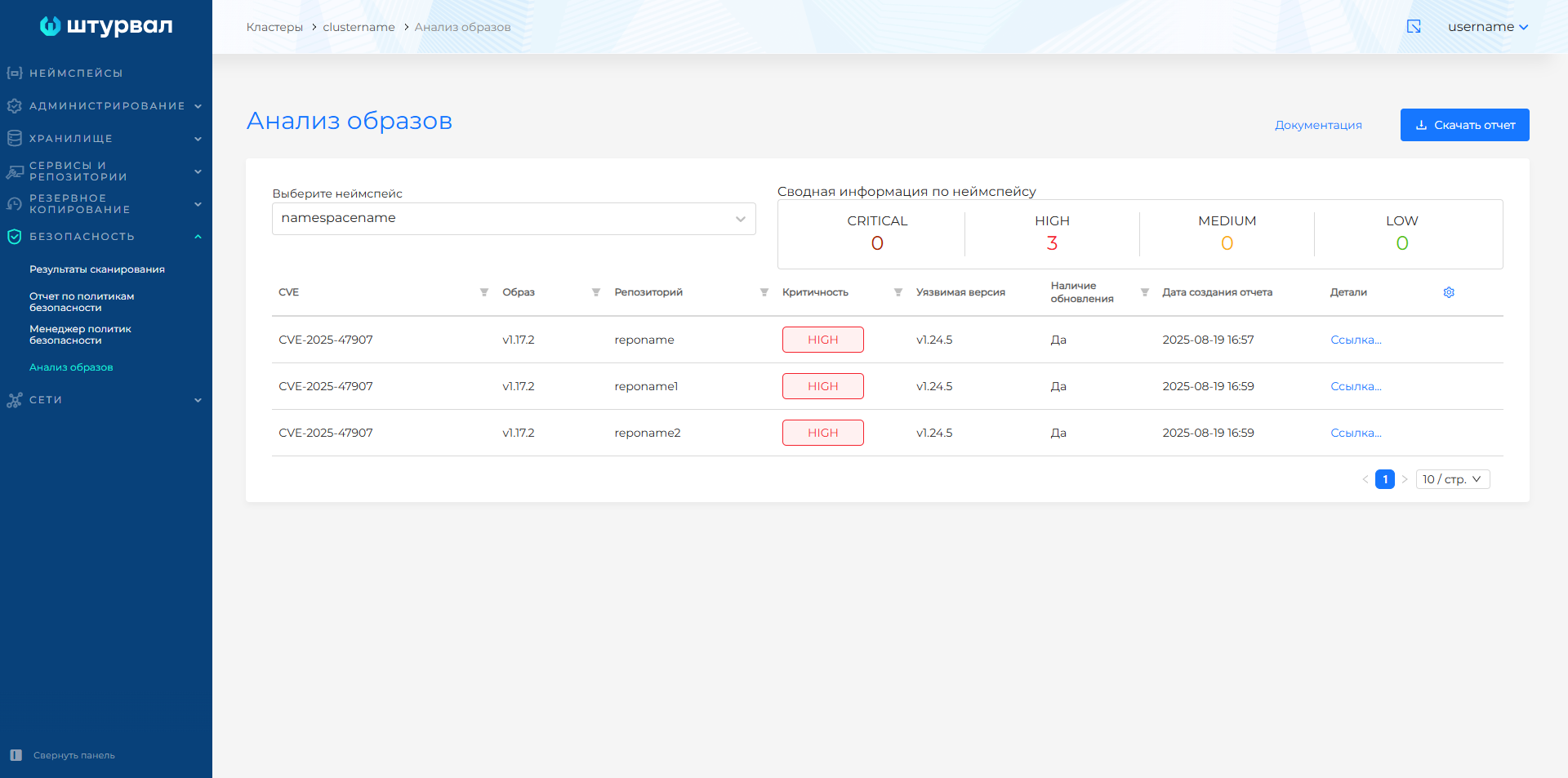
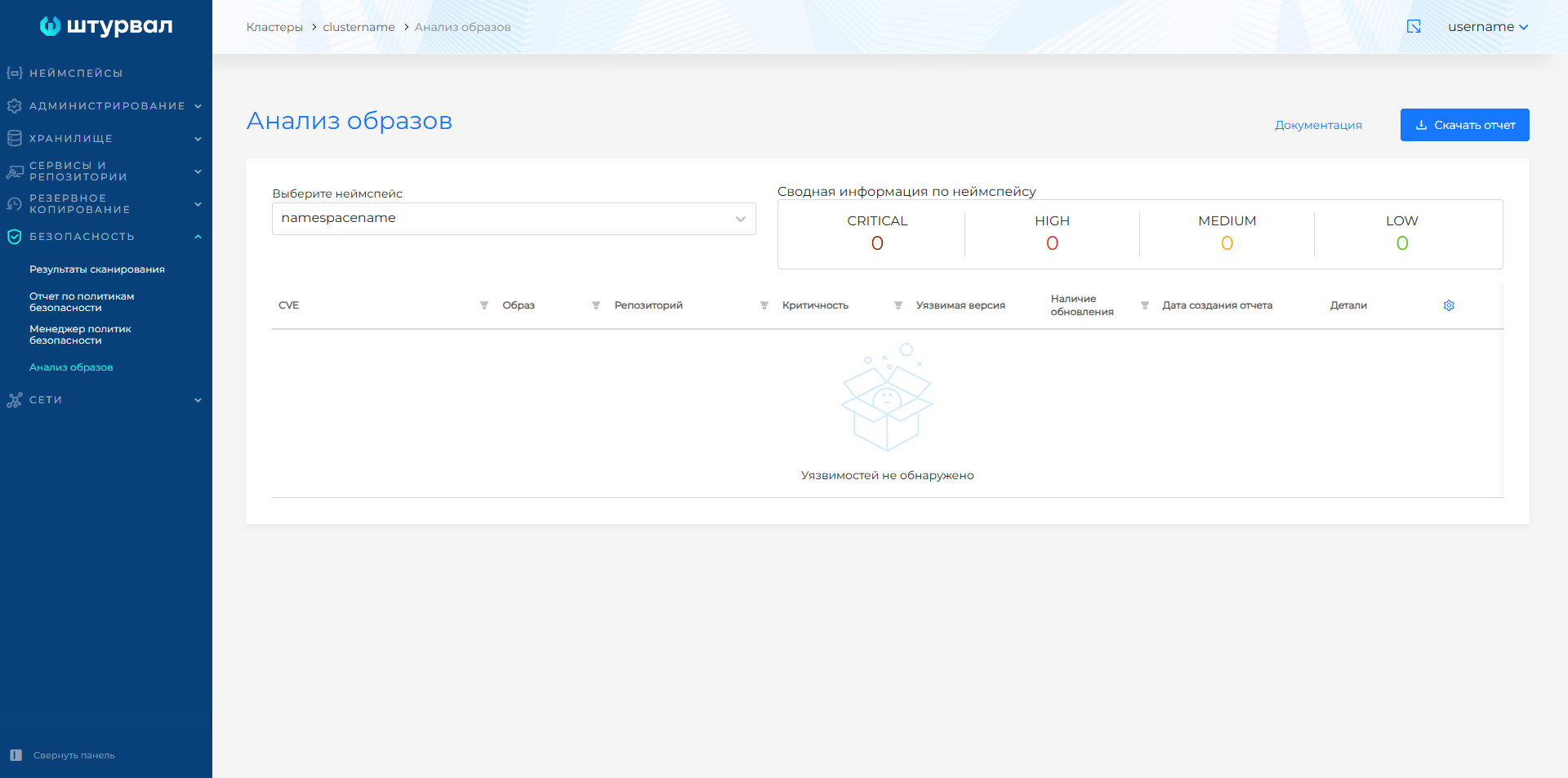
If the SSP sets
trivy.showSuppressed: true, you can check excluded vulnerabilities in the resource:kubectl get vulnerabilityreports.aquasecurity.github.io -A -o json | jq -r '.items[] | select((.report.modifiedFindings // []) | length > 0) | "\(.metadata.namespace)/\(.metadata.name)\tmodified=\(.report.modifiedFindings | length)\tvulns=\((.report.vulnerabilities // []) | length)"'
Additional
- CISA - VEX - description of format and use.
- Scanning container images - reports, criticality, marking of vulnerabilities in the platform.
- Container Image Scanning Module (
shturval-scanner) - service parameters. - How to manage CustomValues - creating and checking SSP.